Table of Contents
This updated guide explains how to get 30GB of free data every month from windscribe VPN with clear steps, practical tips, and useful context. Windscribe VPN is a cross-platform application that helps unblock all blocked websites, remove ads during use, and it can help protect your WiFi connection, increasing privacy when operating online.
- Get a month of free movie viewing with MobiFone subscription
- Get 3 months of free movie viewing on iflix with Viettel sim
- Get 100GB OneDrive for free from Samsung phone
- Top best VPN apps for Android and iPhone phones to access blocked websites
Some Key Features of Windscribe VPN
- Surf Facebook comfortably even though the network is slow as a "turtle".
- Unlock all websites, even Youtube videos blocked in your area.
- Access the things you love without being tracked.
- Block annoying ads.
- Create and manage links to keep them secure right from your browser.
- Protect your IP address and protect yourself when torrenting.
- No fear of personal information being leaked.
How to Get 30GB of Free Data from Windscribe VPN
Step 1:
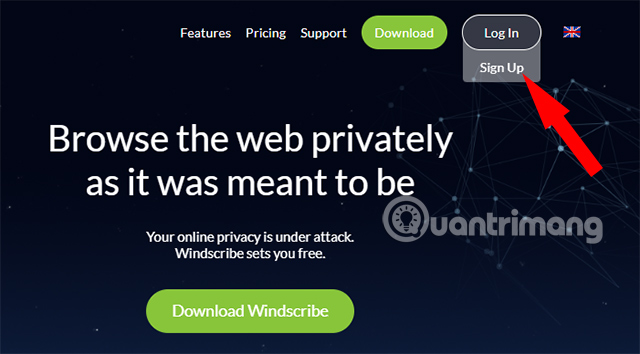
To get 50GB of Windscribe VPN for free, you first need to visit the application's homepage HERE and register for a new account. You need to select Log In and select Sign Up.
Step 2:
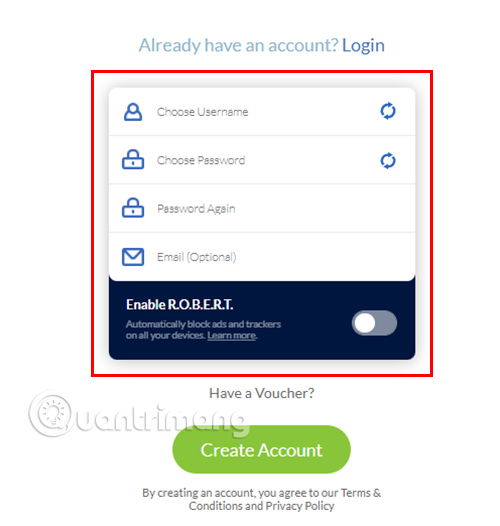
Fill in the necessary information to create an account including:
- Username: Account name
- Password: Password
- Password Again: Re-enter password
- Email: Your email address.
Step 3:
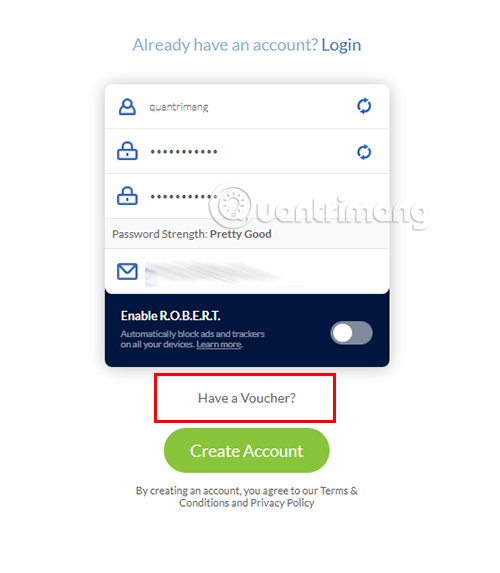
select Have a Voucher? and fill KOOBIDEHin the Voucher Code field.
Step 4:
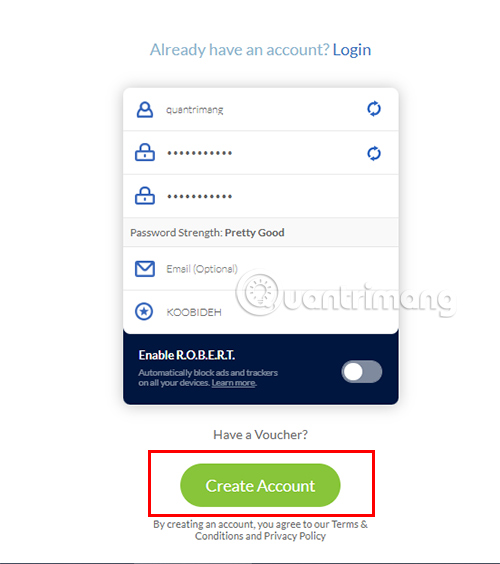
select the Create Account button to create an account. If Windscribe VPN asks for a Captcha code, enter the code exactly as provided.
Step 5:
So you have successfully created a Windscribe VPN account. Now You need to access the email provided to the system during the account creation process and open the email sent by Windscribe VPN and choose the Confirm Email (for 10 GB) button.
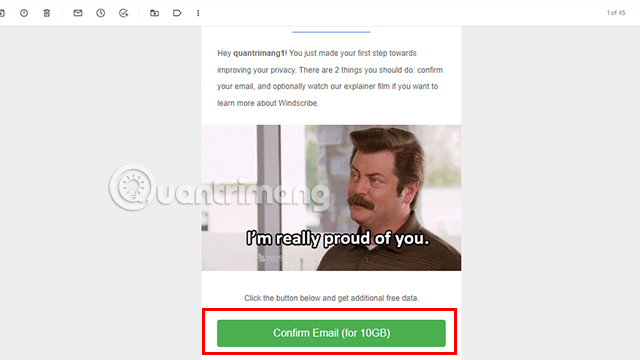
So you have received 10GB of free storage for 1 year . Next will be the steps to receive an additional 20GB of storage per month.
Step 6:
At the Windscribe VPN My Account interface, scroll down and select the Claim Voucher button.
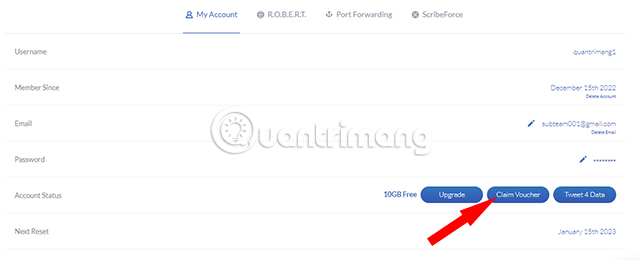
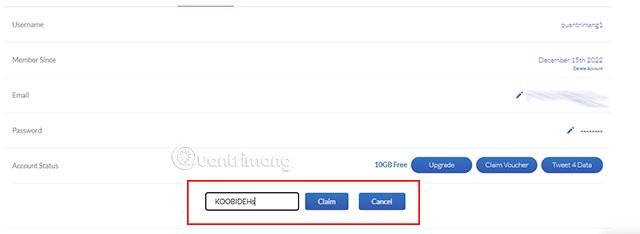
The extension appears, here fill KOOBIDEHin the blanks then choose Claim.
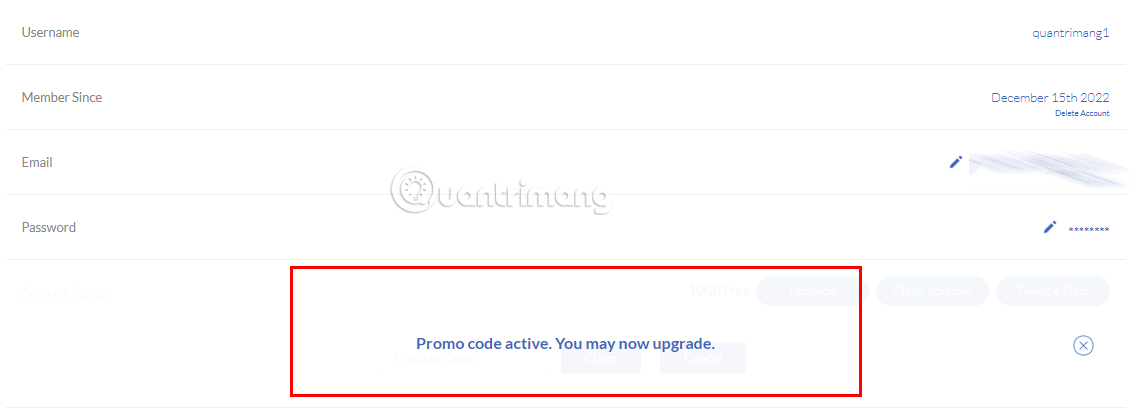
You will see a successful voucher import message and your bandwidth is increased to 30GB .
- Download Windscribe VPN software
Note: Voucher codes are not valid when used together (not cumulative), so if you have used another type of coupon code before or with a higher value, you can skip this tutorial.
Good luck!
See also:
- How to block ads while surfing the web
- Best Free VPN Apps iOS Users Shouldn't Miss
- Increase Internet connection speed by VPN solution
FAQ
What should I prepare before I get 30gb of free data every month from windscribe vpn?
Review the requirements and options in the guide first. Having the correct device, app version, account access, or materials ready helps prevent avoidable errors.
How long does it take to get 30gb of free data every month from windscribe vpn?
The time depends on the task and your setup. Most basic steps can be completed quickly, while downloads, updates, scans, or troubleshooting may take longer.
What should I do if the steps do not work?
Repeat the instructions in order, confirm that your software or device is supported, and check permissions, connectivity, and available updates before trying again.
Related Articles
 How to Get Free 50GB of Storage Per Month from Windscribe VPN4 minutes read
 Link Download Windscribe 1.83.203 minutes read
 Windscribe - Trusted Free VPN Service for Safe Internet Surfing Explained5 minutes read
 Which Is the Best Free VPN for PC in 2022?6 minutes read
 Top 5 Best Free VPNs for Windows7 minutes read
 Top 2021 Best Free Vpns for Computers, Phones12 minutes read
Reader Comments 0
Sign in with email or Google to join the discussion.