Table of Contents
Learn how to experience the new 4 × 4 map on PUBG. Follow clear, step-by-step instructions, review the required setup, and use practical troubleshooting tips for common problems.
Producer PUBG opened the third test of Sanhok (4x4) map with many attractions. Although compared to the current map, the Sanhok map is smaller in size, only 1/4 the size of the old map. But with this old map, users can battle many types of terrain such as rivers, mountains, residential areas and more distributed on the map. The following article will guide you how to download PUBG: Experimental Server to experience the new 4 × 4 map.
- Instructions on how to use voice chat in PUBG Mobile game
- 9 things to note when playing PUBG Mobile if you want to top
- Tips to become the last survivor in PlayerUnknown's Battlegrounds game
Instructions for Downloading New 4x4 Maps on PUBG
Step 1:
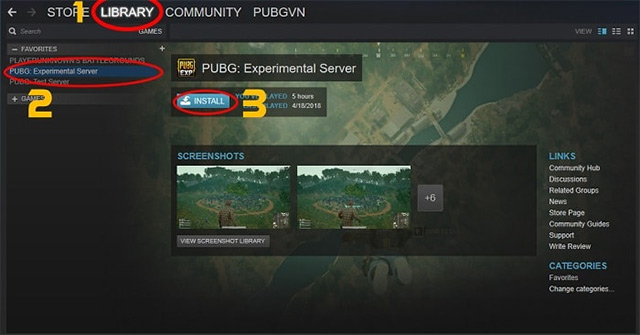
First of all, players log in to the Steam account that downloaded the game and then select the Library tab , select PUBG: Experimental Server and click Install .
Step 2:
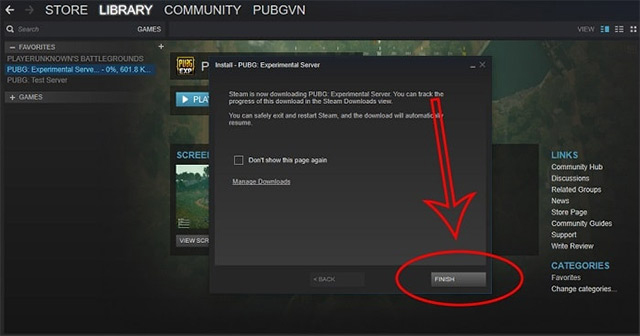
When the message board appears as shown below, click Next button to move to the next step.

Step 3:
Then you need to wait for the game to create the folder containing the PUBG installer and then click the Finish button to close the interface.
Step 4:
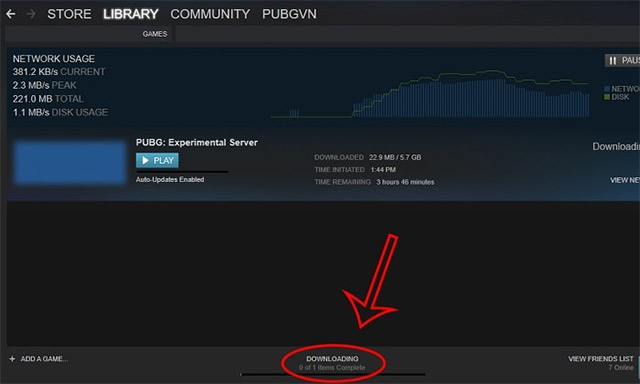
The game download process will take place shortly after. To see the download speed, select the Downloading bar below.
When completed, gamers just need to open the game to experience this new Sanhok 4x4 map.
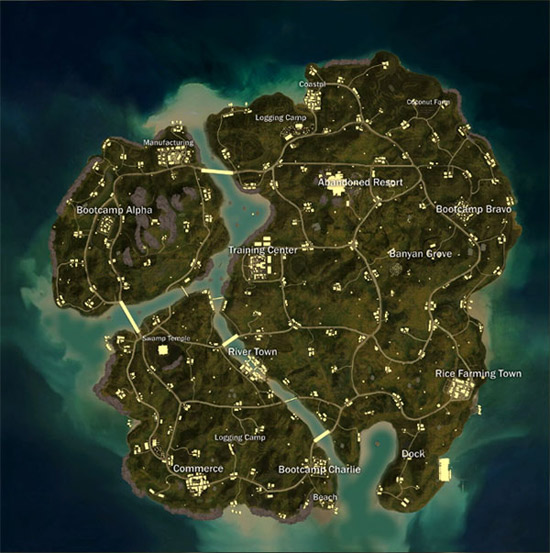
Currently Sanhok map test program on PUBG will take place in time only. So quickly download PUBG: Experimental Server to experience this 4 × 4 map. This new map will give gamers more exciting challenges.
See more:
- How to install the Rules Of Survival game on PC
- How to connect to Rules of Survival account with Facebook
- Shortcuts control the Rules of Survival game
I wish you all success!
Update note: Game mechanics, item values, menus, and availability can change. Check the current game version or official support information if your experience differs.
FAQ
What does this guide explain about experience the New 4 × 4 Map on PUBG?
Learn how to experience the new 4 × 4 map on PUBG. Follow clear, step-by-step instructions, review the required setup, and use practical troubleshooting tips for common problems.
What is the best way to apply these tips?
Work through the sections in order, especially instructions for downloading new 4x4 maps on PUBG. Practice one change at a time so you can see what improves your results.
Can game features or requirements change?
Yes. Updates can change menus, mechanics, item values, compatibility, and availability. Check the current in-game information or the developer's official support pages when details differ.
Related Articles
 Comparison Between PUBG Mobile VNG and PUBG Mobile International6 minutes read
 PUBG Mobile: How to Choose the Right Accessories for Each Gun8 minutes read
 PUBG Mobile: Weapons That Are Easy to Win the TOP 1 of the Game9 minutes read
 PUBG Mobile: the Most Popular Locations Vikendi8 minutes read
 PUBG Mobile: Top Accessories to Support the Best Gaming7 minutes read
 Tips for Quick Rankings in PUBG Mobile9 minutes read
Reader Comments 0
Sign in with email or Google to join the discussion.