Table of Contents
This guide explains how to check the phone is not deducted by the network using a clear, step-by-step process. It also highlights the settings and checks that can help you avoid common errors.
In order to bring users convenience when using, the current operators MobiFone, Viettel, Vinaphone have provided many more services, especially registering to change 4G sim and registering 4G packages. However, there are many customers who have questions about phone problems except for reasons unknown, while they do not directly register any service with the operators.
The cause of the injustice deduction in the mobile network is because your phone is automatically registered and used services such as ebook, ringback tones, 3G, liveinfo. Normally users will not be good know they use these services, because they work "underground" on the phone, unless you check the services that are in use. In this article we will show you how to check if your phone is charged with unreasonable money.
1. Check with Viettel network operator
First, users need to check which phone services they are using. How to check that service is to Compose a message TC to 1228 . Or check directly on Viettel's homepage. Read more in the article How to check which Viettel service is used on the phone.
If the phone does not use any service, you will receive a notification not to use any VAT service of Viettel as shown below.

If you use the service, including the service you directly register or the "automatic" registration service will also appear. In addition, Viettel will provide detailed cancellation for each type of service. You just need to follow it.

2. Check MobiFone network
As with Viettel network, users need to check if they are registering Mobifone service.
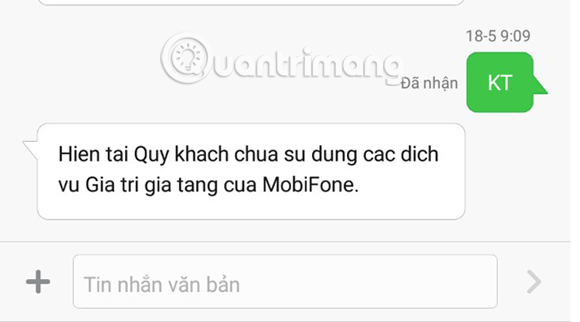
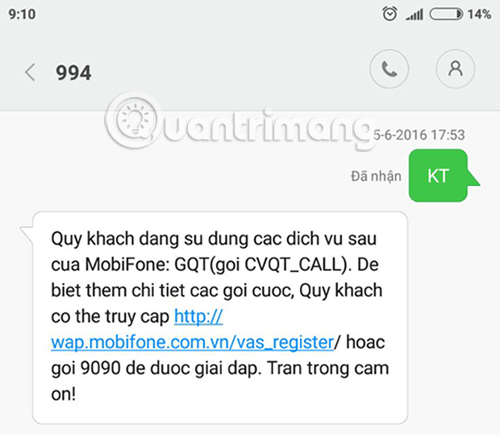
You can Write KT message to 994 , or press * 901 * 4 * 6 # or * 901 * 4 * 7 #. In addition, you can access MobiFone homepage to check. Refer to the article How to check registered MobiFone service?.
If you do not register to use the service, you will receive the message as shown below.
If you use the service, MobiFone will announce details in the message.
To cancel the services of MobiFone network, we can refer to the service table below.
Mobifone's serviceHow to cancel Service 3G service Create message HAVING package name 999 MobiClip service (View and download video) Prepare HUY package name send 9022 MEnglish service Compose HUY package name 9140 CALL BUSY service Prepare HUY send 9036 Call blocking service CALL BARRING Prepare CB send 999 ZING MOBIFONE service (using Zing services without spending 3G) Prepare HUY ZING to send 999 LifeInfo services
Compose HUY to 9022
Or follow:
On the new version : Menu> super SIM> activate> turn off the service.
On the old version : Menu> super SIM> turn on / off service> turn off.
Mobifone ringback music service Compose HUY send to 9224 Learning information service Mstudy Compose HUY package code to 9091 Mfilm service Compose HUY package name to 9033 Network access service OPERA Mini Compose the package send name 999 Service WEGAMES Compose WE send to 9210 VGAMES Service Compose HUY for 9210 Missed call notification service (MCA) So HUY sends to 9232 SMS PLUS service Compose HUY SS to 9070 Festival culture service from switchboard 1111 Prepare HUY TIN to 1111
3. Check with Vinaphone subscribers
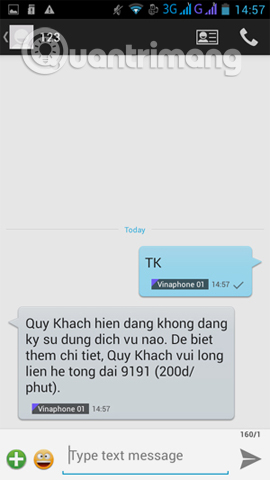
For mobile subscribers using Vinaphone network, you can send Messages with the syntax TK sent to 123 . Or check on Vinaphone's website in the article How to check Vinaphone's registered service?.
If the message is sent as shown below, you do not use any Vinaphone service.
If of use, users will receive details of the list of such services as well as how to cancel registered Vinaphone services, similar to Viettel's network.
Above is how to check which phone service you are using with 3 Mobifone, Viettel, Vinaphone networks and how to unsubscribe the services you are using. This will limit the situation where the phone is deducted from the unfairly money that users does not know the reason.
I wish you all success!
FAQ
What should I prepare before I check the phone is not deducted by the network?
Review the requirements in the guide, confirm that your device or software is compatible, and save important work before changing settings related to check the phone is not deducted by the network.
Why might check the phone is not deducted by the network not work as expected?
The most common causes are incompatible versions, missing permissions, incorrect settings, or an interrupted internet connection. Recheck each step and restart the app or device when appropriate.
Can beginners follow these check the phone is not deducted by the network steps?
Yes. Follow the steps in order, avoid skipping confirmation screens, and compare your interface with the screenshots because labels may differ slightly between versions.
Related Articles
 How to Check Which Service Viettel Is Using on the Phone3 minutes read
 Check Android Phone Configuration6 minutes read
 Measure Your Internet Speed Online, No Software Required19 minutes read
 How to Check Voicemail from Another Phone: Practical Guide6 minutes read
 How to Check Internet Package Network FPT, VNPT, Viettel Are6 minutes read
 Measuring the Speed of Viettel, Vnpt and Fpt Using Speed of Me4 minutes read
Reader Comments 0
Sign in with email or Google to join the discussion.