Table of Contents
This guide covers fujitsu's ultra-sharp touch screen laptop support with practical context and easy-to-follow details. Use it to understand the subject and apply the information confidently.
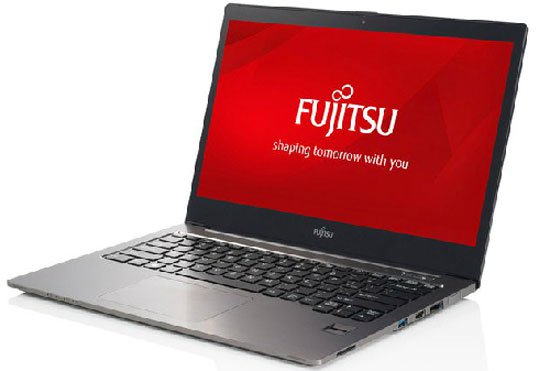 Fujitsu Lifebook U904.
The U904 Is Fujitsu's most advanced ultrabook model with a weight of only 1. 39 kg and is only 15. 5 mm thin. The screen of the machine possesses high definition and option of anti-glare type (without tap support) and usually (with tap support). The screen of the screen is super slim, so the overall size is only equivalent to the 13-inch screen laptop model.
Fujitsu Lifebook U904 Optional Intel Core i5 or Core i7 processor with Intel HD Graphics 4400 graphics chip, 8 GB RAM memory, hybrid hard drive with 500 GB capacity with 16 GB SSD memory chip or upgrade to SSD capacity of 512 GB.
Fujitsu ultrabook model integrated 2 USB 3. 0 ports, Ethernet connection port, Wi-Fi standard n, Bluetooth, headphone jack, optional 3G or 4G connection. Buyers can choose Windows 8. 1 Pro or Windows 7 Pro.
FAQ
What should I check before following these steps?
Confirm device and software compatibility, save important data, and make sure you have the required permissions, files, and account access.
Why might the process not work?
Common causes include outdated software, missing permissions, incompatible hardware, an unstable connection, or completing a step in the wrong order.
Can I undo the changes if necessary?
That depends on the tool or setting. Use built-in restore options when available, keep a backup, and record the original configuration first.
Related Articles
 Lenovo Studies Ultra-thin ThinkPad Laptops3 minutes read
 New Generation Ultrabooks Will Have 3D Touch Screens4 minutes read
 Laptop Touch Screen Grows Slowly4 minutes read
 Close Up of Acer Iconia Two-screen Laptop3 minutes read
 Dell Unveiled the First Touch-screen Laptop 'Stone Pot'4 minutes read
 Should You Buy a Touchscreen PC?5 minutes read
Reader Comments 0
Sign in with email or Google to join the discussion.