Table of Contents
This guide provides a clear, practical overview of free form creation websites, with useful context, important details, and straightforward takeaways for everyday readers.
1. Strawpoll
If you wanted to ask a single question and find out how people would respond, try Strawpoll. This service provides only one thing: create a single question with different answer options.
Strawpoll was once the premier site for creating polls on Twitch, due to its simplicity and speed. Now, Twitch has its own poll feature; however, Strawpoll was just as useful as before.
What makes Strawpoll so easy to use is that you don't need to register to use it. All you need to do is type the question you want to ask in the top box (Type the question here), then enter all of the answer options below (Enter poll option) . Don't worry if you need more answers - the website will automatically add new cells as you fill in the previous ones.
If you do not want participants to cheat on your poll, you can request that it not allow voting from the same IP address or browser cookies.
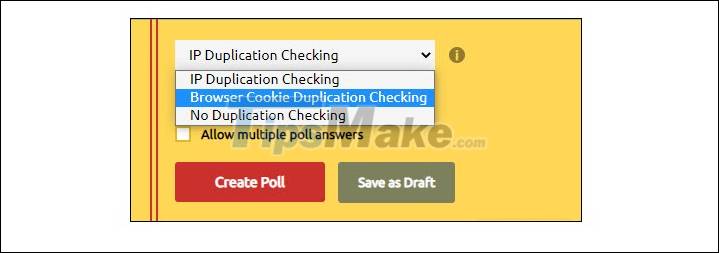
When all settings are ready, you Create Pool to create a survey, click Share to share it with people you want to learn, or Results to see the results.
2. Poll Maker
If you liked Strawpoll's idea, but were disappointed by the lack of other special features, try Poll Maker. This is a step up from Strawpoll with features, making it the best option if you want a quick and simple survey with some advanced options.
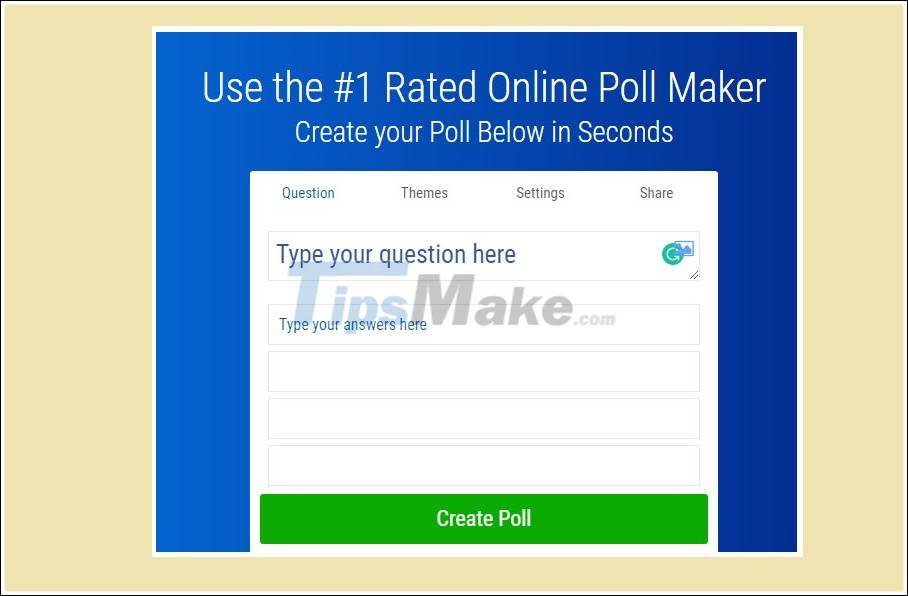
The main UI works very much like Strawpoll: you have a main box for questions and boxes for answers. However, you can add an image to each answer by clicking on the image icon, which allows you to upload an image or add an image from an online gallery.
To customize more, you can in turn try through the settings on the menu bar including Themes (interface), Settings (settings) and Share (sharing).
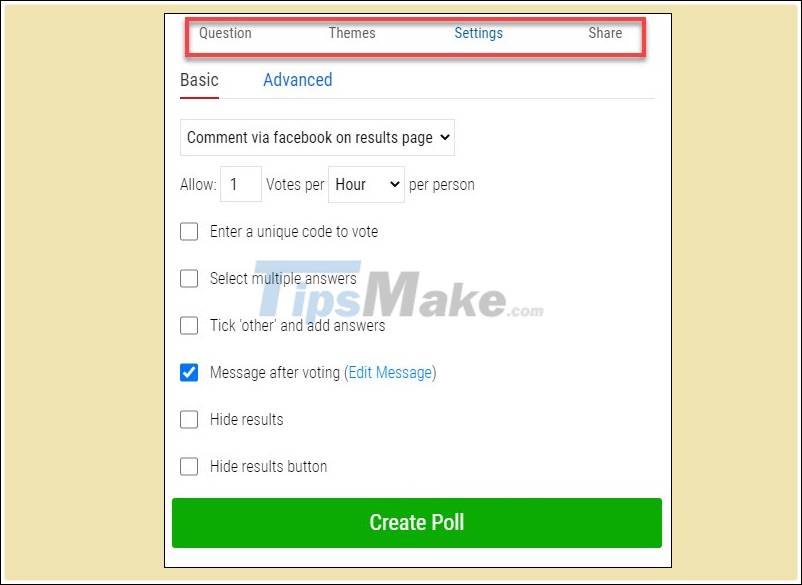
In the Settings section , you can allow users to comment on the survey (comment on result page). You can set it so that people can vote once in a while or just once. If you don't want people to see the results, hide the results.
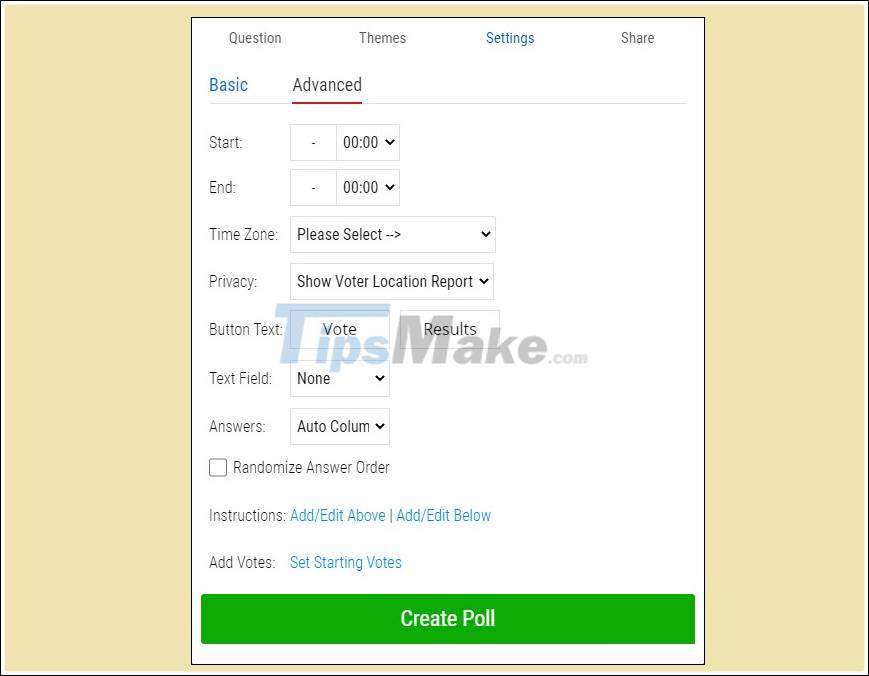
In the Advanced Settings window, you can set a time period for the survey to work. In addition is the ability to track where the voters come from (Privacy) and sort answers randomly (Randomize Answere Order).
3. Google Forms (Google Form)
If you're looking for a full-fledged survey, with a variety of question types, it's time to leave StrawPoll and Poll Maker. There are plenty of options for this - the point is, most of them aren't "really" free.
For example, you have Survey Monkey, which has a free plan. However, free surveys cannot exceed 10 questions and are limited to 40 respondents.
As a result, Google Forms is the number one candidate. Google Forms lets you add as many questions as you want, change the look and feel, and it's completely free.
If you are unsure about creating your own form, don't worry. Place your cursor over the plus sign and Select Template .
Google Forms has a few examples suitable for popular uses for surveys. If you find a template that fits what you want to do, go ahead and use it to speed things up.
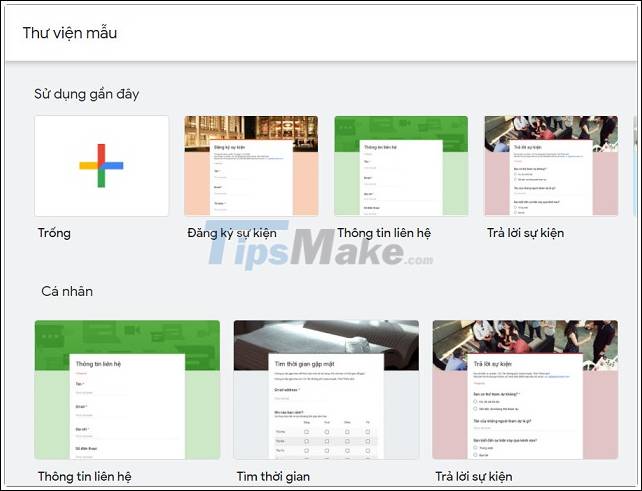
To dig deep to do your own survey, you won't be disappointed with the Google Forms features. You can set up your survey to have multiple choice answers, drop-down options, or let users enter their own answers. If you need to collect dates and / or times, you can easily choose a particular response type.
When you submit your Google Forms, you can track Form activity in the Answers tab. Once you've gathered enough data, export your responses to Google Sheets with minimal effort.
What are your options?
Which option is best for you? Each has its own strengths and weaknesses, and each is tailored to a specific need.
If you simply wanted to ask a question and get one or more answers, use Strawpoll. Easy-to-use and optional sign-in features help you quickly take and share polls.
To ask a single question, but Strawpoll is too restrictive for you, visit Poll Maker. The tool's additional options make it great for doing an advanced poll.
As soon as you need to ask more than one question, you enter the field of surveyors. In this situation, Google Forms is one of the few 'really free' options with unlimited customization and use.
Key Takeaways
Use the information above as a practical reference for free form creation websites. Review each step carefully, confirm any requirements, and choose the option that best fits your situation.
FAQ
What does this guide explain about Free Form Creation Websites?
It explains the main concepts, practical considerations, and useful steps related to free form creation websites without requiring advanced knowledge.
Who can benefit from learning about Free Form Creation Websites?
This information is useful for readers who want a clear overview, practical guidance, and reliable steps related to free form creation websites.
What should I check before applying this information?
Review the requirements, confirm that your device, software, or situation matches the instructions, and back up important data before making major changes.
Related Articles
 Guide to Creating Forms in Canva Using AI5 minutes read
 Icon Creation Software: The Best Free Icon Creation Tools13 minutes read
 Invite to Download Website X5 Start 15, Website Creation Tool for $4 minutes read
 Top 10 Best Free Avatar Creation Websites 2019: Create Avatars5 minutes read
 Top Most Effective and Easy-to-Use AI Tools for Creating Websites9 minutes read
 Top Websites to Create Online Logos, Beautiful, Free Online7 minutes read
Reader Comments 0
Sign in with email or Google to join the discussion.