Table of Contents
The 2020 12.9-inch iPad Pro was faster than the entry-level Intel MacBook Air and MacBook Pro in several benchmark and export tests, but that did not automatically make it the better computer. The Macs offered a conventional desktop workflow and broader software compatibility, while the iPad Pro offered touch, Apple Pencil support, better cameras, and a detachable form factor.
Important: this comparison covers models released in 2020. It is useful when evaluating those devices on the used market, but it is not a comparison of Apple's current lineup. Prices below are U.S. launch prices, and both Apple's hardware and iPadOS software support have changed substantially since then.
Models compared
| Device | Configuration in the original test | 2020 launch price used |
|---|---|---|
| 12.9-inch iPad Pro (4th generation) | A12Z Bionic, 6GB RAM, 128GB storage | $999 for the iPad; $349 for the Magic Keyboard |
| 13-inch MacBook Pro | 1.4GHz quad-core 8th-generation Core i5, Intel Iris Plus 645, 8GB RAM, 256GB SSD | $1,299 |
| 13-inch MacBook Air | 1.1GHz dual-core 10th-generation Core i3, Intel Iris Plus graphics, 8GB RAM, 256GB SSD | $999 |
The iPad's keyboard was sold separately, so the fair laptop-style comparison was approximately $1,348 rather than the tablet's $999 base price. An Apple Pencil was another optional purchase.
Design and portability
The 2020 MacBook Air and 13-inch MacBook Pro shared a 13-inch Retina display, aluminum enclosure, Magic Keyboard, Touch ID, two Thunderbolt 3 ports on the entry configurations, and the Apple T2 security chip. The Pro added a brighter display and Touch Bar. The Air's tapered body made it slightly lighter: roughly 1.3kg compared with about 1.4kg for the Pro.
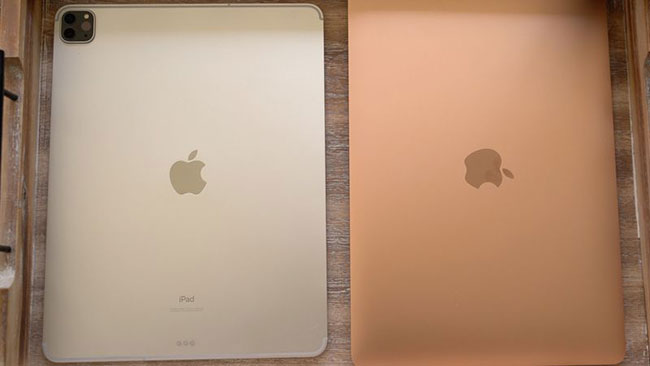
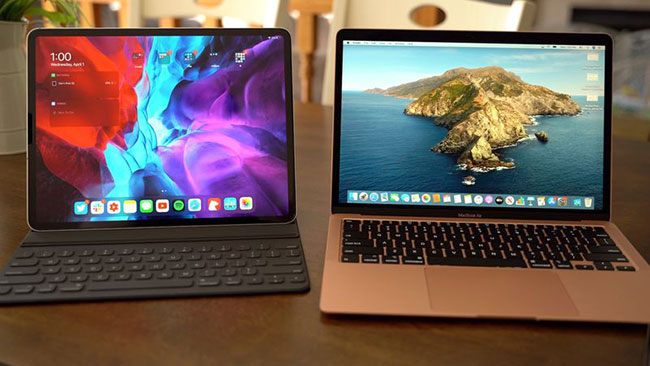
The 12.9-inch iPad Pro was the most flexible design. It could be used as a thin touch-screen tablet, paired with Apple Pencil for handwriting or drawing, or attached to the Magic Keyboard for a trackpad-and-keyboard setup. With that keyboard attached, its total weight was close to the MacBook Pro's, so the iPad was not necessarily the lightest complete package.
Benchmark results from the original test
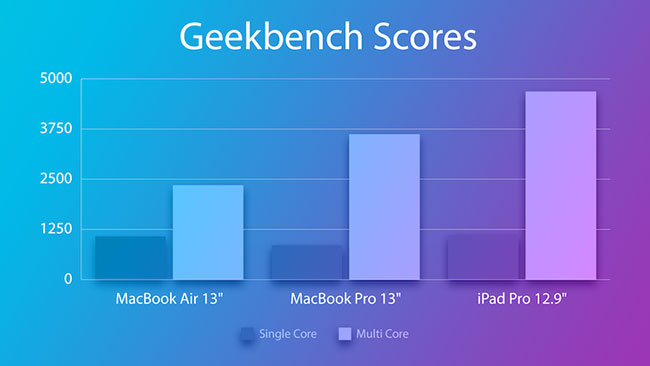
Geekbench 5 was used to compare CPU performance. These scores apply only to the tested configurations and software versions; they should not be generalized to later Apple-silicon Macs or newer iPads.
| Device | Single-core | Multi-core |
|---|---|---|
| 12.9-inch iPad Pro (A12Z) | 1,116 | 4,686 |
| 13-inch MacBook Pro (Core i5) | 859 | 3,621 |
| 13-inch MacBook Air (Core i3) | 1,076 | 2,350 |
The iPad Pro led both tests. The Air edged ahead of the tested Pro in single-core performance, but the Pro's four CPU cores produced a much stronger multi-core result. The tested Pro used an older 8th-generation chip; higher-priced 2020 Pro configurations used newer 10th-generation processors.
What the real-world tests showed
Benchmarks did not capture the differences between macOS and iPadOS, so the original comparison also timed a file transfer and video exports:
- A 1.3GB video transfer took about five seconds on both Macs and roughly 50 seconds on the iPad in the tested workflow.
- A five-minute 4K project exported from Final Cut Pro in 4 minutes 10 seconds on the MacBook Pro and 5 minutes 30 seconds on the MacBook Air.
- A comparable five-minute 4K export in LumaFusion took about three minutes on the iPad Pro.
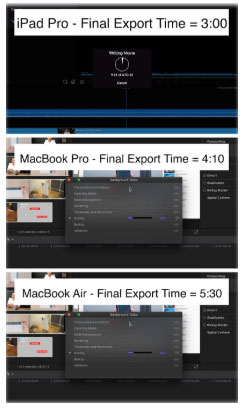
These timings compare different operating systems and, in the iPad test, different editing software. They illustrate the performance of one workflow rather than proving that one device is universally faster. Codec, effects, storage, app version, thermals, and export settings can all change the result.
Software matters more than the score
In 2020, the iPad could not run Xcode, Final Cut Pro, or Logic Pro, and its multitasking and file-management options were more limited than macOS. Apple later released iPad versions of Final Cut Pro and Logic Pro, so the original claim that those apps do not exist on iPad is no longer accurate. Xcode still requires a Mac, and desktop plug-ins, utilities, and development tools can remain decisive for some workflows.
The iPad's strengths were equally practical: a touch interface, Face ID, much better cameras than the 2020 Mac notebooks, Apple Pencil support, and easy switching between portrait and landscape use. That made it particularly well suited to handwritten notes, PDF annotation, drawing, and reading. See these iPad note-taking apps for examples of Pencil-focused workflows.
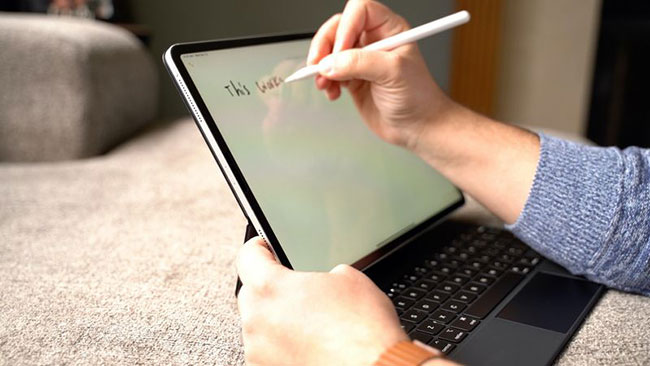
With the Magic Keyboard, the iPad could handle writing, browsing, email, and many office tasks much like a laptop. However, buyers should check every required app, external device, and file workflow before treating it as a Mac replacement.
Which 2020 device is the better used buy?
- Choose the iPad Pro if touch, Apple Pencil, tablet use, and portability between work modes matter most—and every essential app is available on iPadOS.
- Choose the MacBook Air for basic documents, browsing, email, and a familiar desktop environment. The entry Core i3 model is the weakest choice here for sustained heavy work.
- Choose the MacBook Pro if you need macOS and expect longer CPU-intensive workloads, although the tested Intel model is now several generations old.
Condition, battery health, storage capacity, remaining software support, and local used price now matter more than the original launch-price difference. Also compare these Intel models with later Apple-silicon machines; the transition that began with the Apple M1 generation changed the performance and efficiency baseline for both Macs and iPads.
Related Articles
 Compare Dell XPS 15 and MacBook Pro 16 Inch 20208 minutes read
 16-inch Macbook Pro Launched, Replacing the 15-inch Version5 minutes read
 13-inch MacBook Pro Retina Appears with iPad Mini3 minutes read
 The 12-inch MacBook Air Will Have 3 Colors Like the iPhone 5S3 minutes read
 MacBook Pro 16-inch M3 Pro Review: Outstanding Inside and Out Explained15 minutes read
![[Infographic] Breakthrough Designs in 12-inch MacBook](/data/thumbs_200x120/[infographic]-breakthrough-designs-in-12inch-macbook_thumbs_200x120_1nXDyqkYY.jpg) [Infographic] Breakthrough Designs in 12-inch MacBook3 minutes read
[Infographic] Breakthrough Designs in 12-inch MacBook3 minutes read
Reader Comments 0
Sign in with email or Google to join the discussion.