Table of Contents
ElevenLabs Code tools run custom JavaScript when an ElevenAgents agent calls a tool. They are useful when you need calculations, branching, or response processing without hosting a separate webhook endpoint. ElevenLabs documents this as an enterprise-only feature.
Choose the right tool type
- Code tool: calculate values, combine API responses, or transform data before returning it.
- Webhook tool: call an external endpoint when little custom processing is needed.
- Client tool: trigger an action implemented in the user's app or browser.
A code tool exports a default async function, receives a context object, and returns a result to the agent. Keep that result focused on what the agent needs.
Understand parameters and context
| Property | Purpose |
|---|---|
ctx.args | Arguments supplied by the agent for this call. |
ctx.config | Mapped string configuration values. |
ctx.secrets | Mapped secret references for request headers. |
| Authentication connection accessor | Mapped connection reference for the authentication header; use the exact accessor displayed in your tool's context panel. |
Define each argument's type, identifier, and description in the Parameters section or the editor's Params controls. The identifier must match what the code reads: a parameter named value is accessed as ctx.args.value, not ctx.args.target.
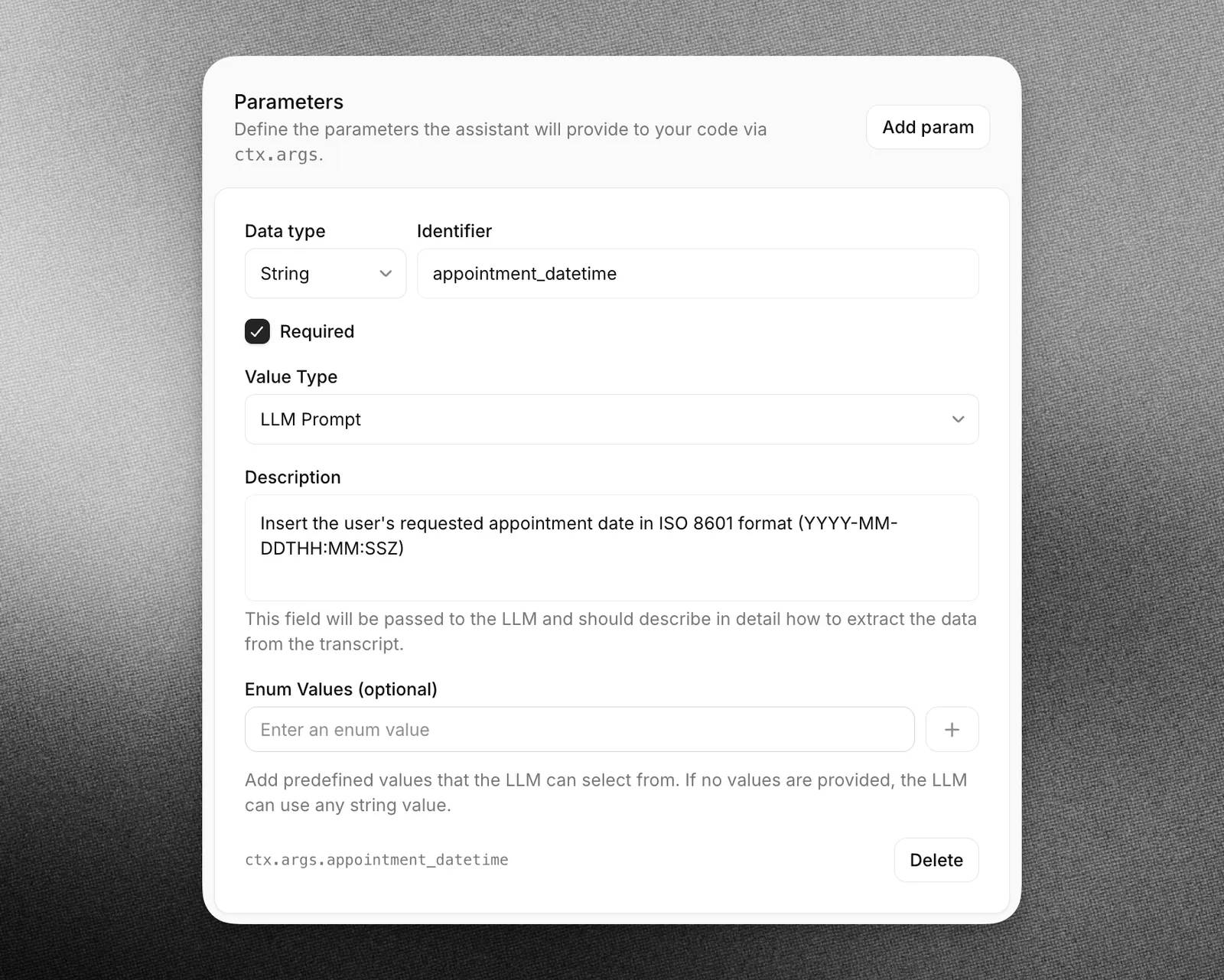
Map configuration and authentication values in Context object. Copy the accessor shown by that panel rather than guessing its spelling. The vendor's reference table and OAuth example use different accessor styles, so check the generated configuration before adapting an example.
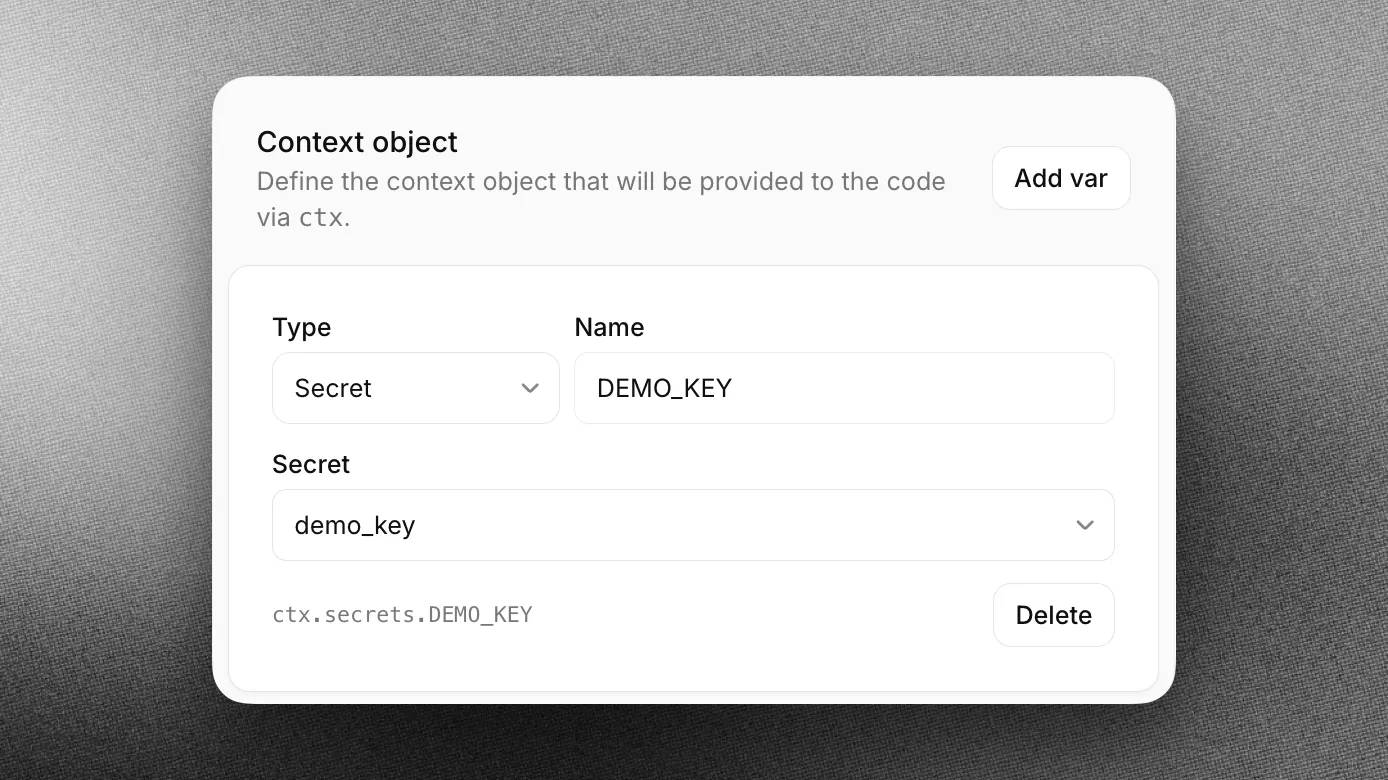
Build a temperature-conversion tool
1. Create the tool
In the agent setup, choose Add Tool and select Code.
| Field | Value |
|---|---|
| Name | convert_temperature |
| Description | Convert a numeric temperature between Celsius and Fahrenheit. |
2. Define matching parameters
| Type | Identifier | Required | Description |
|---|---|---|---|
| number | value | Yes | The temperature to convert. |
| string | from_unit | Yes | The source unit: C or F. |
3. Add conversion logic and validation
Reject missing or unsupported inputs instead of treating every non-C value as Fahrenheit.
export default async (ctx) => {
  const { value, from_unit } = ctx.args;
  if (typeof value !== "number" || !Number.isFinite(value)) {
    return { error: "Provide a finite numeric temperature." };
  }
  if (from_unit === "C") {
    return { result: (value * 9 / 5 + 32).toFixed(1), unit: "F" };
  }
  if (from_unit === "F") {
    return { result: ((value - 32) * 5 / 9).toFixed(1), unit: "C" };
  }
  return { error: "Use C or F as the source unit." };
};
4. Test in the editor
Use Run with sample arguments. Check Output for the returned data and Logs for execution errors.
| Input | Expected result |
|---|---|
| 100, C | 212.0 F |
| 32, F | 0.0 C |
| -40, C | -40.0 F |
| 20, K | Unsupported-unit error |
5. Tell the agent when to call it
Add a concise instruction to the agent configuration:
For Celsius/Fahrenheit conversions, call convert_temperature with value and from_unit. If the source unit is missing, ask for it. Read the returned result with its unit; if the tool returns an error, ask for corrected input.Test a conversation as well as the isolated function. Ask for a conversion, then try a request without a source unit. Inspect the tool call to confirm that arguments match the user's request.
Add an external API only when needed
The conversion example needs no network or credentials. For an API-backed tool, configure the required domain in Code Tool Network Access; this requires workspace administrator access. Check the response status before processing its body and return only the fields needed for the task.
Use mapped secret or authentication references according to the platform's current instructions. Do not hard-code credentials, place them in agent-visible parameters, or log authentication headers. The example domain api.example.com is a placeholder, not a working service.
Check the current Code tools reference for execution limits and authentication details. The documented environment has a configured timeout and does not support external npm dependencies.
Keep tool behavior predictable
Give tools and arguments descriptive names, specify formats, and validate inputs before taking action. For multi-step tasks, state the ordering explicitly—for example, check availability before scheduling a meeting. Choose and test an available model using realistic conversations rather than assuming a model name guarantees correct tool calls.
For background concepts, see JavaScript fundamentals and our REST API overview.
Related Articles
 What Is Currying in Javascript? How to Use Currying in Javascript5 minutes read
 Javascript Code to Create Bubble Chart with Custom Marker2 minutes read
 How to Running Node JavaScript Code in n8n8 minutes read
 minutes read
 Javascript: Complete Guide2 minutes read
 Javascript Code to Generate Error Charts & Graphs2 minutes read
Reader Comments 0
Sign in with email or Google to join the discussion.