Table of Contents
Overview
This guide examines the question 'Can You Play God of War on PC Without a Graphics Card?' in clear, practical terms. It covers the key concepts, recommended steps, common limitations, and useful checks so you can make a better-informed decision.
With the graphics card market in short supply, God of War fans can be happy to know that the PC gaming version of the game won't be too demanding in requiring a discrete graphics card.
God of War PC System Requirements

Low Settings
| Parameter | Minimum configuration |
| Operating system | Windows 10 64-bit |
| Graphics card | Intel Core i5-2500K (4 core 3.3GHz) or AMD Ryzen 3 1200 (4 core 3.1 GHz) |
| Processor chip | Nvidia GeForce GTX 960 (4GB) |
| RAM | 8 GB |
| Free space | 70 GB available space (HDD) |
| DirectX | Version 11 and above |
Recommended Settings
| Parameter | Minimum configuration |
| Operating system | Windows 10 64-bit |
| Graphics card | Intel Core i5-6600K (4 core 3.5GHz) or AMD Ryzen 5 2400 (4 core 3.6GHz) |
| Processor chip | Nvidia GeForce GTX 1060 (6GB) or AMD RX 570 (4GB) |
| RAM | 8 GB |
| Free space | 70 GB available space (HDD) |
| DirectX | Version 11 and above |
Ultra Settings
| Parameter | Minimum configuration |
| Operating system | Windows 10 64-bit |
| Graphics card | RTX 3080 (10GB) |
| Processor chip | Intel Core i9-9900k (8 cores 3.6 GHz) or AMD Ryzen 9 3950X (16 cores 3.5 GHz) |
| RAM | 16 GB |
| Free space | 70 GB available space (SDD hard drive) |
| DirectX | Version 11 and above |
Can I play God of War PC 2022 without a graphics card?
God of War PC has just officially launched its PC version, and what's very interesting is that its image quality is super smooth even when their PC system is not the best when lacking a discrete graphics card and having to rely on an integrated graphics card.
A prime example is the Ryzen 7 5700G processor - the best APU on the market today with 8 cores and 16 threads in the CPU field and 512 GCN (Graphics Core Next) graphics cores. Of course, to optimize the experience of playing God of War on a PC using this APU, users will have to access the BIOS and set their VRAM size to 4 GB.
Reviews show that when setting the game resolution to Full HD quality and graphics quality to Low, the average frame rate is 23 FPS. Although this number is not too terrible, it will clearly bring a good experience to players of a game like God of War. When lowering the resolution quality to 960 x 540 pixels, players can experience the game at 45 FPS frame rate - a very remarkable number.
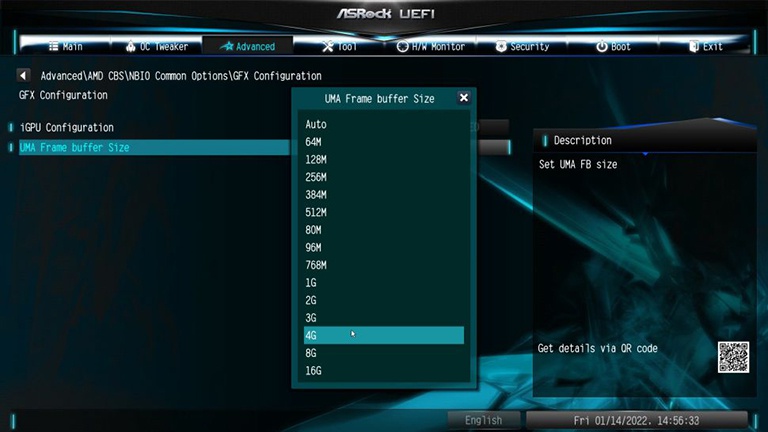
Users can also take advantage of the FidelityFX Super Resolution feature developed by AMD that automatically adjusts settings. With this FSR feature, users can set the graphics quality to Medium and the frame rate to 30 FPS. Those are amazing numbers when looking at this is a PC with integrated graphics.
To experience God Of War realistically and with the best quality, contact this guide today to receive advice and support to own the best priced PC Gaming Setup, most suitable for gamers today.
Key Takeaways
Use the guidance above as a practical reference for can you play god of war on PC. Check compatibility, follow the steps carefully, and verify important details with official documentation when software, security, accounts, health, or purchases are involved.
FAQ
Can You Play God of War on PC Without a Graphics Card?
The answer depends on the conditions, limitations, and evidence explained in this article. Review the relevant section before applying the conclusion to your situation.
What factors can change the answer?
Hardware, software version, location, budget, compatibility, timing, and individual requirements can all affect the result.
How can I verify the information for my situation?
Check current official documentation, compare your exact model or account settings, and confirm any time-sensitive details before acting.
Related Articles
 List of the Best Graphics Cards According to the Price Segment14 minutes read
 Is the Intel HD Graphics 620 Graphics Card Strong? What Games Can You Play7 minutes read
 How to Update Graphics Card: Step-by-Step Guide5 minutes read
 7 Best Best AMD Graphics Cards (GPUs) 20205 minutes read
 7 Things You Need to Know About Integrated and Dedicated Graphics Cards11 minutes read
 How to Use GPU-Z to Analyze Graphics Card Parameters10 minutes read
Reader Comments 0
Sign in with email or Google to join the discussion.