Table of Contents
When choosing a VPN for a device you stream on, check app support and your streaming service’s VPN policy before you pay. Speed matters, but it cannot fix a blocked connection. Netflix’s VPN help, for example, describes catalog and plan restrictions.
Seven providers worth comparing
| Provider | What to check |
|---|---|
| NordVPN | Check whether your device has a native app and use the provider’s support pages to troubleshoot service-specific playback errors. |
| Surfshark | Check its device policy if several people in your household need a VPN. Test video playback on the TV or player you plan to use. |
| IPVanish | Look at the supported streaming devices and whether the app gives you the location choices you need. |
| ExpressVPN | If you intend to connect a TV through your router, confirm support for your exact router model and plan. |
| CyberGhost | The app offers streaming-optimized profiles on supported platforms. Check that your platform and the service you want are listed. |
| Private Internet Access | Check whether your device has a native app and whether its network includes a nearby location. Test with the default security settings. |
| PrivateVPN | Check your preferred location and support availability before committing. Run a trial or read the refund terms if reliability is important. |
How to test playback on your own connection
- Run a speed test with the VPN off on the device you normally watch on.
- Connect to an appropriate VPN server and repeat the test at a similar time. Check actual playback, including seeking and several minutes at the quality you want.
- If playback fails only with the VPN, check the streaming provider’s policy and error guidance. If it buffers with the VPN off as well, troubleshoot your local connection first.
These screenshots are examples from the earlier comparison. Use your own measurements for a purchase decision, since speed varies by home connection, server, and time of day.
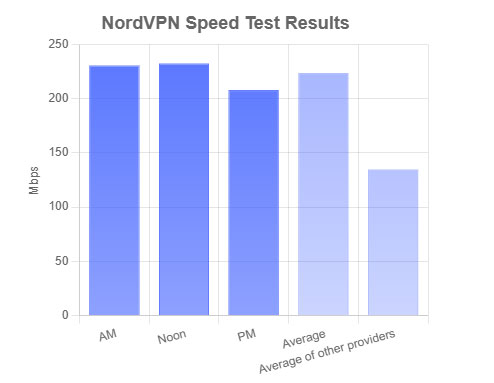
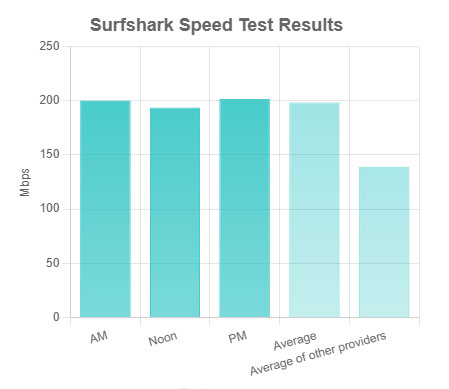
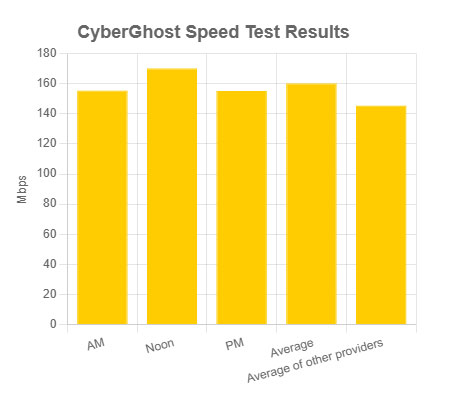
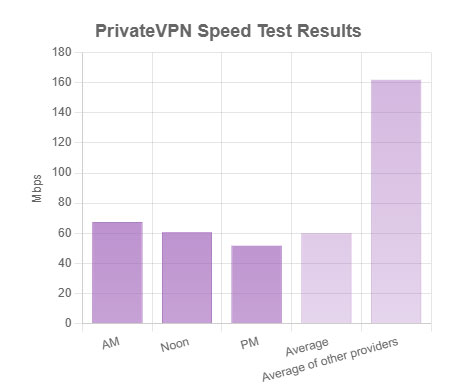
See how to measure your internet speed and how to test VPN performance.






Reader Comments 0
Sign in with email or Google to join the discussion.