Table of Contents
This guide provides a clear, practical overview of what is Google tensor? why did Google develop its own, with useful context, important details, and straightforward takeaways for everyday readers.
More particularly is the case of Apple when the company develops both the operating system, the processor and other hardware components on its own. But it is also this difference that has brought great success to Apple, when iPhone models always deliver better performance and user experience than Android rivals at the same level. In other words, mastering both the operating system and the CPU allows Apple to do things that simply wouldn't be possible if the iPhone used a third-party chip. It is an extremely deep and seamless integration between hardware and software, thereby giving users the most optimal experience.
Google is smart enough to understand that, and at the same time smart enough to realize that it can completely 'learn' Apple's success model while holding the Android operating system as well as its resources. both financial and qualified to develop their own line of mobile processor chips. And so the Google 'Tensor' processor line was officially born.
What is Google Tensor?
At its most basic definition, Google Tensor is simply a 'system on a chip' (SoC), or more commonly known as a 'processor'. It is similar to Qualcomm Snapdragon 888 or Apple A14 Bionic, serving as the component that provides processing power for its respective devices.
'Processing power' is the most 'primitive' concept of a processor, allowing you to perform tasks from basic such as calling, texting… to more advanced such as surfing the web, playing games… on your smartphone. As a modern chip, Google Tensor also allows the device to run more complex AI and machine learning tasks.
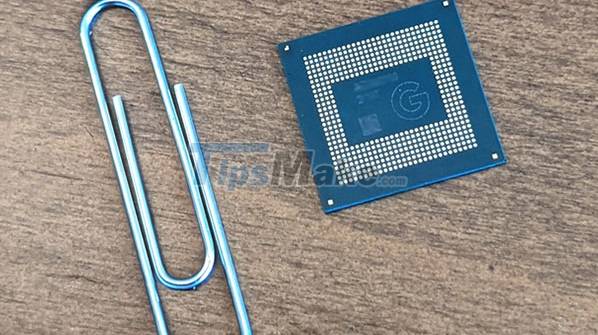
If you are interested in the actual specifications of the Google Tensor chip, the details are yet to be officially announced by Google. Just know that this will be a CPU co-developed with Samsung, owning 8 cores, 5 nanometers and based on ARM architecture.
However, the most interesting aspect on Google Tensor will be its ability to handle AI-related tasks. Tensor itself was originally a reference to Tensor hardware commonly used in Google data centers. The Mountain View company claims this will be an SoC that focuses more on AI/ML capabilities, rather than the usual 'raw performance', thereby unlocking the true potential of applying Artificial Intelligence on smartphone.
The core component of this chip will be the Tensor Processing Unit (TPU), responsible for handling all AI/ML tasks. This will help free up CPU resources for other tasks, potentially leading to better performance and battery life. Unlike Apple's Neural Engine in A-series processors, the TPU will be an integral part of Tensor, as all processes will go through the TPU.
Overall, Tensor is the result of Google realizing that they can't succeed by just using an existing chip like Snapdragon. Instead, it is all about mastering everything and optimizing everything in your own way.
What does the Tensor chip mean for Pixel phones?
We've talked a lot about power and integration, but what will Google Tensor really mean for users and their Pixel phones? The first must confirm the tight integration between hardware and software that allows Google to optimize the experience even more thoroughly.

Photography has always been a big part of Pixel devices, and Tensor allows Google to do that even better. Some examples include taking pictures from multiple cameras at the same time, recording video from multiple cameras at different exposures, faster shutter speeds, and performing more processing tasks while recording video. .
In addition to photos and videos, Tensor is also used to improve speech recognition and dictation. This leads to improvements to Google Assistant, making it more natural and intelligent.
Google and Apple: The new battle for AI on smartphones.
Qualcomm has repeatedly advertised the AI capabilities on Snapdragon chips, but reality shows that it is Apple who really takes things to the next level. Apple holds the crown when it comes to ML processing in smartphones today. A-series chips have always excelled in on-device AI tasks like image recognition, natural language processing, video analytics, and more.
How Tensor will perform against the strength of A-series in AI/ML is unknown. But Google's chip has the potential to revolutionize AI/ML applications on smartphones.
We'll need to wait until the Pixel 6 and Pixel 6 Pro are on hand later this year before we can comment further, but there's no stopping you from dreaming about Tensor helping the Pixel catch up or even out. even overtaken the iPhone 13, even though Apple is at the top of smartphone performance today. It can be said that Google is only now starting to really take its smartphone business seriously.
Key Takeaways
Use the information above as a practical reference for what is Google tensor? why did Google develop its own. Review each step carefully, confirm any requirements, and choose the option that best fits your situation.
FAQ
What does this guide explain about What Is Google Tensor? Why Did Google Develop Its Own?
It explains the main concepts, practical considerations, and useful steps related to what is Google tensor? why did Google develop its own without requiring advanced knowledge.
Who can benefit from learning about What Is Google Tensor? Why Did Google Develop Its Own?
This information is useful for readers who want a clear overview, practical guidance, and reliable steps related to what is Google tensor? why did Google develop its own.
What should I check before applying this information?
Review the requirements, confirm that your device, software, or situation matches the instructions, and back up important data before making major changes.
Related Articles
 Samsung Will Be the Main Production Unit for Google's Tensor4 minutes read
 Google Tensor G3 Is the World's First Smartphone Processor to Support AV15 minutes read
 Tensor G5 Benchmark Leaked: Google's Most Powerful Chip Ever3 minutes read
 The Prototype Image Shows the Back of Google Pixel 3 XL Completely with Glass, Huge Rabbit Ears4 minutes read
 Google Unveils Pixel 10 Lineup and New Wearables at Made by Google Event6 minutes read
 These Special Features Are Only Available on Google Pixel Phones5 minutes read
Reader Comments 0
Sign in with email or Google to join the discussion.