Table of Contents
This guide covers toshiba portege a605 portable laptop with practical context and easy-to-follow details. Use it to understand the subject and apply the information confidently.
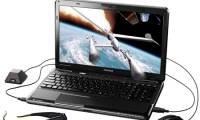
 The Portege A605 is an ultraportable computer Photo: Slashgear .
The manufacturer said it was an ultra-portable device, only 3 cm thin, weighing 1. 5 kg. The Portege A605 runs on Intel's Centrino 2 platform, Core 2 Duo SU9300 processor, 3 GB RAM, 250 GB hard drive. The promised new device will have a battery life of up to 6. 9 hours. The Toshiba Portege A605 is equipped with a DVD burn drive, Wi-Fi connection a / b / g / n (although there is no optional 3G WWAN), plus users can use the webcam and microphone, 3 USB ports. Toshiba's new Portege laptop uses an Intel 4500MHD graphics card, which comes preinstalled with Windows Vista Ultimate operating system.
FAQ
What should I check before following these steps?
Confirm device and software compatibility, save important data, and make sure you have the required permissions, files, and account access.
Why might the process not work?
Common causes include outdated software, missing permissions, incompatible hardware, an unstable connection, or completing a step in the wrong order.
Can I undo the changes if necessary?
That depends on the tool or setting. Use built-in restore options when available, keep a backup, and record the original configuration first.
Related Articles
 Toshiba Introduced a New Ultraportable Laptop4 minutes read
 Toshiba A600 Ultra-portable Good Price4 minutes read
 Toshiba's Ultra-portable Laptop Trio4 minutes read
 Launched 3D Laptop Line Without Glasses4 minutes read
 'Super Portable' Laptop Priced from Toshiba 550 USD3 minutes read
 Toshiba Will Release the 3D Laptop in July4 minutes read
Reader Comments 0
Sign in with email or Google to join the discussion.