Table of Contents
This guide covers toshiba aims at an entertainment laptop for watching tv with practical context and easy-to-follow details. Use it to understand the subject and apply the information confidently.
In Japan, Toshiba has introduced 3 new laptops for entertainment and support watching TV. Three new models of Toshiba laptops are available in Japan including Toshiba Qosmio G60, GX - Series and Dynabook TV.
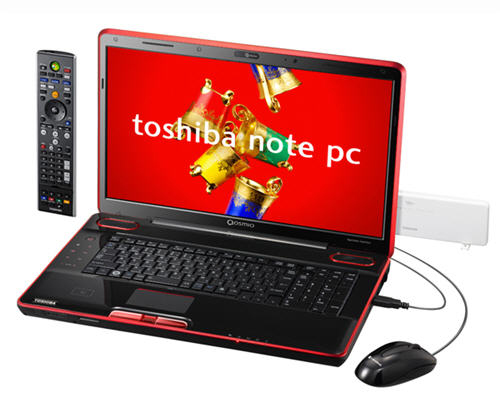 The Qosmio G60 is equipped with both Blu-ray drive as well as support for watching TV Photo: Akihabaranews .
The Qosmio G60 has a large 18. 4-inch HD full-HD LCD screen, uses Intel Core 2 Duo P8700 CPU, 4 GB RAM, 500 GB HDD and especially up to 2 TV receivers that support watching TV ( TV tuner), besides SuprsEngine video decoding technology and equipped with Blu-ray combo drive. According to Akihabaranews, the Qosmio G60 will be sold first in Japan in late November. Meanwhile, the Toshiba Qosmio GX-Series has the same configuration as the Qosmio G60 but leaves a TV tuner and does not use the SpursEngine video decoding technology. But in return, equipped with GeForce GT230M graphics card.
 The more popular Toshiba Dynabook TV also incorporates a television tuner.
Toshiba Dynabook TV is a more popular product with a 16-inch LCD screen, with two configurations including a pair of Intel Celeron T3000 processors with a DVD drive or an Intel Core 2 Duo P8700 and a Blu-ray drive next to 4GB RAM, depending on select 320/500 GB hard drive. These models are capable of watching TV with an integrated television tuner and are running Windows 7 operating system. However, Toshiba has not yet announced detailed information and pricing for these new models. See more photos of Toshiba's 3 new laptop models.
FAQ
What should I check before following these steps?
Confirm device and software compatibility, save important data, and make sure you have the required permissions, files, and account access.
Why might the process not work?
Common causes include outdated software, missing permissions, incompatible hardware, an unstable connection, or completing a step in the wrong order.
Can I undo the changes if necessary?
That depends on the tool or setting. Use built-in restore options when available, keep a backup, and record the original configuration first.
Related Articles
 Toshiba P745, 'Top' Entertainment Laptop to Vietnam5 minutes read
 Entertainment Laptop 'Terrible' at the Beginning of the Year5 minutes read
 Toshiba Aims to Sell 60 Million TVs and Laptops4 minutes read
 Toshiba Unveiled 3D Laptop Without Glasses3 minutes read
 The Top Most 'Audiovisual' Laptops Available Today4 minutes read
 Toshiba Introduced a Netbook That Supports Many Entertainment Features4 minutes read
Reader Comments 0
Sign in with email or Google to join the discussion.