Table of Contents
Explore what's new in the recently improved theft protection feature on Android.
What's new in Theft Protection?
Theft Protection tools may not be on your list of the most useful features on Android, but they are certainly among the most important. Here are the new features.
Gradually increasing lock times are added to Failed Authentication Lock
Android will now lock your device for an increasing amount of time if you enter the wrong PIN, password, or pattern too many times. The goal of this feature is to prevent people from trying to brute-force your password. Google has also added a feature to ensure this doesn't happen by mistake – entering the same password multiple times will not get you locked out.
The Failed Authentication Lock feature now has an on/off button
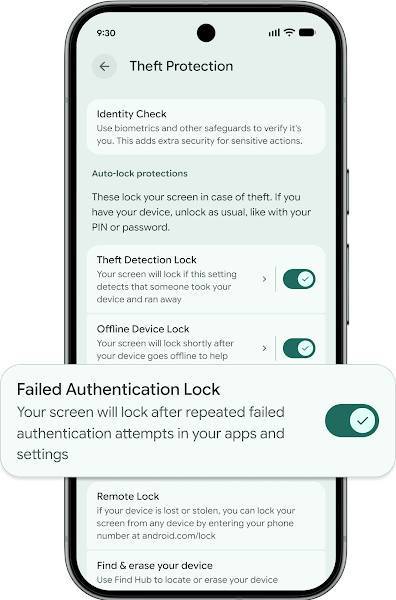
The increasing lock time due to Failed Authentication Lock can be frustrating in daily use, so Google has added a new toggle switch that lets you turn this feature off if you want. This article recommends turning it on, but at least now we have the option to enable or disable it as we wish.
Identity Check includes new applications
Identity Check is a feature that requires biometric authentication (face or fingerprint unlocking) for certain actions (such as changing security settings) outside of trusted locations. Google has expanded this feature to all apps that use biometrics, including banking apps. This enhances security if certain apps are accessed in unusual places. This is one of the best ways to protect your phone in case it's stolen – make sure you're using this feature!
Remote Lock has been updated with a new security check feature
Remote Lock is a tool that allows you to remotely lock your device using a web browser. Google has updated this feature with a new optional security question to help ensure that you are the one using it.
New default settings
Finally, Google has changed the default Theft Protection settings. New devices activated in Brazil will have Theft Detection Lock and Remote Lock enabled from the start. These new default settings appear to be limited to Brazil for now, perhaps as a test before a wider rollout.
What else can Theft Protection do?
In addition to the features mentioned above (Failed Authentication Lock, Identity Check, and Remote Lock), Theft Protection also provides the following tools:
- Find Hub : A central hub where you can view your device's location on a map, play a sound, Remote Lock, or even factory reset. It can find your device even when offline (which is a little scary, but it works well in case of theft).
- Theft Detection Lock : This feature uses artificial intelligence to detect if your phone has been snatched from your hand and automatically locks it.
- Factory Reset Protection : This feature requires your Google login information to reset the phone if it has been restored using "unofficial methods," such as through recovery mode. This feature ensures that stolen devices cannot be used by others.
Overall, Google's Theft Protection suite provides a very comprehensive set of tools to help protect your data and recover your device if it's stolen. With these latest updates, Theft Protection is better than ever. Have these tools ever helped you? Let everyone know in the comments below!
Final Thoughts
Understanding what's new in the recently improved theft protection feature on android makes it easier to evaluate the information and apply the most relevant recommendations. Focus on the key points above and verify details that may change over time.
FAQ
What is what's new in the recently improved theft protection feature on android?
Explore what's new in the recently improved theft protection feature on Android.
What key points does this article cover?
The article focuses on What's new in Theft Protection?, Gradually increasing lock times are added to Failed Authentication Lock, The Failed Authentication Lock feature now has an on/off button, with practical explanations and examples.
How can you use this information in practice?
Use the explanations to compare options, verify important details, and make a more informed decision. Apply the recommendations that best match your goals and situation.
Related Articles
 Android Is About to Support a New Anti-Theft Protection Feature4 minutes read
 How to Enable Google Advanced Protection3 minutes read
 Android Is About to Get a New Anti-theft Feature That Helps3 minutes read
 Data Protection: 5 Types of Data Theft You Should Know to Prevent8 minutes read
 How to Turn Off Screen Sharing Protection on Android: Step-by-Step Guide2 minutes read
 7 Best Anti-theft Apps to Protect Android Device10 minutes read
Reader Comments 0
Sign in with email or Google to join the discussion.