Table of Contents
This guide covers the new Samsung series 5 ultra runs Windows 8 with practical context and easy-to-follow details. Use it to understand the subject and apply the information confidently.
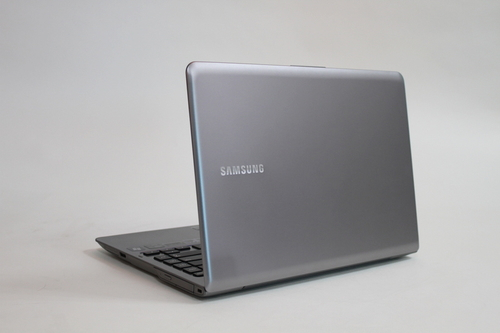 The Series 5 Ultra is one of the most attractive models of ultrabook on the market.
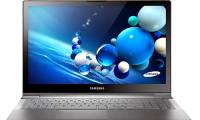
With the trend of laptops running Windows 8 booming in Vietnam later this year, Samsung also gives users a 'familiar and strange' Model of Windows 8 Series 5 Ultra. This is one of the numbers. Few models ultrabook have attractive prices, suitable for many users while still ensuring good configuration, ultra-thin and light design for frequent travel needs.
In the new version sold, the Series 5 Ultra is preinstalled by the manufacturer of the new Windows 8 operating system for a completely different experience than the previous Windows 7. The first impression that is most noticeable is the outstanding boot time. Using a hybrid hard drive that combines SSD and HDD, it only takes more than 10 seconds since pressing the power key until fully displaying the Start Screen screen interface (just a bit slower than SSD drives but much faster than machines equipped with HDD only. Quick test when closing the lid and reopening, the Series 5 Ultra takes only an average of 2 to 3 seconds to fully recover. This is an essential advantage for users who require high mobility as well as quick response time at work.
 Windows 8 helps the machine speed up operations.
However, speed is not the only strong point on the new Series 5 Ultra model. Its performance is also optimized on both Windows 8 interfaces that are Modern UI and familiar Desktop environments. For those who only use simple tasks like surfing the web, mailing or updating social networks, apps in Modern UI interface are perfectly responsive thanks to a simple interface, easy to use as well as operability. Action is much faster than traditional software. Meanwhile, Desktop interface still makes it compatible with all old software such as running Windows XP and Windows 7 operating systems.
Much upgraded on the 'substance' Inside, the Series 5 Ultra retains its ultra-slim and ultra-portable styling as the version sold earlier this year. It weighs 1. 52 kg for the 13 inch and 1. 81 kg versions for the 14 inch version. Series 5 Ultra has a rugged aluminum alloy cover. Machine surface has a certain roughness so users can hold on their hands without slippery as well as do not stain or leave fingerprints like other types with normal plastic ball crust.
Samsung Series 5 Ultra version is sold genuine in Vietnam equipped with 14 inch screen resolution of 1366 x 768 pixels, Intel Core i5-3317U processor with speed of 1. 6 GHz, 4 GB RAM memory, hard drive 750 GB capacity (with an additional 24 GB SSD drive to increase performance), Intel HD Graphics graphics chip. The reference selling price is VND 22 million.
 The device still retains the slim and light design as before.
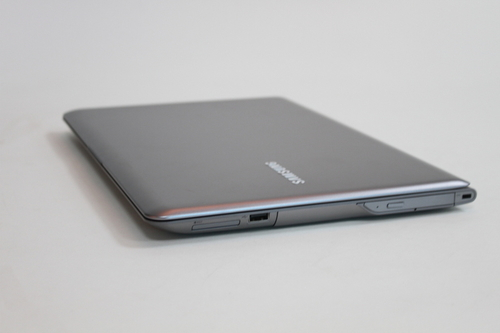 Design optical drive on the right.
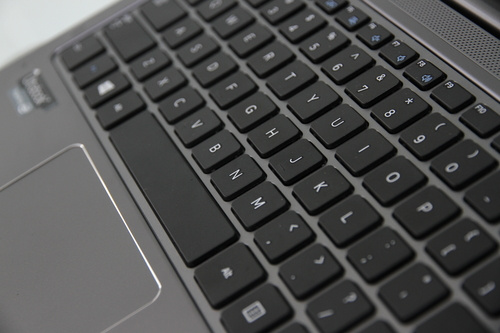 Chiclet keyboard.
 New version running Windows 8.
FAQ
What should I check before following these steps?
Confirm device and software compatibility, save important data, and make sure you have the required permissions, files, and account access.
Why might the process not work?
Common causes include outdated software, missing permissions, incompatible hardware, an unstable connection, or completing a step in the wrong order.
Can I undo the changes if necessary?
That depends on the tool or setting. Use built-in restore options when available, keep a backup, and record the original configuration first.
Related Articles
 Samsung Series 9 Is Somewhat Better Than the MacBook Air4 minutes read
 Samsung Launched 5 Ultra-portable Series 9 Laptops3 minutes read
 Samsung's Ultra-thin Series 5 View3 minutes read
 Samsung Launched the New Series 7 Duo Before CES 20134 minutes read
 Samsung Touch Screen Ultrabook Price from 16. 7 Million3 minutes read
 Galaxy S20 and S20 +:+: Snapdragon 865 // Exynos 990, 8 // 12gb4 minutes read
Reader Comments 0
Sign in with email or Google to join the discussion.