Table of Contents
This guide covers the MacBook air pitted against the portege r830 with practical context and easy-to-follow details. Use it to understand the subject and apply the information confidently.
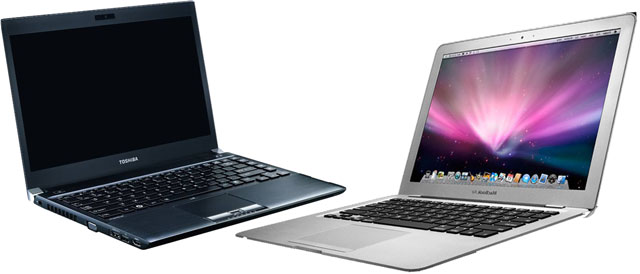 The MacBook Air and Portege R830 are all high-end 13-inch laptops.
The MacBook Air with a large screen version and the Portege R830 are all the most notable high-end 13-inch laptops on the market with a price range of about VND30 million, good configuration and light weight. The duo are very suitable for business users but while the MacBook Air emphasizes the sleek fashion, the Portege R830 presents a style that is more elegant.
Two models are compared to the same price range including Toshiba Portege R830 with Intel Core i5-2520M processor with 2. 5 GHz speed, 4GB RAM, 500GB hard disk drive speed of 7, 200 rounds of minute price. VND 31. 5 million survey. While the MacBook Air 13. 3 inches configured with Intel Core i5 processor clocked at 1. 7 GHz, 4 GB RAM, 128 GB SSD hard drive, Intel HD Graphics 3000 graphics card reference price is about 30 million dong.
Here are some reviews comparing these two laptops based on each criterion.
Design and Durability
Design is a very difficult criterion than losing between these two models because the MacBook Air and Portege R830 are for people with different aesthetic tastes. Apple products are attractive while the R830 attracts users with simple but professionally designed features.
 MacBook Air is charming with thinness while the R830 is elegant.
R830 is currently the 13-inch laptop with the lightest optical drive in the world while the MacBook Air 13 inches is the lightest 13-inch laptop in the world (excluding the unreleased ultrabooks). Both models feature maximum portability, but the R830 is more advantageous with optical drive, a necessary component for business users to access data. Toshiba laptops have a weight and thinness of 1. 4 kg and 1. 9 cm, while Apple products are 1. 7 cm and 1. 3 kg.
However, in terms of durability, Toshiba products outperform rivals with remarkable capabilities. The R830 can withstand impact when dropped from a height of 0. 76 meters and withstands the pressure on the LCD screen lid equivalent to 100 kg. It is also capable of overflowing 30 ml.
Screen
Along with a 13-inch screen size, Apple's products have an advantage over competitors with a higher resolution of 1, 440 x 900 pixels, while the R830 is only 1, 366 x 768 pixels as most regular laptops. The R830 is more advantageous with the anti-glare screen for outdoor use while the MacBook's screen is famous for its sharpness and more vivid color display.
Hardware Configuration
In the upgraded MacBook Air earlier this year, Apple still uses the low-voltage processor line for its model, a point that makes the MacBook Air outperform the R830. Both have the same RAM memory, the larger R830 hard drive, but the MacBook Air uses SSDs for faster data access speeds, convenient for handling jobs or copying data.
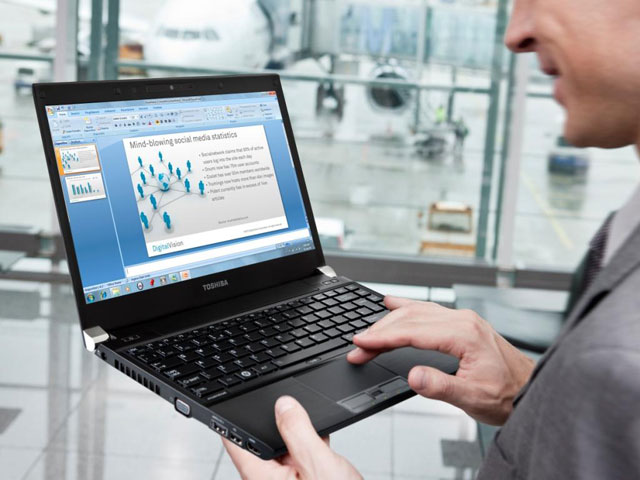 R830 has amazing durability.
Battery Usage Duration
Using SSDs and low-voltage chips but in "rounds" in terms of battery life, the MacBook Air is no more than a competitor. According to Apple's announcement, this model can be used continuously for 7 hours. The R830 is similarly announced for 7 hours and the actual test time for Digitize is over 6 hours.
Operating System
In addition to design, the operating system is also the key to user division for these two models. Apple laptops use Mac OS X operating system, which is more about graphic design, video, web surfing, and an eye-catching interface while Toshiba laptops use Windows operating systems. To choose between these two laptops, users need to specify the purpose of use because many software to work today are only available on Windows operating systems, compatibility with other documents or computers is also better a lot of.
How to Connect
Connectivity is always a problem that makes Apple products more special than other models and also makes its users "miserable". With the exception of the popular USB port and the SD card reader, the 13-inch MacBook Air only features Thunderbolt ports for both data exchange and backward compatibility with DisplayPort. Toshiba's laptop is more realistic with VGA to projectors or HDMI to more convenient HDTVs.
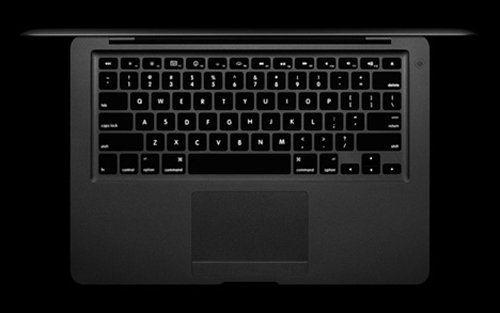 Keyboard backlight is a strong point of MacBook Air.
Other Features
Both the MacBook Air and R830 have chiclet-style keyboards that are easy to use and manipulate, but Apple's products stand out with the new backlight upgrade lamp for use in low-light conditions.
However, the R830 also has some functions that are stronger than competitors such as fingerprint security, data security systems with both hardware and software. Toshiba's laptop also has an interesting feature: Sleep & Charge allows charging devices via the USB port of a computer without turning on.
Conclude
The two notable high-end 13-inch models on the market, but if users can clearly identify the intended use, it is not difficult to choose between the MacBook Air 13-inch and Portege R830. For real business people, the R830 is clearly the better choice, while for those who love fashion, handling uncomplicated work, MacBook Air is a better choice.
FAQ
What should I check before following these steps?
Confirm device and software compatibility, save important data, and make sure you have the required permissions, files, and account access.
Why might the process not work?
Common causes include outdated software, missing permissions, incompatible hardware, an unstable connection, or completing a step in the wrong order.
Can I undo the changes if necessary?
That depends on the tool or setting. Use built-in restore options when available, keep a backup, and record the original configuration first.
Related Articles
 MacBook Air 2010 Pitted ULV Laptops6 minutes read
 Top 5 MacBooks Worth Spending Money on in 20254 minutes read
 Compare Macbook, Macbook Pro and Macbook Air10 minutes read
 Macbook Air 2019 Review -- Beautiful and Durable Laptop14 minutes read
 Compare Macbook Pro and Macbook Air8 minutes read
 Understand the Connection and Key Presses on the Macbook5 minutes read
Reader Comments 0
Sign in with email or Google to join the discussion.