Table of Contents
This guide covers toshiba portege r830 adds red and core i7 chips with practical context and easy-to-follow details. Use it to understand the subject and apply the information confidently.
>>> Review Toshiba Portege R830
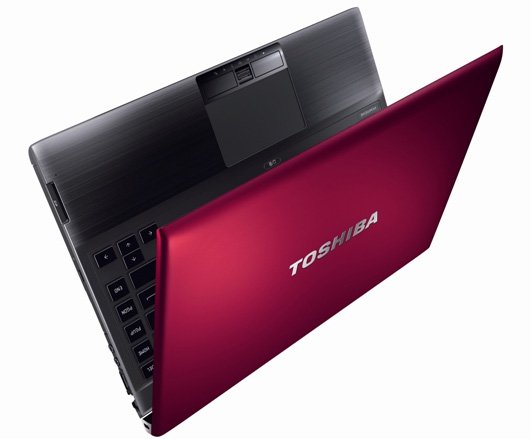 The Toshiba Portege Z830 is red in alloy.
Toshiba's highest-end business laptop, Portege R830 began selling two new versions in the Vietnamese market. The first is the Portege R830-2045UR with a red alloy case for users who are women. This model also has a strong configuration with Intel Core i5-2435M processor with 2. 4 GHz speed, 4 GB RAM, Intel HD Graphics graphics chip and 640 GB hard drive.
For users who require high configurations, the most heavily equipped version of the R830 also uses an Intel Core i7-2640M processor clocked at 2. 8 GHz. The R830-2047U version also has 4 GB of RAM memory, Intel HD Graphics graphics chip, 640 GB hard drive.
 The most advanced Core i7 version in the R830 series for entrepreneurs.
Portege R830-2045UR has a reference price in the market of VND 27. 9 million while the R830-2047U is VND 34. 3 million.
The R830 is currently the world's lightest 13-inch screen laptop. It can withstand impact when dropped from a height of 0. 76 meters and under heavy pressure on the LCD screen lid equivalent to 100 kg. Portege also has a number of other features such as an overflow keyboard, mobile phone charging even when the laptop is off.
FAQ
What should I check before following these steps?
Confirm device and software compatibility, save important data, and make sure you have the required permissions, files, and account access.
Why might the process not work?
Common causes include outdated software, missing permissions, incompatible hardware, an unstable connection, or completing a step in the wrong order.
Can I undo the changes if necessary?
That depends on the tool or setting. Use built-in restore options when available, keep a backup, and record the original configuration first.
Related Articles
 Ultrabook Running Ivy Brige Weighs 1. 12 Kg4 minutes read
 Core i5 Laptop Chips Stand Out11 minutes read
 'A Lot of the First Low-cost Laptops Use Core i3 Chips3 minutes read
 Toshiba Adds V Line Using Core i3 Chip3 minutes read
 Choose a Core 2 Duo or Core I-series Laptop6 minutes read
 Toshiba Satellite and Qosmio Are Equipped with Ivy Bridge Chips4 minutes read
Reader Comments 0
Sign in with email or Google to join the discussion.