Table of Contents
The SQL AND, OR, and NOT operators combine or reverse conditions in a WHERE clause. Use AND when every condition must be true, OR when at least one condition may be true, and NOT to exclude rows that satisfy a condition.
| Operator | A row is returned when |
|---|---|
AND | All connected conditions are true |
OR | At least one connected condition is true |
NOT | The following condition is not true |
Use AND when all conditions must match
AND narrows a result because each returned row must satisfy every connected condition.
AND syntax
SELECT column1, column2
FROM table_name
WHERE condition1
  AND condition2;
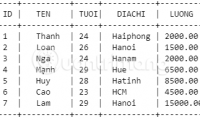
Suppose the NHANVIEN employee table contains the rows shown below:
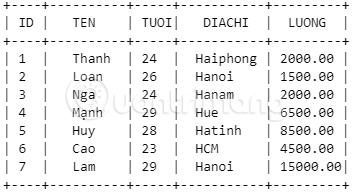
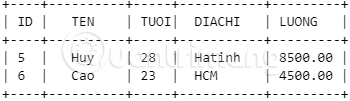
This query returns employees whose salary is above 2,000 and whose age is below 29:
SELECT *
FROM NHANVIEN
WHERE LUONG > 2000
  AND TUOI < 29;
A row that satisfies only one of those comparisons is not included.
Use OR when either condition may match
OR broadens a result. A row is returned if any connected condition is true.
OR syntax
SELECT column1, column2
FROM table_name
WHERE condition1
   OR condition2;
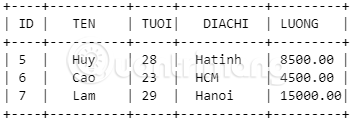
Using the employee data below, the next query finds anyone with a salary above 6,500 or an age below 24.
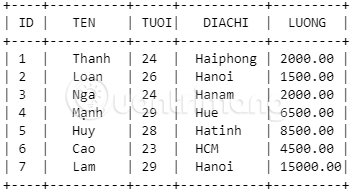
SELECT *
FROM NHANVIEN
WHERE LUONG > 6500
   OR TUOI < 24;
An employee does not need to meet both conditions. Matching either one is enough.
Use NOT to reverse a condition
NOT excludes rows for which its condition evaluates to true.
NOT syntax
SELECT column1, column2
FROM table_name
WHERE NOT condition;
For example, NOT (LUONG < 4000) means the salary is not below 4,000. For non-null numeric values, that is equivalent to LUONG >= 4000:
SELECT *
FROM NHANVIEN
WHERE NOT (LUONG < 4000)
  AND TUOI >= 24;
Writing the positive comparison is often easier to read:
SELECT *
FROM NHANVIEN
WHERE LUONG >= 4000
  AND TUOI >= 24;
Both forms return employees who are at least 24 years old and have a salary of at least 4,000, provided those columns are not NULL.
Combine AND, OR, and NOT with parentheses
When a condition mixes operators, do not rely on a reader remembering precedence rules. Parentheses make the intended grouping explicit.
SELECT *
FROM NHANVIEN
WHERE (DIACHI = 'Hue' OR DIACHI = 'Hatinh')
  AND LUONG >= 4000;
This returns employees in either listed location, but only when their salary meets the threshold. Without the parentheses, AND is normally evaluated before OR, which can produce a different result than intended.
You can also negate a complete group:
SELECT *
FROM NHANVIEN
WHERE NOT (DIACHI = 'Hue' OR DIACHI = 'Hatinh');
Be careful with NULL values
A comparison with NULL is generally neither true nor false; it is unknown. Therefore, NOT (LUONG < 4000) does not automatically include rows where LUONG is NULL. Test missing values with IS NULL or IS NOT NULL:
SELECT *
FROM NHANVIEN
WHERE LUONG >= 4000
   OR LUONG IS NULL;
Practical checks
- Run each condition separately before combining them.
- Add parentheses whenever
ANDandORappear in the same expression. - Use explicit column names instead of
SELECT *in production queries when you only need certain fields. - Check how
NULLvalues should be handled. - Test a filtering condition with
SELECTbefore using the sameWHEREclause in anUPDATEorDELETE.
For structured practice, use the SQL and relational databases course. If repeated rows are the problem rather than filtering logic, see how SQL DISTINCT handles duplicate results.
Related Articles
 Boolean Operators and or in SQL5 minutes read
 Arithmetic Operators: Operator in C ++3 minutes read
 !! == and! ==== What Is the Difference in Javascript?2 minutes read
 Arithmetic Operators in Unix // Linux: C Shell Operators4 minutes read
 Arithmetic Operators in Unix // Linux: Basic Shell Operators5 minutes read
 Arithmetic Operators in Unix // Linux: Korn Shell Operator4 minutes read
Reader Comments 0
Sign in with email or Google to join the discussion.