Table of Contents
Use this guide to understand see the air pollution index using breezometer application and the factors that affect it. The information is organized to make the topic easier to apply in practice.
Air pollution has become a major concern of society. Large concentrations of pollution combined with elevated temperatures can cause dizziness and nausea. In fact, in the summer, quite many people encounter this situation. If the index is high and ultraviolet rays are too strong, you should stay indoors and should not participate in strong physical activity such as jogging. But how do you know the UV index, pollution as well as air quality in the city?
How See the Air Pollution Index Using Breezometer Application Works
BreezoMeter free application can do that. It works worldwide, gathers data from reliable sources to provide indicators about UV, air pollution index.
After downloading and installing the app, you must allow it to access the GPS location. Soon it will give you information about air quality at the place you are standing. Air quality appears by a meter with an elephant shaped needle, as well as the app's background color.
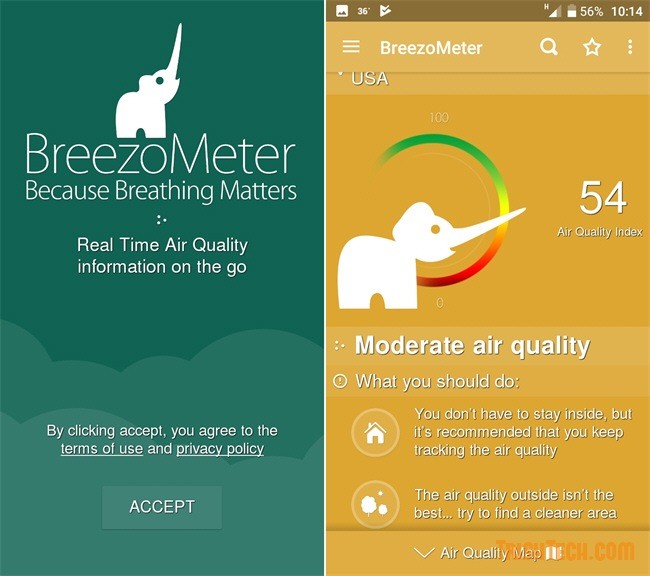
In addition to the air index, it also displays some useful guidelines or suggestions on what should and should not be in the present time. For example, you can go out, or you should stay at home, etc. For extremely bad air quality, it will recommend staying indoors with air conditioning; With moderate air quality, you should limit outdoor activities and with good air quality, you should go outside and breathe fresh air.
Link to download BreezoMeter application
- UVLens application - protects you from harmful UV rays
- Instructions to stamp photos, add watermark to images on Android phones
FAQ
What is the main benefit of see the air pollution index using breezometer application?
The main benefit is a clearer understanding of the topic and a practical way to apply the information covered in this guide.
What should I check before using see the air pollution index using breezometer application?
Confirm compatibility, review the required settings, protect important data, and use the latest supported version whenever possible.
What should I do if the result is different?
Repeat the steps carefully, verify permissions and version differences, and consult the product's official support documentation for changes not shown in the article.
Related Articles
 What Is Air Quality Index: Air Quality Index -- What Is Aqi?4 minutes read
 Index (INDEX) in SQL5 minutes read
 Database Index: Use Index in Access 20164 minutes read
 The Index Function in Excel: Formulas and Usage9 minutes read
 How to Write the Above Index, Below Index in Excel15 minutes read
 Unusual Story: Air Pollution Can Adversely Affect Your Kidneys3 minutes read
Reader Comments 0
Sign in with email or Google to join the discussion.