Table of Contents
This guide covers Samsung applies new technology to the r439-da02vn case with practical context and easy-to-follow details. Use it to understand the subject and apply the information confidently.
The laptop is also equipped with an Intel Core i3 processor. Users can enjoy HD movies, 3D games. 16: 9 standard LED screen helps the entertainment space lively.
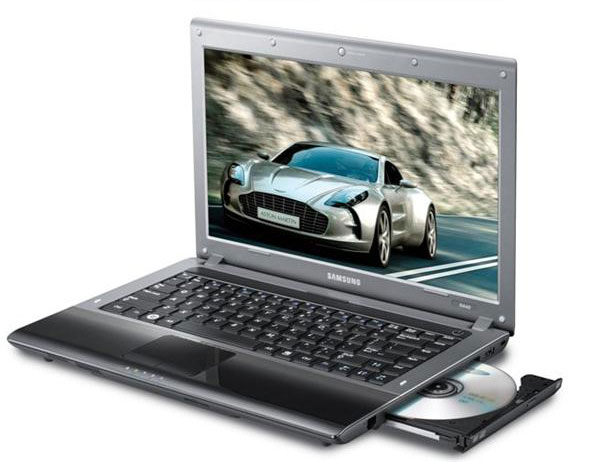 Samsung applies new technology to the R439-DA02VN case
Samsung also integrates exclusively for line R439-DA02VN with many technologies such as Fast Booting (opening the machine for 3 seconds); Noise Reduction Solution provides quiet operation, only 21. 8 dB. This helps the user to focus well, be effective during stressful work.
With the promotion program ' Let Samsung pay your phone bill for you ', from September 24 to October 29, Samsung laptop buyers R439-DA02VN are distributed by Digiworld at IT supermarket outlets nationwide. Receive a scratch card worth VND 500, 000. The total value of the program is up to VND 500 million.
Products distributed by Digiworld Corporation and sold at agents and informatics supermarkets nationwide. Details of reference program: HTTP: //www. Digiworld. Com. Vn
Samsung R439-DA02VN - Price: VND 12, 500, 000 (VAT included) - VXL: Intel Core i3-350M Processor (2 x 2. 26 GHz) - Memory: 2 GB DDR3, 1066 Mhz - Hard drive: 320G SATA (5400rpm) - Optical drive: DVD-RW Super Multi Dual Layer - Screen: 14 "LED HD (1366 x 768) 16: 9 Gloss - Graphics: Intel GMA HD (Core i3) - XP: 128 MB; WIN7: 762 MB - Communication: Webcam SCB-0340N 0. 3 MP + Mics (1) - Security: BIOS Boot Up Password, HDD Password, Set Supervisor / User Password - Battery, volume: 6 cells, 2. 2 kg
FAQ
What should I check before following these steps?
Confirm device and software compatibility, save important data, and make sure you have the required permissions, files, and account access.
Why might the process not work?
Common causes include outdated software, missing permissions, incompatible hardware, an unstable connection, or completing a step in the wrong order.
Can I undo the changes if necessary?
That depends on the tool or setting. Use built-in restore options when available, keep a backup, and record the original configuration first.
Related Articles
 Notebook Samsung R439 - Strong and Different4 minutes read
 3 New Models of Samsung Laptops4 minutes read
 Learn the Cooling Technology on Samsung Refrigerators11 minutes read
 Galaxy a Series 2021: New Product, Using the Same Strategy7 minutes read
 Samsung Applies for a Patent for a 'Smart Charging Ring' That Can Charge a6 minutes read
 Samsung Launches the First ZNS SSD with Dual Ports, 4 Times4 minutes read
Reader Comments 0
Sign in with email or Google to join the discussion.