Table of Contents
Explore revoke access permissions for these 3 apps to double your phone's battery life.
Within just a few days of revoking three access permissions, their phone's battery life nearly doubled. No need to uninstall dozens of apps or close them unnecessarily, no need to constantly switch to power saver mode, or use a low-brightness screen. Simply stop allowing apps to do things they don't need to. After doing so, many realized that these access permissions were actually the cause of battery drain and needed to be seriously considered.
Background activity
Hidden costs of background applications
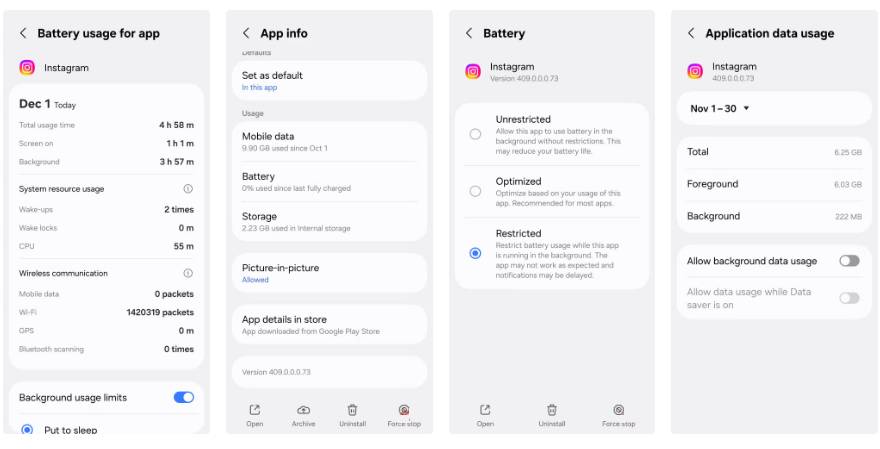
All iPhones have a Background App Refresh feature that allows apps to run processes even when you're not using them. Android smartphones also have a similar feature, which, by default, allows all downloaded apps to run in the background. This lets them sync data with servers to get the latest content for you. While this is a convenient feature that gives you the most up-to-date content every time you open an app, it also consumes unnecessary energy. Furthermore, not all apps need to run in the background. For example, this makes sense for cloud storage services, but not every game or social media app.
When checking your phone, you'll find several apps running in the background even though you rarely use them. Turn off background activity for unnecessary apps. You can do this by opening the app information and going to Settings -> Battery -> Restricted . Undeniably, this is one of the most effective ways to fix battery drain on your smartphone.
Location services
Things that silently drain your phone's battery
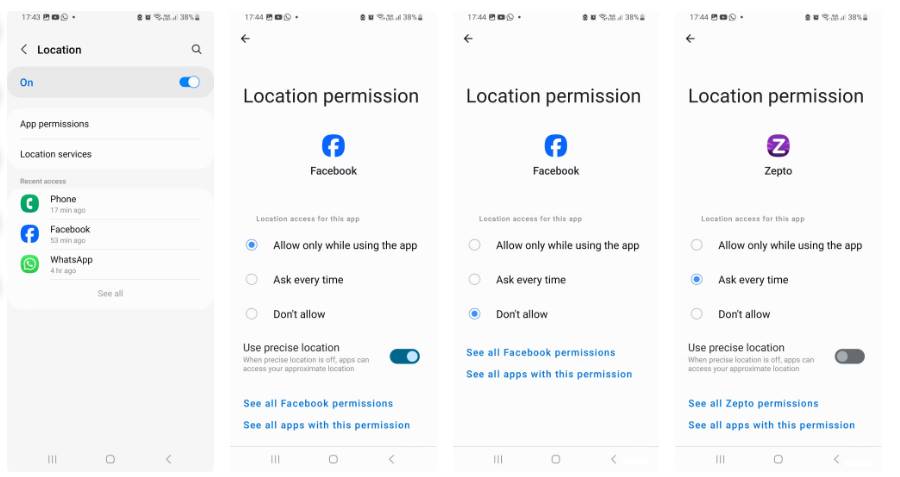
It's undeniable that location access is one of the most power-hungry permissions on any smartphone. This is even worse when you set location access to 'Allow all the time' with precise location. That's because precise location uses GPS, Bluetooth, Wi-Fi, and the phone's sensors to determine your exact location. Approximate location, on the other hand, uses Wi-Fi or cellular data and consumes far less power.
While checking which apps can track your location, you'll find many unnecessary apps like shopping and social media that have requested precise location access, which is always enabled. It makes sense for navigation and ride-hailing apps to use precise location for greater accuracy. For other apps, adjust location access permissions. For example, turn off location access for social media and shopping apps, and only use approximate location for news, weather, and other apps.
Scan for Bluetooth and nearby devices
Restrict access to only essential applications
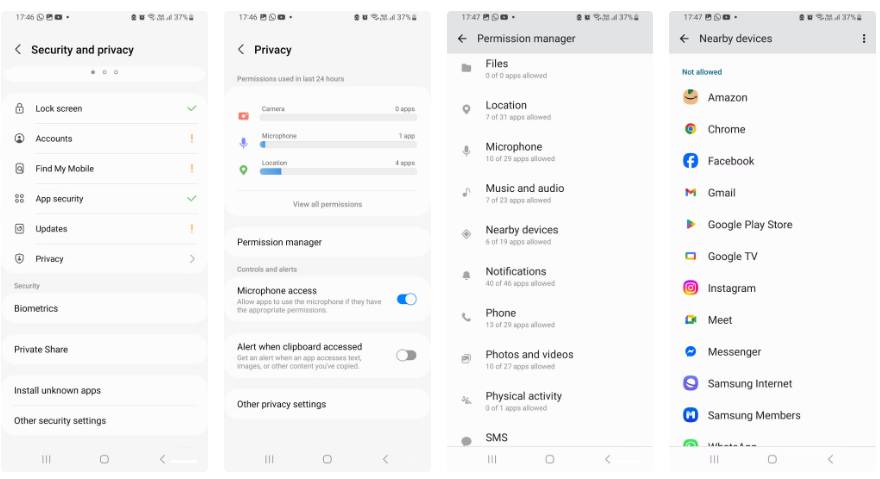
Even when you turn off Bluetooth, many smartphones continue scanning for Bluetooth and nearby devices in the background as long as the apps have permission. While this offers conveniences such as quick pairing, nearby sharing, etc., it also comes at a cost. Some apps you rarely use still have permission to continuously scan for Bluetooth devices. This will activate Bluetooth and network components, preventing the phone from remaining in deep sleep mode. Although each scan uses little power, the frequent waking will drain the battery.
Restrict Bluetooth and access to nearby devices to only essential apps. This change will not only improve the user experience; the battery graph will also become flatter, and you'll have more screen time.
Permissions you shouldn't disable (and why)
Some rights remain important
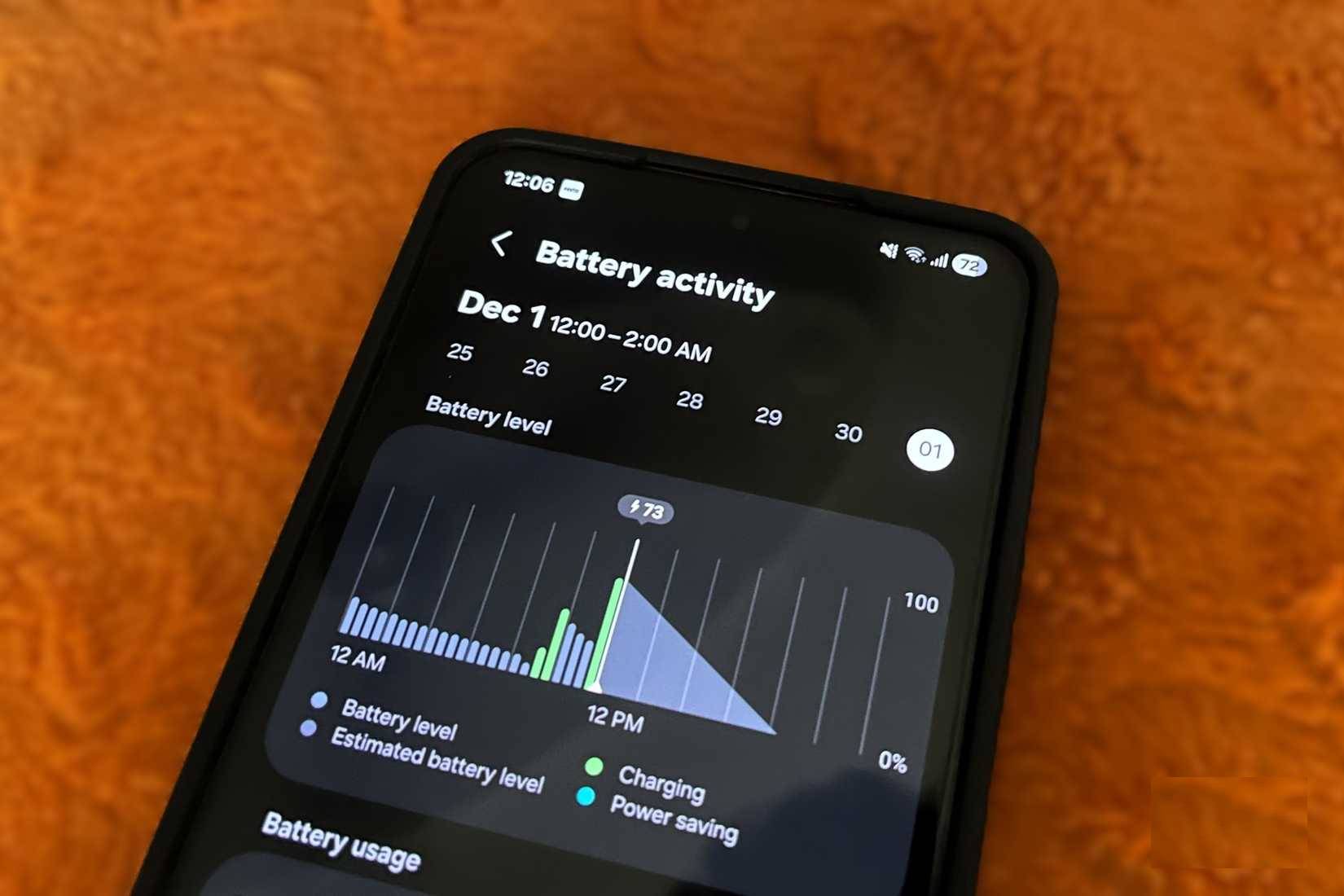
When checking permissions on your phone, the goal isn't to disable or revoke every permission. Instead, focus on those that can help you prevent unnecessary background activity. Don't disable all notifications and alerts on your phone. Be careful to cut down on notifications from apps you rarely use or don't care about. Don't disable core permissions for system apps as they can do more harm than good. Disabling critical system permissions can cause stability issues and increase battery drain.
Don't turn off Wi-Fi just because you use it frequently, and turning it off will only have a minimal impact on battery life. Another important factor is access to the microphone and camera on your smartphone. Many users believe these permissions consume unnecessary power because they activate many hardware components and perform intensive processing. While this is partly true, it depends heavily on the app. Don't disable camera and microphone access for all apps. Instead, closely monitor each app and revoke access from those that definitely don't need them.
Final Thoughts
Understanding revoke access permissions for these 3 apps to double your phone's battery life makes it easier to evaluate the information and apply the most relevant recommendations. Focus on the key points above and verify details that may change over time.
FAQ
What is revoke access permissions for these 3 apps to double your phone's battery life?
Explore revoke access permissions for these 3 apps to double your phone's battery life.
What key points does this article cover?
The article focuses on Background activity, Hidden costs of background applications, Location services, with practical explanations and examples.
How can you use this information in practice?
Use the explanations to compare options, verify important details, and make a more informed decision. Apply the recommendations that best match your goals and situation.
Related Articles
 How to Use the Temporary Permission Feature of Android 11 on Any3 minutes read
 MS SQL Server: Grant // Revoke Permissions in SQL Server4 minutes read
 9 Tips to Extend Battery Life for Android Phones You Should Apply10 minutes read
 Tips to Double Battery Life on iPhone4 minutes read
 Don't, and Exactly, Never Leave Your Phone Down to 0% Battery!4 minutes read
 How to Increase, Extend Battery Life on Android Phones Effectively3 minutes read
Reader Comments 0
Sign in with email or Google to join the discussion.