Table of Contents
This updated guide examines Review Tenda Nova Mw6 and Mw3: Good, Cheap Mesh Mesh Wi-Fi System and organizes the essential facts, background, and practical takeaways in clear American English.
We are now entering a new phase, at a time when mesh networks are gradually becoming popular, having reasonable prices and bringing more advantages.
Join TipsMake.com to learn about the new Tenda Nova MW6 WiFi mesh device (and cheaper Nova MW3) through the following article.
Technical data
Tenda Nova MW6
- Router type: AC1200
- Wireless: Dual band
- MU-MIMO: Yes
- Dimensions: 100 x 100 x 100mm per device (node).
- Processor: 1Ghz
- Antenna: 2 internal dual band 3d antennas
- Memory: 8MB Flash + 128MB RAM
- Ports: 2 Gigabit Ethernet ports,
- Number of devices in the box: 3
- Application: Tenda Nova (available on both Android and iOS)
- Color: White
- Price: $ 399 (VND 9,250,000) for a set of 3 devices, $ 349 (VND 8,091,000) for a set of 2 devices, $ 189 (VND 4,382,000) for 1 device
Tenda Nova MW3
- Router type: AC1200
- Wireless: Dual band
- MU-MIMO: Yes
- Dimensions: 90 x 90 x 90mm per device (node).
- Processor: 600MHz
- Memory: 8MB Flash + 64MB RAM
- Antenna: 2 internal dual band 3d antennas
- Ports: 2 Ethernet ports
- Number of devices in the box: 3
- Application: Tenda Nova (available on both Android and iOS)
- Color: White
- Price: $ 199 (4,614,000 VND) for a set of 3 devices, $ 149 (3,454,000 VND) for a set of 2 devices, $ 89 (VND 2,063,000) for 1 device.
Design - Appearance, Feeling and Features
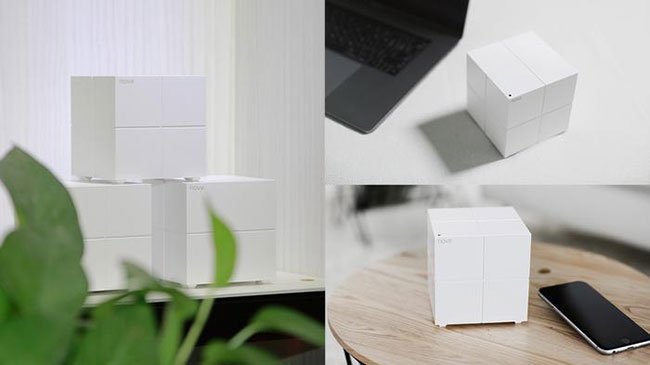
Each node (device) in Nova's WiFi system is a large, white block. There are several dividing lines on each side of the mini router, plus some of the heat holes below. Each device in the set is minimalist and suitable for all spaces.
Both MW6 and MW3 are dual band systems, which means they are not capable of operating like some other three band systems on the market.
Nova MW6 supports MU-MIMO and a combination of Gigabit Ethernet ports, while Nova MW3 does not. Nova MW3 is also a bit smaller.

MW6 is also designed for large area houses. Tenda claims coverage can reach up to about 600 square meters - that is double the area of 100 - 300 square meters that MW3 supports. So, if you live in a small space and do not need Gigabit Ethernet ports, Nova MW3 will be more suitable.
Establish
You will be amazed at the simple and intuitive setup process for the Nova system.
Even if the Tenda Nova app lacks some of the refinement and features found in other Linksys and Deco options, it's all pretty simple. Once setup is complete, you can use the app to remotely monitor and control your home network - this is a potential advantage over some other options.

Similarly, there are a number of parental control features built into the app that allow you to group devices by user and then restrict access to the network only at certain times.
However, the app is the only way to set up Tenda. You cannot do that with a regular web browser. Another strange thing is that Tenda always supports you to remotely access by attaching your router to a separate account system, but does not give you any option to protect that account by two-factor authentication. element.
Performance of Tenda Nova MW6 and MW3
The signal strength of Tenda MW6 is equal (even better) than that of many other WiFi Mesh systems.
The author placed each device in the system at the same location in a three-storey house and measured them using Netgear's WiFi analysis application.
Room
Signal strength MW6
Velop signal strength
Signal strength Deco
Signal strength Covr
Living room
100%
100%
100%
100%
Kitchen
100%
100%
100%
eighty six%
Bedroom 1
100%
100%
100%
100%
Bedroom 2
100%
68%
95%
55%
And here are the results of MW3:
Room
Signal strength MW3
Velop signal strength
Signal strength Deco
Signal strength Covr
Living room
100%
100%
100%
100%
Kitchen
100%
100%
100%
eighty six%
Bedroom 1
60%
100%
100%
100%
Bedroom 2
60%
68%
95%
55%
Conclude
If the capabilities of the mesh network excite you and you're willing to spend money to own a beautiful device, good processing ability, Tenda Nova MW6 and MW3 WiFi systems might be what you are looking for.
Advantages:
- Cheap
- Complete the mission
Defect:
- Strange limitations on the application
- There are 3 bands
FAQ
What is Review Tenda Nova Mw6 and Mw3: Good, Cheap Mesh Mesh Wi-Fi System about?
It provides a structured overview of Tenda Nova MW6, explains the main context, and highlights practical takeaways for readers.
Why does this topic matter?
Understanding the main concepts helps readers evaluate the issue, avoid common mistakes, and make better-informed decisions.
How should readers use this information?
Use the guidance as a practical starting point, confirm details that may have changed, and follow current product, safety, or security recommendations.
Related Articles
 10 Best Mesh Wi-Fi Network Systems15 minutes read
 Tenda AC23 Review: Dual Band Gigabit Wi-Fi Router5 minutes read
 Review Tenda N301: the Router Is Compact and Affordable3 minutes read
 Wi-Fi Mesh System Explained: How It Works and Key Features13 minutes read
 Review Tenda Ac7 Ac1200: a Strong and Stable Dual Band Wi-Fi4 minutes read
 Wi-Fi Trigger and Wi-Fi Mesh: What Is the Difference?9 minutes read
Reader Comments 0
Sign in with email or Google to join the discussion.