Table of Contents
This guide covers photo of the first ivy bridge laptop from dell with practical context and easy-to-follow details. Use it to understand the subject and apply the information confidently.
>>> The Start by Ivy Bridge laptop from Dell in Vietnam
June is the time when many computer manufacturers will start launching models of Intel Core i Ivy Bridge processors to Vietnam market. Dell is one of the first names with the Inspiron 14R 5420. It runs on a 2. 5 GHz Intel Core i5-3210M processor with the latest 3rd generation Core i platform. This new line processor offers up to 15% increase in performance over the previous generation.
Inspiron 14R 5420 has 14 inch screen resolution of 1366 x 768 pixels, 4 GB RAM memory, 500 GB hard drive and NVIDIA GeForce GT630M graphics card.
Another special feature of Dell's new laptop model is that it is equipped with up to 4 USB ports which are the latest 3. 0 standard with charging technology when the machine is turned off. This product also has VGA, HDMI, LAN and optical read / write DVD drives. The product comes preinstalled with Ubuntu 11. 1 operating system.
The machine has a reference price of VND 15. 9 million excluding VAT.
Below is the actual picture of this product.
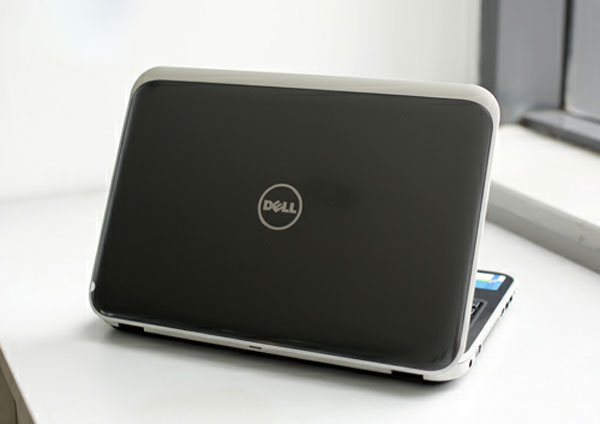 The cover of the machine is covered with a high quality aluminum imitation plastic.
14 inch screen size.
Chiclet keyboard follows the tradition of Dell. The navigation keys of the machine are quite large.
The touchpad gives the initial feel not really smooth.
Dell 14R's new design is much more natural on rounded contours.
Left side with VGA port, power, heat sink slot, HDMI, 2 USB ports, headphone and microphone jacks.
Right side with optical drive, two USB ports and LAN port.
The drive comes with the machine.
This model runs Intel Core i 3rd generation and Ubuntu operating systems.
Heat sink and exhaust fan on the underside.
Front side speaker system.
Screen mirror shadow when used outdoors.
Hardware parameters.
FAQ
What should I check before following these steps?
Confirm device and software compatibility, save important data, and make sure you have the required permissions, files, and account access.
Why might the process not work?
Common causes include outdated software, missing permissions, incompatible hardware, an unstable connection, or completing a step in the wrong order.
Can I undo the changes if necessary?
That depends on the tool or setting. Use built-in restore options when available, keep a backup, and record the original configuration first.
Related Articles
 The First Ivy Bridge Laptop from Dell in Vietnam4 minutes read
 The New Dell XPS 15 Can Be Thinner Than the Current One3 minutes read
 Dell Launches an Ultra-thin Laptop4 minutes read
 Ces 2020: Dell Launches G5 15 Se, a Mid-range Gaming Laptop3 minutes read
 The Best Dell Laptops 20205 minutes read
 Dell Revealed the XPS 15 Configuration in 2012 Version3 minutes read
Reader Comments 0
Sign in with email or Google to join the discussion.