Table of Contents
This guide covers panasonic launches a laptop 'hole' running ivy bridge chip in japan with practical context and easy-to-follow details. Use it to understand the subject and apply the information confidently.
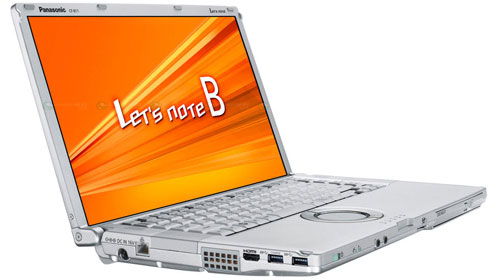 Let's Note B11 has a starting price of about 2, 100 USD.
Panasonic has just introduced Let's Note B11 laptop model using Ivy Bridge chip in Japan. As expected, this product will have a selling price ranging from 170, 000 to 250, 000 yen (about 2, 100 to 3, 100 USD).
The screen of the device is 15. 6 inches in size and Full HD resolution. Let's Note B11 uses Core i7-3615QM chip with 4GB RAM. In addition, B11 is also equipped with 640GB HDD. However, users can choose to upgrade RAM to 8GB and 256GB SSD.
Let's Note b11 uses Core i7-3615QM chip
The product has a pit design.
You can choose to upgrade 8GB RAM and 256GB SSD.
FAQ
What should I check before following these steps?
Confirm device and software compatibility, save important data, and make sure you have the required permissions, files, and account access.
Why might the process not work?
Common causes include outdated software, missing permissions, incompatible hardware, an unstable connection, or completing a step in the wrong order.
Can I undo the changes if necessary?
That depends on the tool or setting. Use built-in restore options when available, keep a backup, and record the original configuration first.
Related Articles
 Laptop Uses Ivy Bridge MSI Big Screen3 minutes read
 How to Replace a Broken Laptop Screen4 minutes read
 MSI Launches GT680R Gaming Laptop Using Sandy Bridge Chip3 minutes read
 Panasonic CF-30: Laptop 'Against' Tiger7 minutes read
 Japan's Unique 'Steep Skyward' Bridge Costs 4.8 Trillion: Main Insights5 minutes read
 LaVie Z 'Lost Weight', Priced at 1, 600 USD in Japan3 minutes read
Reader Comments 0
Sign in with email or Google to join the discussion.