Table of Contents
This article explores Microsoft has updated Windows 8 with 15 usd with straightforward explanations and useful context. It also highlights common questions and important details to consider.
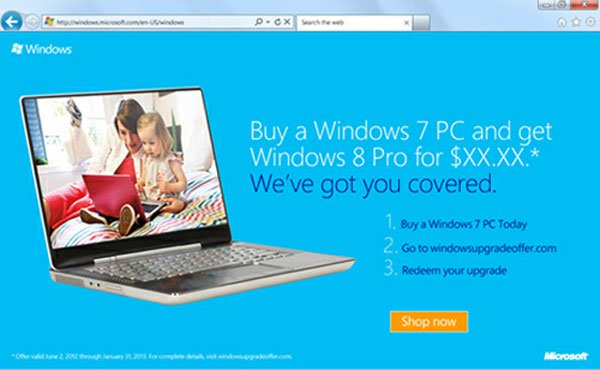 The updated program is applied from 2/6 this year to 31/1/2013. (Photo: Windows8update).
How Microsoft Has Updated Windows 8 with 15 USD Works
Microsoft has announced it will offer Windows 8 upgrade program for customers for $ 15. This program will be applied from June 2, 2012 to January 31, 2013. Customers using Windows 7 Home Premium, Professional or Ultimate can buy Windows 8 Pro for only $ 15. After paying, updating to Windows 8 Pro will be completed at the same time Windows 8 officially released to the market, possibly in late October this year.
According to Computerworld, The program will be applied by the " Software giant " to 131 markets, including Vietnam. List of updated markets for Windows 8 for $ 15 posted on Microsoft's website, can be viewed here.
Users will receive the update by downloading directly to the device. If customers want to use the DVD to install Windows 8 on the computer, they will have to pay an additional cost. Each customer is only updated on five machines.
Earlier, a " Leaked " source on Cnet also reported that Microsoft could update Windows 8 for users early this summer. Some other sources also mentioned that the company will perform a new operating system upgrade for customers for $ 15.
FAQ
What is the main benefit of Microsoft has updated Windows 8 with 15 usd?
The main benefit is a clearer understanding of the topic and a practical way to apply the information covered in this guide.
What should I check before using Microsoft has updated Windows 8 with 15 usd?
Confirm compatibility, review the required settings, protect important data, and use the latest supported version whenever possible.
What should I do if the result is different?
Repeat the steps carefully, verify permissions and version differences, and consult the product's official support documentation for changes not shown in the article.
Related Articles
 Microsoft Silently Updated One of the Most Requested3 minutes read
 The Trick to Help Windows XP Continue to Be Updated3 minutes read
 Microsoft Silently Updated Windows 10 to Patch 2 Serious Security Holes3 minutes read
 Microsoft Extends Windows 8.1 Update Time3 minutes read
 When Microsoft Stops Supporting Windows 10 Versions and What You Need to Know7 minutes read
 Photos App on Windows 11: Complete Guide3 minutes read
Reader Comments 0
Sign in with email or Google to join the discussion.