Table of Contents
This guide covers MacBook air 2013 upgraded Intel haswell chip, battery all day with practical context and easy-to-follow details. Use it to understand the subject and apply the information confidently.
 The new MacBook Air only upgraded the configuration.
Thanks to new hardware, Apple promises a 12-hour battery For 13-inch machines and 9 hours For an 11-inch version. This upgrade is significant compared to the Corresponding 7 hours and 5 hours Of last year's versions. Particularly, Intel HD Graphics 5000 integrated graphics chip is also said to bring 40% more graphics performance. However, the company will not use integrated chips with high performance Iris but power consumption with Intel Haswell platform.
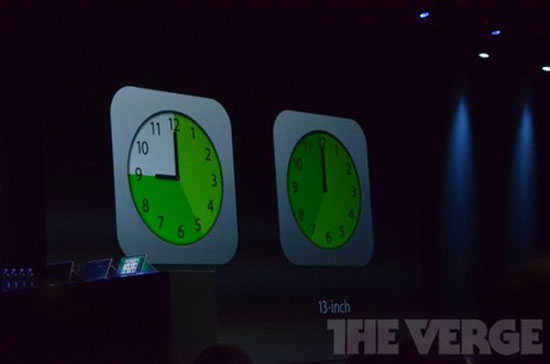 Battery life is the highlight on MacBook Air 2013.
Both new versions will be available to order today on the Apple website. It is worth noting that the new price is lower than the same screen version and capacity compared to last year.
Specifically, the MacBook Air 13 inch Will cost from $ 1, 099 With a capacity of 128 GB SSD and $ 1, 299 For a 256 GB version. The 11-inch screen model will cost from 999 USD With 128 GB capacity and 1, 199 USD For 256 GB capacity version.
All have processor speeds of 1. 3 GHz and 4 GB RAM. Users can optionally add up to 8 GB, 512 GB of internal memory as well as Intel Core i7 processor.
FAQ
What should I check before following these steps?
Confirm device and software compatibility, save important data, and make sure you have the required permissions, files, and account access.
Why might the process not work?
Common causes include outdated software, missing permissions, incompatible hardware, an unstable connection, or completing a step in the wrong order.
Can I undo the changes if necessary?
That depends on the tool or setting. Use built-in restore options when available, keep a backup, and record the original configuration first.
Related Articles
 The Most Advanced Intel MacBook Pro Will Come Out Next Month3 minutes read
 The 15-inch MacBook Pro Uses a Haswell Chip to Show Off4 minutes read
 The First Laptop to Use Intel's Haswell Chip Appeared3 minutes read
 Apple May Release a New MacBook Air Next Month3 minutes read
 Acer and Lenovo Simultaneously Upgraded to Haswell Chips5 minutes read
 Asus Upgraded the Transformer Line4 minutes read
Reader Comments 0
Sign in with email or Google to join the discussion.