Table of Contents
This guide covers lenovo u330, a fashionable ideapad with practical context and easy-to-follow details. Use it to understand the subject and apply the information confidently.
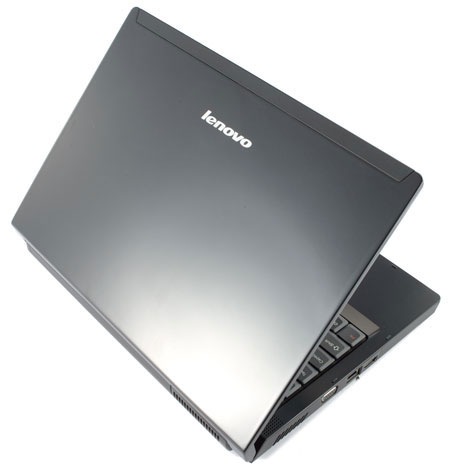 Lenovo IdeaPad U330 has a small, light body, stylish design
When exposed to the Lenovo IdeaPad U330 for the first time, users are very easily conquered by this machine, because it possesses a sturdy and attractive appearance. The exterior of this stylish laptop is glossy, like a large enamel stone. The slim body of only 2. 3 cm in weight and less than 2 kg in weight also gives a good impression when the user holds the device in hand. Inside, the hinges and the top edge are painted like the outside. The two left / right mouse buttons under the touchpad are surrounded by thin metal borders, though a small detail that brings great aesthetic effect.
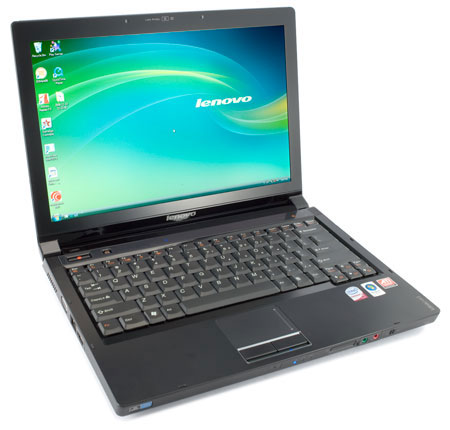 Lenovo IdeaPad U330 is equipped with a wide screen mirror 13. 3 inches, thin and without burrs
Lenovo IdeaPad U330 is equipped with a 13. 3-inch wide screen mirror, designed without the edge, although it contributes a lot to create the glitter for the whole machine, but has the disadvantage of a large reflective, so you It is difficult to use the machine outdoors or in a place with lots of light. In return, when using the computer in the office or at home, the image is clearly displayed, the color is beautiful and the viewing angle is quite wide, because the screen of the U330 is equipped with LED backlight system and has a resolution of 1, 280 x 800 pixels. Touchpad and touchpad (touchpad) is always considered a strong point of Lenovo branded laptops, which continues to be confirmed in this machine. The keyboard of the U330 is quite similar to the ThinkPad models, with full of familiar buttons and size and bouncing enough to give users a comfortable feeling when writing long paragraphs of text. Above is the orange tap key sequence used to manage multimedia features such as Play / Pause, Stop, Next / Previous. , however, you have to tap the Shuffle key on the right corner then the keys This is new. Lenovo's TouchPad U330 touchpad also reacts quite well to user actions. In particular, the mouse buttons below are quite large in size.
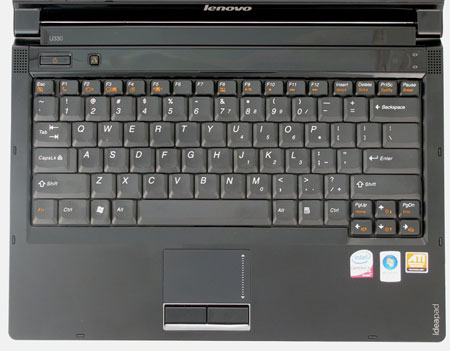 The keyboard and touchpad of the device respond quite responsibly to user actions
Because it is a compact 13. 3-inch machine, highly fashionable, the IdeaPad U330 is only equipped with two USB ports on the right side. In return, the device still owns all other necessary connection ports such as VGA, LAN, FireWire, headphone and microphone jacks, 6-in-1 memory card reader, ExpressCard / 34. In particular, Lenovo also equips the U330 with an HDMI port on the left side and a DVD burner on the right. The speakers have a relatively small volume, the sound quality is only average. If you listen to music, watch movies in closed, quiet rooms, you can use external speakers, otherwise users should wear headphones to get the best experience. One thing to complain about the sound system of this machine is that when plugging in the charger or unplugging, the machine will sound a loud "beep". If you're wearing a headset while doing this, it's easy to get a "heart attack" because of that jarring sound.
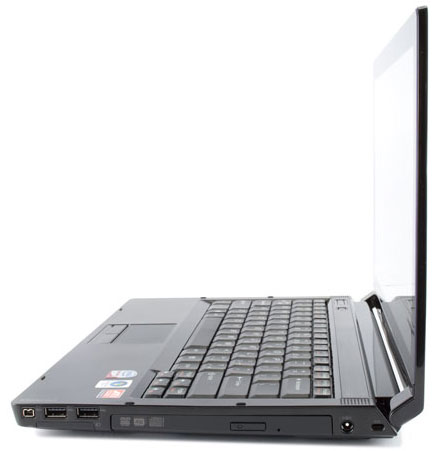 Lenovo IdeaPad U330 is only equipped with two USB ports.
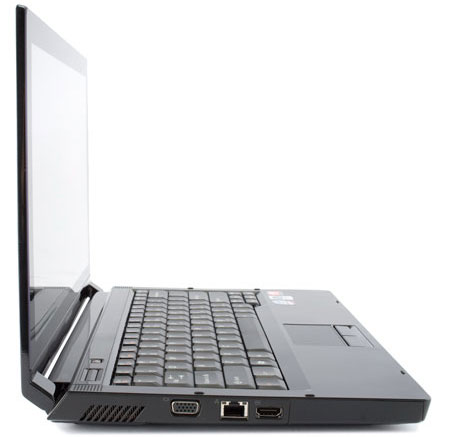 . But there's an HDMI port.
Although it is a machine aimed at general users, Lenovo IdeaPad U330 is still very powerful. It is equipped with Intel Core 2 Duo P8600 2. 4 GHz processor, 2 GB RAM, 320 GB hard drive and ATI Mobility Radeon HD 3400 discrete graphics card. Especially, users of this machine can switch mode Graphics level depends on the current state of the power source without restarting the machine. Accordingly, if you are using the battery, the machine will run integrated graphics mode to save energy, but will switch to high-resolution graphics mode with a removable card to achieve greater efficiency when plugging in the charger. During the trial, the device runs most apps smoothly, with acceptable heat. The 6-cell battery pack can operate for nearly 4 hours if using a power-saving mode, and if using a discrete graphics card and turning on all wireless connections, the device runs for more than 2. 5 hours, then the charger must be plugged in. Like other models of Lenovo, IdeaPad U330 is also equipped with familiar features such as VeriFace face recognition, the system automatically protects the data in the hard drive when the device falls under the name APS (Active Protection System ), or data recovery feature with just one One-Key Recovery System key.
Currently Lenovo IdeaPad U330 is available in the market, with reference price of about 2, 000 USD.
Advantages: - Sleek and impressive design - The keyboard and touchpad are responsive and comfortable for users - Ability to switch graphics mode without shutdown - High configuration, strong operability Defect: - Mirror screens have a large reflectance, difficult to use in places with lots of light - The sound system is not impressive.
FAQ
What should I check before following these steps?
Confirm device and software compatibility, save important data, and make sure you have the required permissions, files, and account access.
Why might the process not work?
Common causes include outdated software, missing permissions, incompatible hardware, an unstable connection, or completing a step in the wrong order.
Can I undo the changes if necessary?
That depends on the tool or setting. Use built-in restore options when available, keep a backup, and record the original configuration first.
Related Articles
 Lenovo Introduced G Series Laptops and New IdeaPad Z4 minutes read
 Lenovo IdeaPad: Affirm Your Rank7 minutes read
 Lenovo Ideapad Gaming 3 Detailed Review: the Perfect Match!13 minutes read
 Lenovo Launched a New Series of Laptops7 minutes read
 Review Lenovo Ideapad L340: the Right Gaming Laptop for9 minutes read
 Review Lenovo Ideapad S540 Laptop: a Safe Option5 minutes read
Reader Comments 0
Sign in with email or Google to join the discussion.