Table of Contents
LDPlayer 14 is the first LDPlayer release built on Android 14. It is aimed at Windows users who need compatibility with newer Android games, want to run multiple emulator instances, or keep Hyper-V enabled. The main changes are the newer Android environment, revised resource scheduling, improved Hyper-V compatibility, and an AI Wallpaper tool.
LDPlayer advertises performance improvements over earlier releases, but actual frame rate and stability depend on the game, PC hardware, graphics driver, emulator settings, and background workload. Treat the developer's benchmark figures as product claims rather than a guarantee for every computer.
What's new in LDPlayer 14?
Android 14 environment
LDPlayer 14 runs an Android 14-based system. This matters when a game requires a newer Android API or has stopped supporting the Android 9 environment used by LDPlayer 9. It can also reduce compatibility workarounds for recently released apps.
A newer Android version does not automatically make every game faster. Older or specialized games may still work more reliably in LDPlayer 9, and some titles require their own emulator build. Check the game's support notice if it fails to install or launch.
Improved Hyper-V compatibility
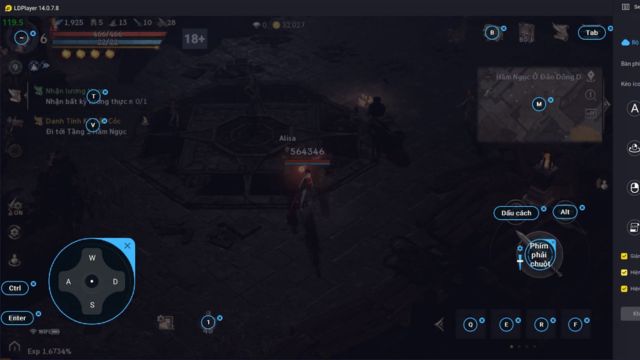
LDPlayer says version 14 can operate with Windows Hyper-V enabled, reducing the need to turn off virtualization features that other Windows tools may use. This is especially relevant on PCs that rely on Hyper-V, Windows Sandbox, WSL 2, or virtualization-based security.
Hardware virtualization still needs to be available and configured correctly. Hyper-V support does not compensate for disabled Intel VT-x or AMD-V, an outdated graphics driver, or insufficient memory.
Single- and multi-instance resource scheduling
The updated engine is designed to reduce unnecessary background work and allocate resources according to whether an emulator instance is active or idle. This can help when running several game accounts, although every instance still consumes CPU time, memory, storage, and graphics resources.
AI Wallpaper
AI Wallpaper accepts a text description or a static image and creates an animated background for the emulator desktop. It is a personalization feature and does not improve game performance. Review what an uploaded image contains before sending it to an online generation feature.
LDPlayer 14 vs LDPlayer 9
| Area | LDPlayer 9 | LDPlayer 14 |
|---|---|---|
| Android base | Android 9 | Android 14 |
| Best reason to choose it | Compatibility with established games and lighter legacy setups | Apps that require a newer Android version and newer Windows virtualization environments |
| Hyper-V | Supported in compatible configurations, with more potential limitations | Reworked for broader Hyper-V compatibility |
| Multi-instance tools | Available | Available with revised resource scheduling |
| Keyboard mapping and macros | Available | Available |
| AI Wallpaper | Not a headline feature | Included |
| Hardware demand | May suit older systems or older games better | Benefits more from a modern CPU, sufficient RAM, and current graphics drivers |
Do not uninstall LDPlayer 9 immediately if it already runs an important game reliably. Install or test LDPlayer 14 separately, confirm that your account and local game data are available, and migrate only after checking the titles you use.
Who should upgrade?
LDPlayer 14 is the stronger candidate when:
- A game requires a newer Android version or does not appear in the older instance's store.
- You need Hyper-V enabled for other Windows features.
- You regularly run several emulator instances and want the newer scheduling options.
- You have a modern 64-bit Windows PC and current graphics drivers.
LDPlayer 9 may remain the practical choice when:
- Your current games are stable and have no Android-version requirement.
- The PC has limited memory or an older processor.
- A specific game or automation setup has already been tested only on LDPlayer 9.
Installation and migration checklist
- Download the installer only from LDPlayer's official site.
- Confirm that hardware virtualization is enabled in the PC firmware.
- Update the graphics driver from the GPU or PC manufacturer.
- Keep enough free storage for the emulator, game downloads, updates, and multiple instances.
- Back up or synchronize game progress using the game's supported account system before replacing an old instance.
- Install one game first and test login, controls, sound, frame rate, and stability.
- Set a reasonable CPU-core and memory allocation; assigning everything to the emulator can make Windows less responsive.
Settings for smoother gameplay
- Match the emulator resolution to what your monitor and GPU can handle.
- Start with the game's default frame-rate limit, then increase it only if performance remains stable.
- Close unused emulator instances and heavy background apps.
- Use per-game key mapping instead of assuming one control layout fits every title.
- If a game shows a black screen or crashes, switch the graphics renderer, update the driver, and restart the instance before reinstalling.
LDPlayer 14 is primarily a compatibility upgrade, not a promise that every mobile game will run perfectly. Its Android 14 base and Hyper-V work are the clearest reasons to try it; keep an older instance until the games and data you care about have been verified.
Related Articles
 LDPlayer 9: a Fast, Stable, Smooth, and Free Android 9 Emulator9 minutes read
 How to Download and Install Ldplayer 9, Android Emulator4 minutes read
 LDPlayer 14 Beta: Android 14, Hyper-V and PC Gaming Guide12 minutes read
 Ldplayer 9 - the Smoothest Android Gaming Emulator on PC7 minutes read
 Instructions for Configuring Ldplayer for Each Game Type6 minutes read
 TOP Reasons Why Ldplayer 9 Is the Best Emulator Today7 minutes read
Reader Comments 0
Sign in with email or Google to join the discussion.