Table of Contents
This guide provides a clear overview of instructions for typing with typer shark deluxe game, including Practice Typing with Typer Shark Deluxe Game, Level of the Game. Use it to understand the topic, compare the available options, and make a more informed decision.
To avoid being attacked by sharks, players will have to type quickly and accurately the words that appear on the shark's body to destroy them. The game seems simple, but as each level increases, the word length increases and the movement speed of the sharks also increases, making the game very difficult to pass. People just type wrong or don't type all the words, the shark will eat the divers right away.
Let's discover how to play and challenge in Typer Shark Deluxe to have fun and learn typing and vocabulary effectively.
Practice Typing with Typer Shark Deluxe Game
Level of the Game
There are three play options in this educational typing game. These modes will show difficulty, which is unlocked after the player completes the typing skill assessment. Slower typists will have the game adjust to their skills. The words are not difficult in different modes and the sharks come at a slower speed.
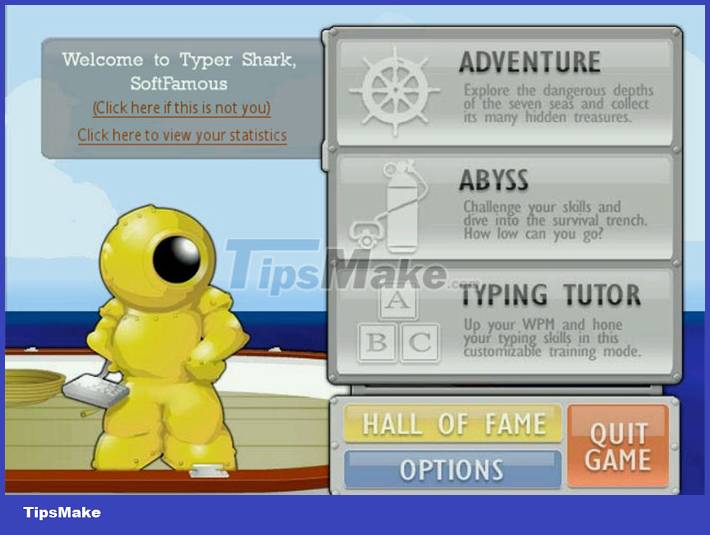
- ABYSS mode: Everyone will practice their typing skills through a treasure hunt and shark slaying game
- Adventure Mode: Same as ABYSS mode but with more advanced difficulty.
- Tutorial Mode: This mode will familiarize players with the keys and teach them how to type with 10 fingers in the most scientific way. After learning how to type, players will learn how to type 10 fingers with text.
The Deeper You Dive, the More Difficult the Difficulty Increases
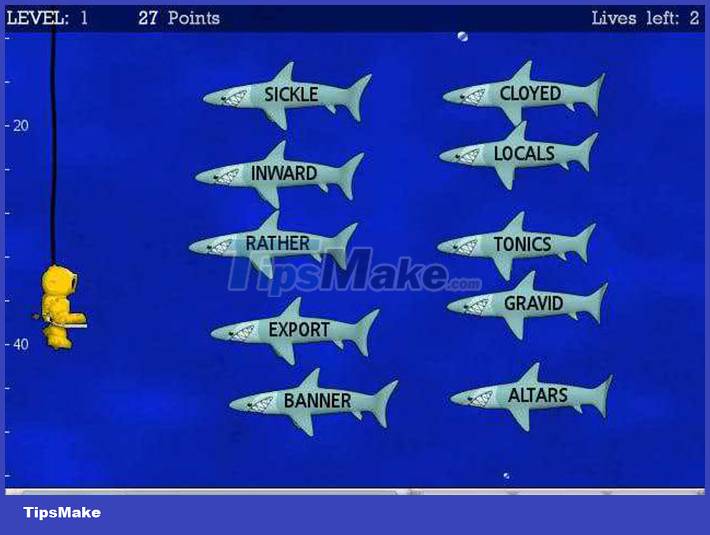
The first option of the game is the challenge mode, where the player will have to dive to about 280 feet and face sharks of varying difficulty. The deeper you dive and the further you go in the game, the difficulty of the sharks will be determined. The first sharks require only short, simple words, and later, more dangerous fish such as hammerhead sharks, which will require many long, difficult words.
Dive Until You Lose
The second game mode, Deep ABYSS, is similar to the first except that everyone has to dive 280 feet until they lose. The difficulty the sharks create will change each time the diver deepens. In terms of gameplay, there will not be a big difference between these two game modes.
Typing Tutorial Mode
The third game mode Tutor makes a difference, perfecting your typing by improving accuracy and speed. In this mode, everyone will do various exercises to build their typing ability. Players can repeat a row or alternate between letters. These exercises are designed to improve memory related to typing.

The only limitation of this mode is the amount of instruction information. Instead of teaching the essentials of typing, the game just gives exercises without much explanation. If the teaching element were stronger in this mode it would be a huge improvement, making this game much more useful.
Overall, Typer Shark is a great educational typing game because players can forget that they are actively studying because they have to focus on fighting the sharks and improving their scores. This game is for anyone who wants to improve their typing skills. This would be a perfect game for the home computer as it is educational and improves the typing skills of not only kids but adults as well.
Conclusion
Understanding Instructions for Typing with Typer Shark Deluxe Game makes it easier to compare options, avoid common mistakes, and apply the information in this guide more effectively. Review the relevant requirements before making changes or choosing a solution.
FAQ
What is Instructions for Typing with Typer Shark Deluxe Game?
Practice Typing with Typer Shark Deluxe Game Level of the Game There are three play options in this educational typing game.
Why is Instructions for Typing with Typer Shark Deluxe Game important?
Understanding Instructions for Typing with Typer Shark Deluxe Game helps you evaluate features, compatibility, performance, and potential limitations before you choose a product or follow a procedure.
What should you consider when using or choosing Instructions for Typing with Typer Shark Deluxe Game?
Consider your specific goal, compatibility requirements, available features, cost, security, and the practical recommendations described in this guide.
Related Articles
 minutes read
 Tux Typing - Free Typing Practice Tool for Kids: Main Insights6 minutes read
 Practice Typing 10 Fingers, Typing Fast with Mario Teaches Typing6 minutes read
 Practice Typing with 10 Fingers with Mario Teaches Typing Online7 minutes read
 TOP Game Websites That Teach Children to Type on the Computer5 minutes read
 Instructions on How to Practice Typing 10 Fingers Standard and Fastest6 minutes read
Reader Comments 0
Sign in with email or Google to join the discussion.