Table of Contents
Learn how to instructions to download boom mobile on the phone. It also highlights practical details and common issues to consider.
Perhaps for those who are 9x years old, Boom Online game used to make a storm at once in the shop which is an unforgettable memory for many gamers. Appeared at the time of 2007, Boom Online created a craze when all the shops in Vietnam had a lot of people playing, and after a time of existence in Vietnam, this game was officially closed in 2017.
And coming soon, Boom Online will "re-export" but not on computers, but this game will appear on the mobile platform with the new name Boom M or BnB M. If you want to download Boom first Mobile on the phone can follow the instructions This guide.
- PUBG Mobile VNG: The types of teammates will help you to top 1
- Instructions for downloading and installing Tan Thien Long Mobile on the computer
Instructions to Download Boom Mobile on the Phone
Step 1: To download Boom M, go to the App Store application, type Boom M or Boom Mobile or BnB M to find Boom Mobile game and click Get to download Boom M to your phone.

Step 2: Then boot up and the application will ask you to update, click OK to download.

Step 3: Next, if you have ever played Boom Online, select I am an Advanced player . If you just play, click I am Tan Binh to start the tutorial to play Boom Mobile, though both will take you to the original tutorial.

Once you have completed the tutorial, you will be logged into your Boom Mobile account.
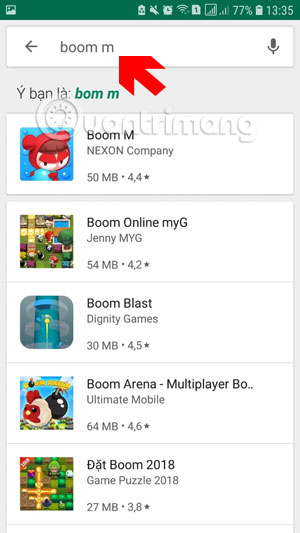
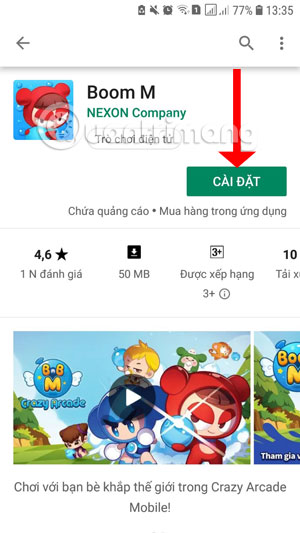
Also on Android, you find by Boom M keyword, then select the icon of Boom Online right below. Next click Install to start downloading the game.
If you want to find out in advance what this Boom Mobile game has, you can refer to some character information and character skills in the article "Character Summary and Character Skill Index" in Boom Mobile. These are still the familiar characters in the legendary Boom Online but there are corrections to the appearance and skills of the characters. Learn some information about characters in Boom Mobile and choose for yourself the character that best suits your play.
Version note: Menus, features, and availability can change between versions. If the interface differs, consult the current official documentation for your device or app.
FAQ
How do I instructions to Download Boom Mobile on the Phone?
Learn how to instructions to download boom mobile on the phone. It also highlights practical details and common issues to consider.
What should I check before following the steps?
Confirm that your device, software version, account permissions, files, and connection meet the requirements described in the guide. Back up important data before making system-level changes.
What should I do if the process does not work?
Repeat the steps in order, verify settings and permissions, restart the app or device, and compare your screen with the provider's current documentation for your version.
Related Articles
 How to Use All Items in Boom Mobile7 minutes read
 How to Installing and Playing Boom Mobile on Your Computer6 minutes read
 Instructions to Play Boom Mobile for Newbies6 minutes read
 How to Renaming Characters for Free in Boom M3 minutes read
 How to Receive Lucci Purple, Diamond and Gold in Boom Mobile5 minutes read
 How to See the Probability of Spin Characters3 minutes read
Reader Comments 0
Sign in with email or Google to join the discussion.