Table of Contents
Learn how to renaming characters for free in boom M. It also highlights practical details and common issues to consider.
Boom Mobile also allows users to edit personal information, information such as avatars, character names or nicknames. But no game allows users to edit information continuously, but when you want to change, you have to waste, even a very high fee to change your information. To change the character name in Boom Mobile for free, follow the instructions below.
- Instructions to play Boom Mobile for newbies
- Ways to receive Lucci Purple, Diamond and Gold in Boom Mobile
- How to unlock characters in Boom Mobile
How to Rename Characters in Boom Mobile
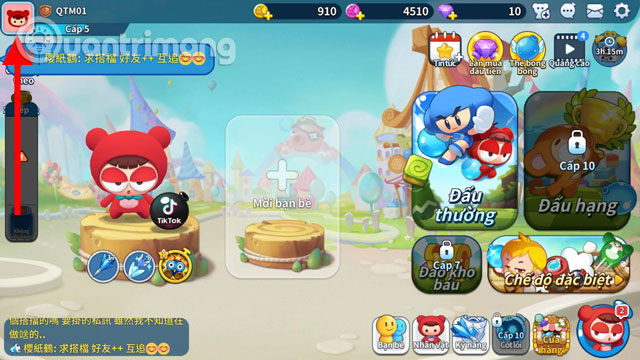
Step 1: First in the main interface, select the avatar icon in the upper right corner.
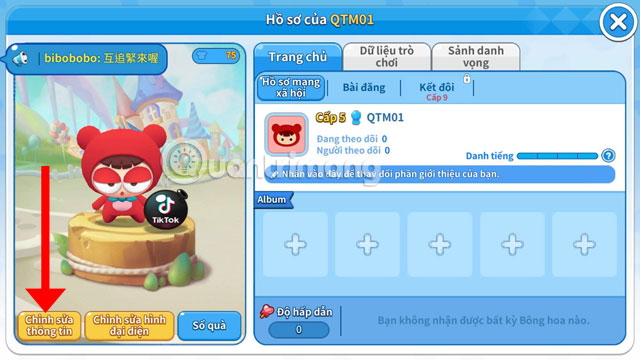
Step 2: Once you have entered your Personal Profile view, in the character window, click Edit info.
Next in the player information table, select the frame of your name and write a new name. Then click Free Change once .

Now you have seen your character's name successfully changed.

And if you want to change your name again, you will need 400 diamonds for the next change.

It's quite simple for you to rename your character in Boom Mobile, but the number of free exchanges will be only once in the first time. It's easy to understand because there are no game publishers that allow players to change their names constantly.
Version note: Menus, features, and availability can change between versions. If the interface differs, consult the current official documentation for your device or app.
FAQ
How do I renaming Characters for Free in Boom M?
Learn how to renaming characters for free in boom M. It also highlights practical details and common issues to consider.
What should I check before following the steps?
Confirm that your device, software version, account permissions, files, and connection meet the requirements described in the guide. Back up important data before making system-level changes.
What should I do if the process does not work?
Repeat the steps in order, verify settings and permissions, restart the app or device, and compare your screen with the provider's current documentation for your version.
Related Articles
 How to Unlock Characters in Boom Mobile4 minutes read
 How to See the Probability of Spin Characters3 minutes read
 How to Write Special Characters in Boom Mobile3 minutes read
 Best Characters and Character Skills Index in Boom Mobile5 minutes read
 How to Use All Items in Boom Mobile7 minutes read
 How to Receive Lucci Purple, Diamond and Gold in Boom Mobile5 minutes read
Reader Comments 0
Sign in with email or Google to join the discussion.