Table of Contents
Learn how to see the probability of spin characters. It also highlights practical details and common issues to consider.
In Boom Mobile's store, you will see an item called Random Dial. These items will help you have the skills, characters or core pieces to get in-game items, if you want to see the probability of returning items, characters, skills in Boom M, follow the instructions at under this article
- Guide to renaming characters for free in Boom M
- Summary of characters and character skills index in Boom Mobile
- How to unlock characters in Boom Mobile
How to See the Probability of Turning Characters, Skills, Items in Boom Mobile
Step 1: In the Boom Mobile main interface, select Store.
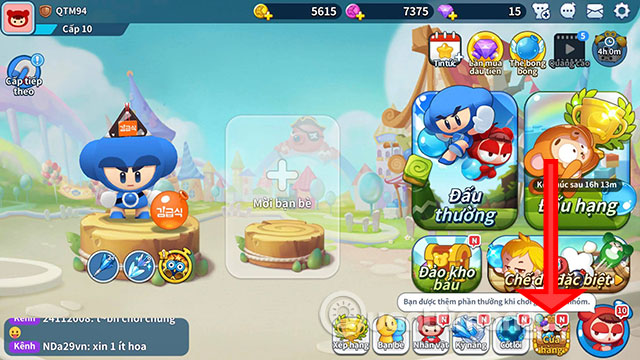
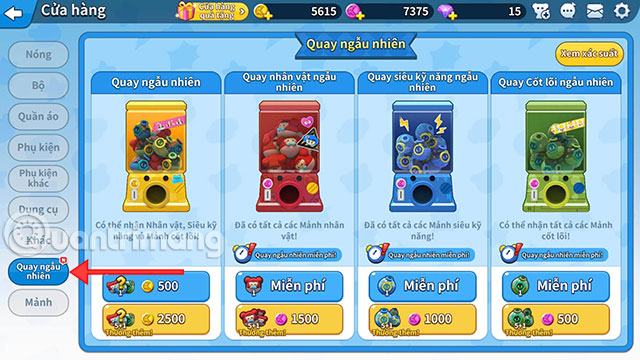
Then in the Store , press Random Dial, the 4 camera interface will appear and you just need to select View probability in the upper right corner.
Next, the probability table for each camcorder's piece will be displayed for your reference.
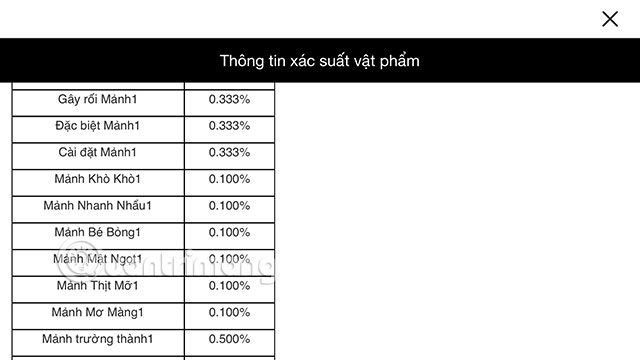
Each type of random camera will have different probability levels. If you are interested in any camera, please refer to the item on that camera.
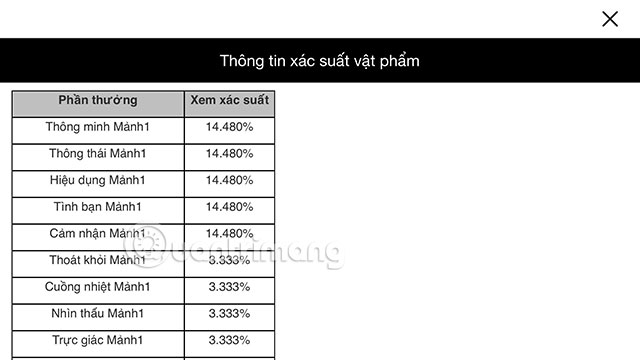
Hopefully the above guide will help you to know the detailed probability to shoot items in Boom Mobile. Normally, a random gold item camera will have a lower probability of turning with purple Lucci.
Version note: Menus, features, and availability can change between versions. If the interface differs, consult the current official documentation for your device or app.
FAQ
How do I see the Probability of Spin Characters?
Learn how to see the probability of spin characters. It also highlights practical details and common issues to consider.
What should I check before following the steps?
Confirm that your device, software version, account permissions, files, and connection meet the requirements described in the guide. Back up important data before making system-level changes.
What should I do if the process does not work?
Repeat the steps in order, verify settings and permissions, restart the app or device, and compare your screen with the provider's current documentation for your version.
Related Articles
 Best Characters and Character Skills Index in Boom Mobile5 minutes read
 How to Renaming Characters for Free in Boom M3 minutes read
 How to Unlock Characters in Boom Mobile4 minutes read
 How to Write Special Characters in Boom Mobile3 minutes read
 How to Use All Items in Boom Mobile7 minutes read
 Instructions to Play Boom Mobile for Newbies6 minutes read
Reader Comments 0
Sign in with email or Google to join the discussion.