Table of Contents
This updated guide examines How to Removing Fake Security Software Antivirus PC 2009 and organizes the essential facts, background, and practical takeaways in clear American English.
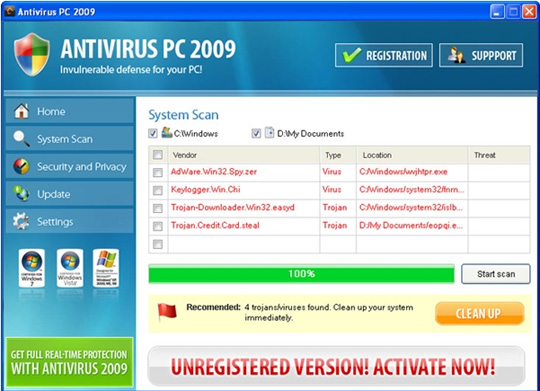 The main interface of Antivirus PC 2009
With the familiar way of operating, when successfully entering the computer, Antivirus PC 2009 will automatically activate the service to review and search for security errors in the system, and display the information completely. deviation to make users trust. One of the absolute security solutions trusted by many security experts is Spyware Doctor software with Antivirus.
Steps to remove Antivirus PC 2009 from the system:
First, you need to turn off the following processes (by Task Manager or Process Explorer):
avpc2009.exe avpc2009s.exe Uninstaller.exe xvgke.exe eopqi.exe wvjhtpr.exe fnrnspc.exe islbk.exe
Next, find and delete all 2009 Antivirus PC files, storage folders and shortcuts like:
c: Program FilesAntivirus PC 2009 c: Program FilesAntivirus PC 20092.vbs c: Program FilesAntivirus PC 2009avpc2009.exe c: Program FilesAntivirus PC 2009avpc2009s.exe c: Program FilesAntivirus PC 2009bzip2.dll c: Program FilesAntivirus PC 2009libltdl3.dll c: Program FilesAntivirus PC 2009pthreadVC2.dll c: Program FilesAntivirus PC 2009Uninstaller.exe c: Program FilesAntivirus PC 2009data c: Program FilesAntivirus PC 2009datadaily.cvd c: Program FilesAntivirus PC 2009dataself.hdb c: Program FilesAntivirus PC 2009quarantine% UserProfile% xvgke.exe % UserProfile% DesktopAntivirus PC 2009.lnk % UserProfile% My Documentseopqi.exe % UserProfile% Start MenuProgramsAntivirus PC 2009.lnk c: WINDOWSwvjhtpr.exe c: WINDOWSsystem32fnrnspc.exe c: WINDOWSsystem32islbk.exe
Also, open the registry and delete the keys created by Antivirus PC 20009 as follows:
HKEY_CURRENT_USERSoftwareMicrosoft Windows Script Host HKEY_CURRENT_USERSoftwareMicrosoftWindows Script HostSettings HKEY_LOCAL_MACHINESOFTWAREAVPC2009 HKEY_LOCAL_MACHINESOFTWAREMicrosoftWindowsCurrentVersionUninstallAntivirus PC 2009 HKEY_LOCAL_MACHINESOFTWAREMicrosoftWindowsCurrentVersionRun 'Antivirus PC 2009
Ending this step without any difficulties, you have successfully removed the complete Antivirus PC 2009 from the infected computer. For added security, you should consult the features and use the security programs of the following reputable brands: Spyware Doctor with Antivirus, Norton, Trend Micro, Kaspersky, AVG, MalwareBytes or others The Meta security application is available here.
FAQ
What is How to Removing Fake Security Software Antivirus PC 2009 about?
It provides a structured overview of Technical, explains the main context, and highlights practical takeaways for readers.
Why does this topic matter?
Understanding the main concepts helps readers evaluate the issue, avoid common mistakes, and make better-informed decisions.
How should readers use this information?
Use the guidance as a practical starting point, confirm details that may have changed, and follow current product, safety, or security recommendations.
Related Articles
 Instructions to Remove Fake Antivirus Pro 2010 Security Software3 minutes read
 How to Removing the Fake Win 7 Anti-spyware 2011 Software4 minutes read
 Twitter 'Hit' Fake Antivirus Software3 minutes read
 9 Best Antivirus Software for Mac12 minutes read
 Technical: How to Removing Fake Internet Security 2010 Software3 minutes read
 Fake Av: Warning Fake Antivirus Software Appears in Series3 minutes read
Reader Comments 0
Sign in with email or Google to join the discussion.