Table of Contents
This updated guide examines How to Loading Free Fire Cards, for Loading Free Fire Diamonds and organizes the essential facts, background, and practical takeaways in clear American English.
The fastest way to top up Free Fire cards still used by many gamers is to top up Free Fire diamonds with messages. Not only do you receive diamonds, but also some additional offers from carriers, here's how to top up the Free Fire card with a message.
- Top survival shooter on Mobile and download link
- How to make friends in the game Garena Free Fire
- Common types of tactics in Free Fire
Step 1: Visit the garena card loading page at this link, then select Free Fire to top up the card.

Step 2: Log in to the Free Fire account you are using, you can login with your Facebook account or with your character ID.

If you do not know, the character ID you can find in the account personal information.

Step 3: Once you have logged into your Free Fire account, you will be selected one of the methods for loading the Free Fire card.

Here I choose to top up the Free Fire card by texting, currently the Free Fire network operator supports topping up the card as Vinaphone and Viettel. Select the number of diamonds and click Payment processing .

Step 4: You will see a QR code appear next.
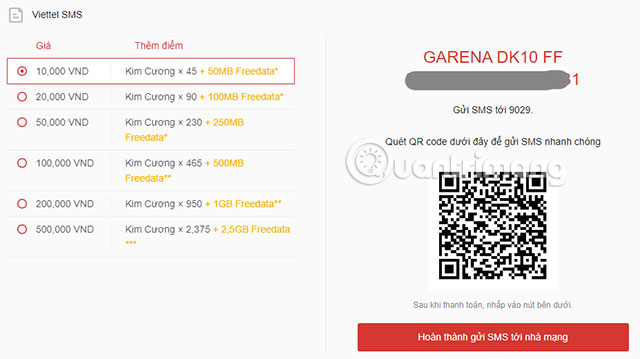
Step 5: Turn on your camera and put in the scan code, then click on the notice to open napthe.vn in Safari. Go there and click open this page in the message.


Your next thing is to send a message to 9029 with the content of the free fire diamond loaded message at the price selected earlier. Wait for a while and you will see the message sent from 9029.
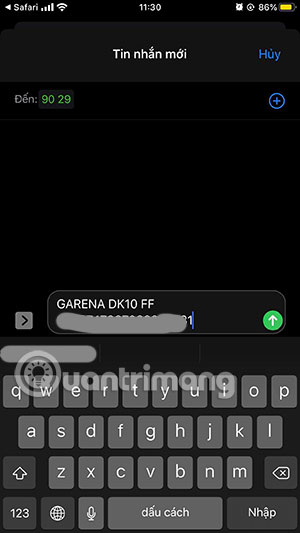

Step 6: Now in the game you will receive a gift first recharge is Joseph.

If you are running Free Fire, exit and re-enter. Then the system will update and the number of diamonds you've loaded appears.

So you can top up the Free Fire card in a variety of ways. Whichever method you find most convenient to do is choose, but prioritize the ways to top up the card with the offer.
FAQ
What is How to Loading Free Fire Cards, for Loading Free Fire Diamonds about?
It provides a structured overview of top up free fire card, explains the main context, and highlights practical takeaways for readers.
Why does this topic matter?
Understanding the main concepts helps readers evaluate the issue, avoid common mistakes, and make better-informed decisions.
How should readers use this information?
Use the guidance as a practical starting point, confirm details that may have changed, and follow current product, safety, or security recommendations.
Related Articles
 5 Ways to Get Free Diamonds in Free Fire7 minutes read
 How to Get Free Fire Diamonds for Free in January 20215 minutes read
 How to Snatch 10,000 Diamonds from the Hail Loc Free Fire Event3 minutes read
 How to Get Free Fire MAX Diamonds for Free in 20254 minutes read
 New Ways to Get Free Free Fire Diamonds Every Day 202411 minutes read
 4 Ways to Get Free Diamonds in Free Fire: Features, Uses, and7 minutes read
Reader Comments 0
Sign in with email or Google to join the discussion.