Table of Contents
The sections below explain instructions for booking airline tickets, cheap hotel rooms when in a clear and practical way. Review the key details, examples, and considerations before applying the information.
- 4 websites to book super cheap air tickets, help people who often fly "saving" air tickets
- Essential things when needed to hunt for cheap airline tickets
- Do you know why airline tickets are so expensive or not?
Step 1: Download the Traveloka app
How Instructions for Booking Airline Tickets, Cheap Hotel Rooms When Works
To book cheap airline tickets, hotel rooms, you first need to download and install Traveloka application to your device.
- Download Traveloka for iOS
- Download Traveloka for Android
Well-known as a fairly complete online hotel and flight booking application, Traveloka has a relatively intuitive and easy-to-use interface, especially the arrangement of service options is very reasonable. Specifically, at the top will be the booking of flights and hotels,. In the middle of the famous tourist destinations in the country, the discoveries with new attractions, beautiful cafes,. And finally there is the tutorial on how to pay. In addition, the homepage also announces available promotions, convenient for customers to apply immediately.

Step 2: Find flight tickets
Click Find flights , where you can choose your departure and destination points on the same day, your return date as well as the number of passengers and class. In less than 1 minute, the app will list you the appropriate tickets of all current airlines in order of low to high prices.

Step 3: Find a hotel room
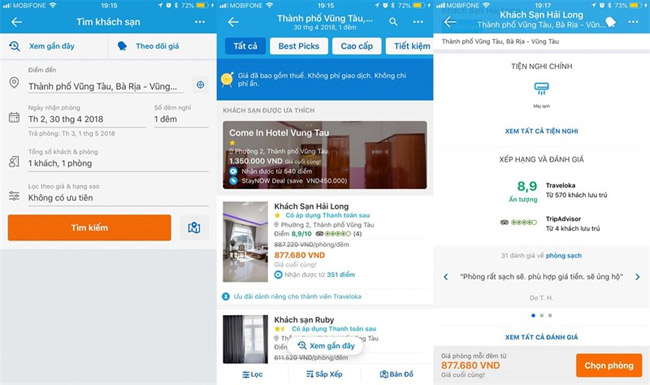
Like finding a flight ticket, you can also easily find the hotel room where you are going to vacation. The app provides filters such as price limits at the ability to charge rates, hotel star rating, amenities as well as area-based hotel filtering such as near beaches, attractions,. Traveloka There is also a filter to find hotels by location on the map.
In addition to finding bargains, you can also preview the image at that hotel with the reviews of previous users.
Step 4: Pay and check again
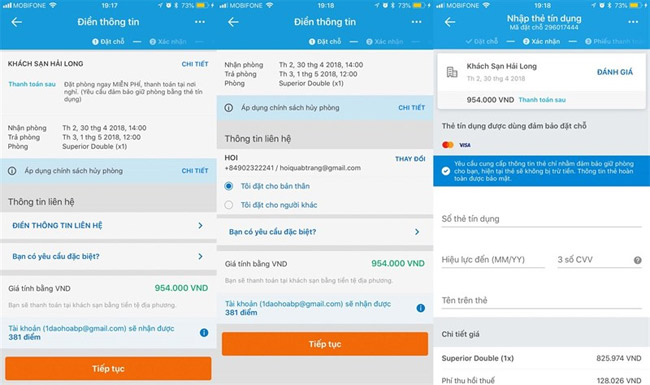
After selecting a room, you just need to select and then fill in the online payment information.
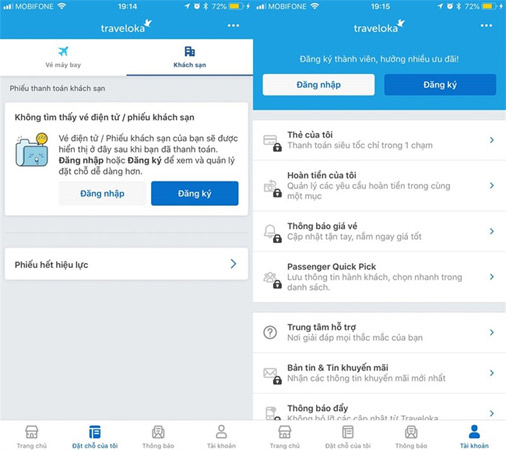
Don't forget to check My Reservation To check and review your flight ticket or hotel reservations.
So, with just a few simple steps, you can book flights, book cheap hotels quickly and easily, right? From now on, using Traveloka, you will no longer have to worry about the "preparation" for each trip, and can instead enjoy your exciting journey.
Wish you have an enjoyable experience!
- Instructions on how to order 2018 Tet train tickets online
- How to recharge your phone via Zalo Pay application
- How to order Shopee on the phone
FAQ
What is the main benefit of instructions for booking airline tickets, cheap hotel rooms when?
The main benefit is a clearer understanding of the topic and a practical way to apply the information covered in this guide.
What should I check before using instructions for booking airline tickets, cheap hotel rooms when?
Confirm compatibility, review the required settings, protect important data, and use the latest supported version whenever possible.
What should I do if the result is different?
Repeat the steps carefully, verify permissions and version differences, and consult the product's official support documentation for changes not shown in the article.
Related Articles
 Essential Things if You Want to Hunt for Cheap Airline Tickets8 minutes read
 4 Websites to Book Super Cheap Air Tickets, Helping People Who8 minutes read
 Do You Know Why Airline Tickets Are so Expensive or Not8 minutes read
 Top 10 Best Hotel Booking Apps on Android6 minutes read
 How to Book Air Tickets by Phone with Momo Wallet6 minutes read
 The Meaning Behind the Code Printed on Airline Tickets: Main Insights5 minutes read
Reader Comments 0
Sign in with email or Google to join the discussion.