Table of Contents
Overview
This guide covers increase volume on laptop win 10 without software in clear, practical terms. It covers the key concepts, recommended steps, common limitations, and useful checks so you can make a better-informed decision.
Do you feel that your computer speakers are too small, unable to meet your work and entertainment needs?! Without any software, let's join this guide to learn how to increase the volume on the latest version of Win 10 laptop in This guide!
Step 01
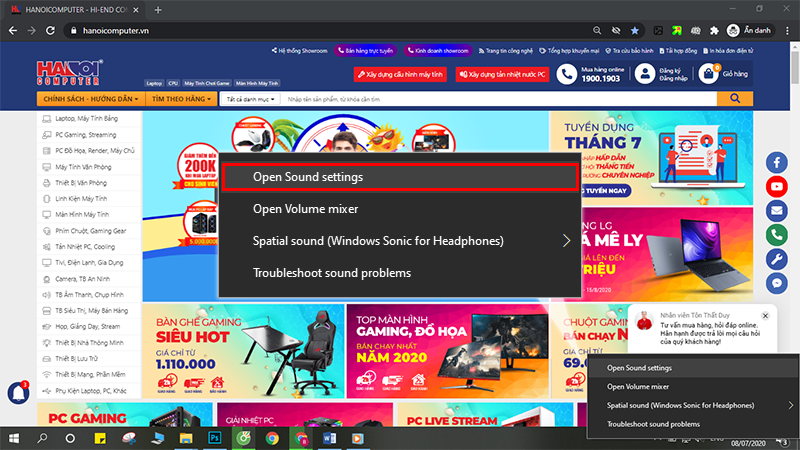
To increase the volume on a Win 10 laptop without software, first we need to right-click on the speaker icon on the taskbar > Select Open Sound Settings
Step 02
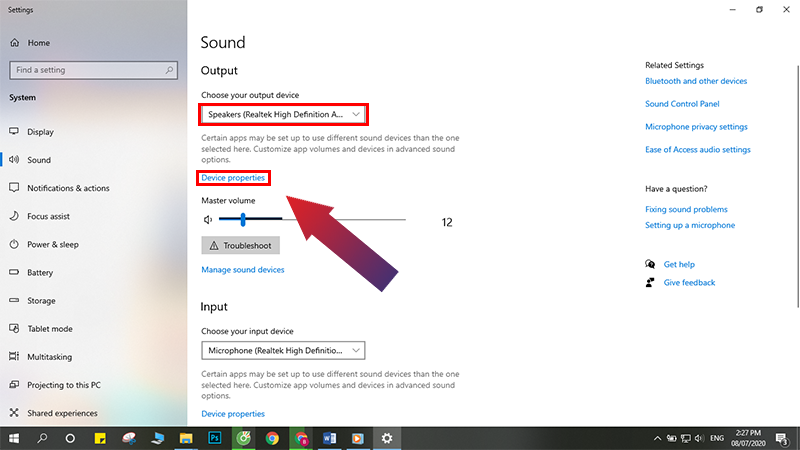
In the Output section, select Speakers > Click Device properties
Step 03
Select Additional device properties in the upper right corner to open the Speaker Properties window

Step 04
Select the Enhancements tab in the Speaker Properties window > Click Loudness Equalization > Click OK to save.

So we have completed the task of increasing the volume on the laptop. Experience the difference right away! Hopefully your laptop speaker volume has increased significantly after applying the above method. If you are still not satisfied with the results, you can use sound amplification software to improve it.
Thank you for taking the time to read the article, this guide hopes you have gained more useful information through this article.
Key Takeaways
Use the guidance above as a practical reference for increase volume on laptop win 10 without software. Check compatibility, follow the steps carefully, and verify important details with official documentation when software, security, accounts, health, or purchases are involved.
FAQ
What is the main point of this article?
This article explains increase volume on win 10 laptop without software !!, including the central facts, context, practical implications, and details needed to understand the topic.
Why does this topic matter?
It may affect performance, cost, safety, convenience, purchasing decisions, or how people understand a broader development.
Could the information change over time?
Yes. Product details, software features, prices, policies, codes, and news developments can change, so verify time-sensitive information with official sources.
Related Articles
 Top Software to Increase the Volume of PC and Laptop7 minutes read
 Free Laptop Volume Increase Software, Did You Know: Main Insights8 minutes read
 How to Increase the Volume of Laptop Speakers4 minutes read
 5 Extremely Simple Ways to Increase Laptop Volume When Speakers Are Too Low10 minutes read
 2 Effective Ways to Increase Laptop Volume Immediately: Expert Selection Guide10 minutes read
 How to Increase Laptop Volume in Windows 105 minutes read
Reader Comments 0
Sign in with email or Google to join the discussion.