Table of Contents
This practical guide explains how to recover a locked Netflix account. Follow the steps in order, review the requirements first, and use the troubleshooting notes when a setting or option does not work as expected.
Why is your Netflix account locked?
There are many reasons why you might get locked out of your Netflix account, but generally, they all revolve around a few core issues.
|
Reasons why your account is locked |
Typical message or symptom |
Why does it happen? |
The Fastest Way to Recover Your Netflix Account |
|---|---|---|---|
|
Forgot password or email |
Too many login attempts. Please try later . (Error -56 / NGP‑57) Too many login attempts. Please try again later. (Error-56 / NGP-57) |
Entering your password or email incorrectly multiple times will trigger Netflix's anti-fraud lock feature. |
Use Forgot Password? to reset via confirmed email/phone, then wait 10–15 minutes for the lock timer to clear. |
|
Log in from a location outside the household |
Requires entering a 4-digit code sent to account holder; cannot stream until verified. |
Netflix now applies 'household' rules; a new IP/device must be authenticated. |
Requires account owner to provide code (expires in 15 minutes) or add/move to paid 'additional member' slot. |
|
Continuous attack efforts |
Too many login attempts will result in a lockout, sometimes with security warning emails about strange logins. |
Attacker is trying to guess login credentials; Netflix will automatically lock after a certain number of failed attempts. |
Reset your password, turn on two-step verification by adding a phone number, and review recent devices in Account > Manage Access and Devices . |
|
Payment issues |
Error banner plays or 'Your membership is on hold… please update payment method' . |
Card expired, insufficient funds or gift card balance exhausted. |
Update card information, redeem a new gift card, or switch to PayPal/debit in Billing Details , then reload the page. |
|
Violation of Terms of Service (sharing, copyright infringement, public display, etc.) |
The email states 'Your account has been suspended/terminated for violating our Terms of Use'. |
Netflix detects activity that violates its rules (e.g., widespread password sharing, public screenings, copyright infringement). |
For suspensions: Please respond to the notice or contact support with proof that the issue has been resolved. Permanent terminations cannot be reversed; you will need to create a new account. |
Once you know why your Netflix account is locked, you can begin the unlocking process.
Try the self-recovery option (First line of defense)
The first and most obvious solution is the 'forgot password' option. Depending on your device, you can find this option through Netflix's Help page. To use this service, you can either request support via email or send a text message to your mobile phone number. In either case, Netflix will send you a text message with instructions on how to reset your password.
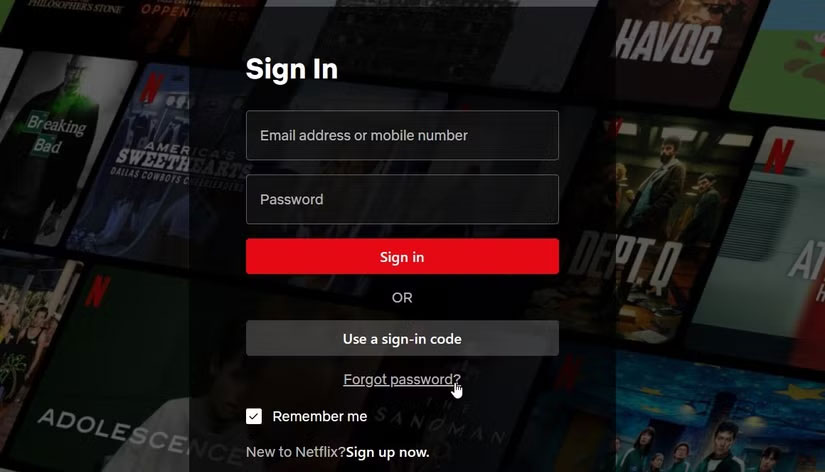
If you don't know your email and password, you can also ask Netflix to look up your account using your first name, last name, and the last four digits of the debit or credit card Netflix stores in your account profile.
The link provided by Netflix to reset your account will expire after 24 hours. After that time, you will need to request a new link.
If you requested an account reset email but don't see it in your inbox, check your spam, junk mail, or promotions folder. Be sure to review any email filters you have set up that may have moved this type of message to a different folder in your email account.
Netflix also suggests adding the info@account.netflix.com email address to your contacts and then requesting a password reset again. If that still doesn't work, it's possible that your email provider is having issues, causing email delays. This is rare, but it can happen. In this case, Netflix suggests waiting up to 5 hours before trying again.
What to do if Netflix password reset feature doesn't work?
What if the Netflix link you sent isn't working? There are a few steps you can take to resolve this issue. First, you'll need to delete any remaining Netflix password reset emails from your inbox. Once you've deleted those emails, visit netflix.com/clearcookies , which will prompt you to clear your Netflix cookies on your computer or mobile device.
In this case, go back to the Netflix sign-in help page and request a password reset using the email address associated with your account. Enter your email address and click the Email Me option. From there, return to your email inbox and follow the steps outlined in the new Netflix password reset email.
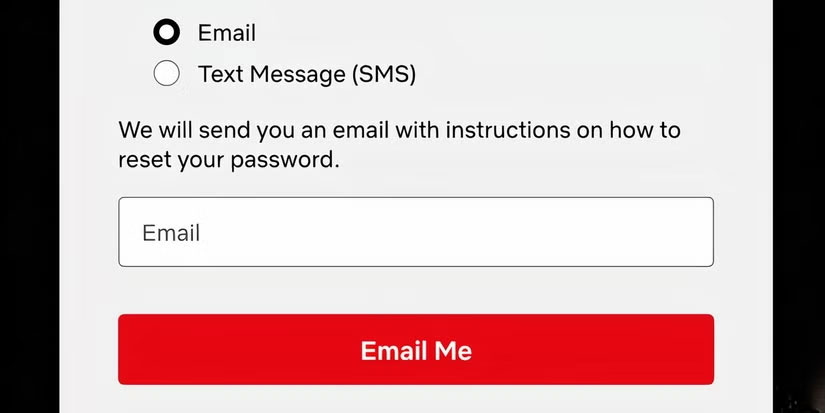
If all of these steps don't work, Netflix suggests you try resetting your password on another device, such as your computer, mobile phone, or tablet.
While it's rare, when you try to change your password, you may get a message that says "This password is not secure or is too common ." There are several reasons why Netflix might not like your password choice. In this case, keep adding passwords until they accept it.
Has your Netflix account been hacked?
Unfortunately, we live in an age where hackers are constantly looking for ways to cause trouble by accessing our personal information, regardless of its size or sensitivity. When hackers try to break into your Netflix account, you will most likely receive an email informing you that your account has been compromised and that you need to change your account password following the steps outlined above.
After taking these steps, consider taking additional precautions. First, sign out of any devices that you (or someone else) may have logged into your account on. You can do this by going to your Netflix account on your computer and selecting Security. From there, select Access and Devices , then scroll down and select Sign out of all devices . This will remove access from anyone else who may be using your account. They will need to enter your new password to regain access.
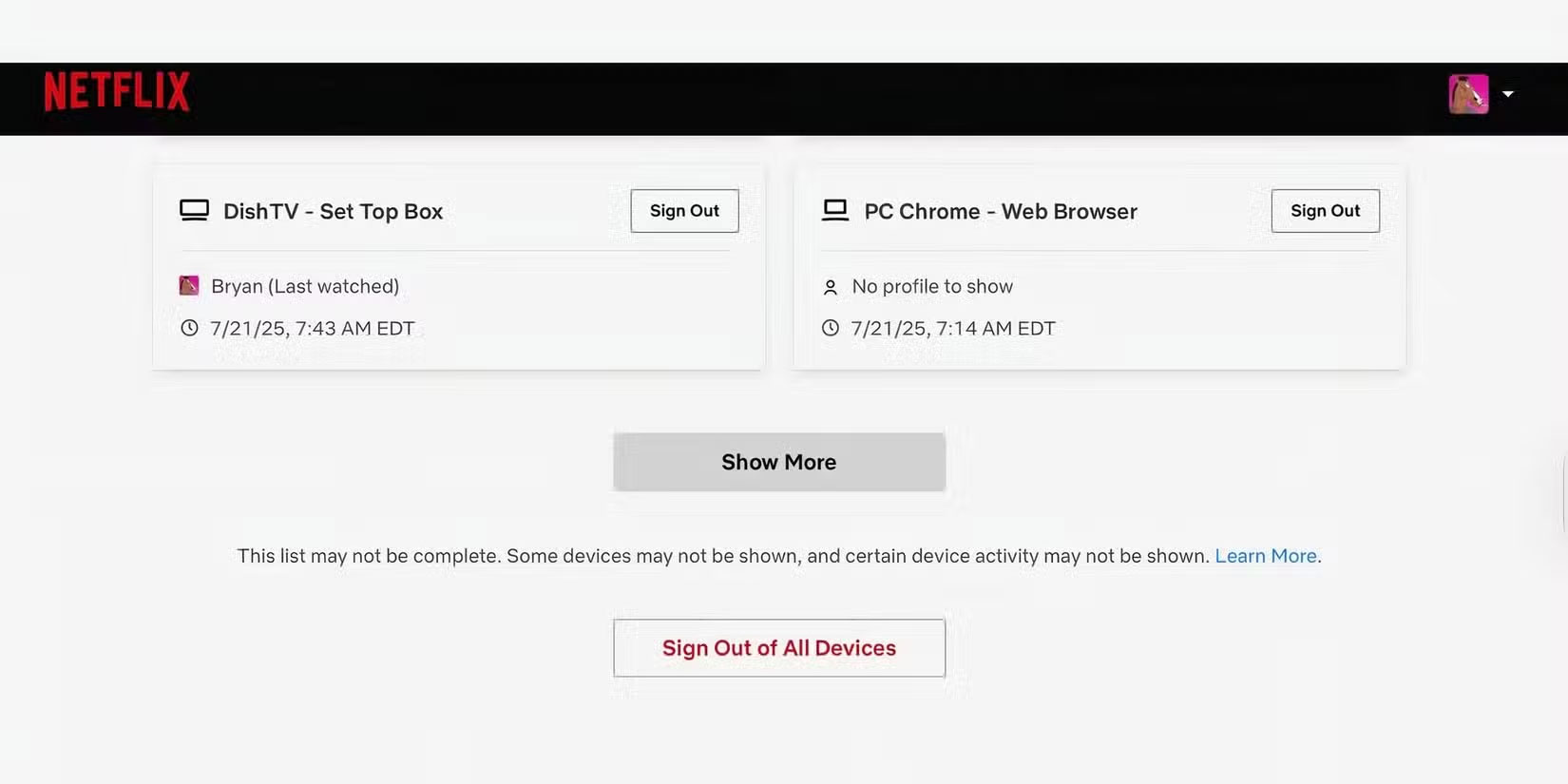
Another important step is to remove unauthorized payment methods from your account. Go to Manage payment methods and then remove any unfamiliar payment options. For added security, you can remove all payment methods from your account and then add only one account for Netflix to bill from going forward.
As a last resort, if your Netflix account has been compromised, check your bank account regularly. If you see unauthorized transactions, contact your bank or credit card company immediately.
Payment related issues
When Netflix is unable to charge your account for the next month of service, they will usually email you fairly quickly. Furthermore, the next time you open Netflix, regardless of device, you will see a message stating that your payment method is not working. In this case, you will need to go to the banking section of your account and make the necessary changes. Once Netflix successfully charges your debit or credit card, full access to the service will be restored.
FAQ
Why is your Netflix account locked?
There are many reasons why you might get locked out of your Netflix account, but generally, they all revolve around a few core issues.
What should you know about try the self-recovery option (First line of defense)?
The first and most obvious solution is the 'forgot password' option. Depending on your device, you can find this option through Netflix's Help page. To use this service, you can either request support via email or send a text message to your mobile phone number. In either case, Netflix will send you a text message with.
What to do if Netflix password reset feature doesn't work?
What if the Netflix link you sent isn't working? There are a few steps you can take to resolve this issue. First, you'll need to delete any remaining Netflix password reset emails from your inbox. Once you've deleted those emails, visit netflix.com/clearcookies, which will prompt you to clear your Netflix cookies on your.
Has your Netflix account been hacked?
Unfortunately, we live in an age where hackers are constantly looking for ways to cause trouble by accessing our personal information, regardless of its size or sensitivity. When hackers try to break into your Netflix account, you will most likely receive an email informing you that your account has been compromised and that.
Related Articles
 How to Recover Locked WhatsApp Account: Complete Guide4 minutes read
 How to Recover a Locked Tinder Account: Practical Guide9 minutes read
 How to Secure Your Netflix Account?: Step-by-Step Guide5 minutes read
 How to Recover a Locked Facebook Account: Step-by-Step Guide4 minutes read
 Instructions to Reset Netflix Account Password4 minutes read
 How to Get the Zalo Account Fastest When Locked4 minutes read
Reader Comments 0
Sign in with email or Google to join the discussion.