Table of Contents
Learn how to gift games on epic games store with clear steps, practical tips, and troubleshooting guidance for a reliable result.
Instructions for giving away games on Epic Games Store
Step 1
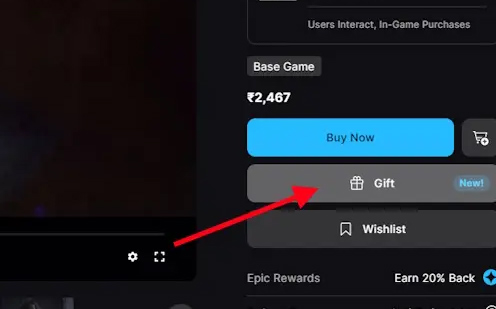
We go to Epic Games Store and log in to your account. Next, open the game you want to give and click Gift next to it to send the game.
Step 2
Switch to the new interface and find the person you want to send the game to in the Who's it for? section. That person must be added to your Epic friends list.
Step 3
Click Go to Checkout to pay for the game according to the instructions on the screen. You can also schedule a gift at When shall we send the gift.
Once you send a gift, the recipient has 14 days to accept or decline. If the recipient already owns the game, the gift will not be accepted and will be automatically refunded. When a gift is declined, the sender will receive a full refund.
Final Thoughts
Use this guide as a practical checklist for how to gift games on epic games store. Work through the steps in order, verify each result, and adjust the options to match your needs.
FAQ
What do you need before following this How to Gift Games on Epic Games Store guide?
Review the required tools, accounts, settings, or materials mentioned in the article. Learn how to gift games on epic games store with clear steps, practical tips, and troubleshooting guidance for a reliable result.
What are the main steps for how to gift games on epic games store?
Follow the sections in order, especially Instructions for giving away games on Epic Games Store, Step 1, Step 2. Complete each step before continuing and verify the result as you go.
What should you do if the process does not work as expected?
Recheck the prerequisites, update the relevant app or service, review the settings, and repeat the step that caused the issue. Use any troubleshooting notes included in the guide.
Related Articles
 How to Get Free Games on Epic Games Store: Step-by-Step3 minutes read
 Tips for Refunding When Buying Games on the Epic Games Store5 minutes read
 Is Epic Games Store Worth Installing: What You Need to Know5 minutes read
 Free Game Epic Games Store 20247 minutes read
 Epic Games Store2 minutes read
 Download the Ultimate Ark: Survival Evolved for Free on Epic Games Store3 minutes read
Reader Comments 0
Sign in with email or Google to join the discussion.