Table of Contents
This is how to fix the error Connection failed LOL PBE, DTCL PBE, this situation currently appears quite a lot for gamers who want to experience new content in the LOL PBE test server.
DTCL season 13 has just been released, and the current server has encountered some errors that not all gamers will encounter. So everyone will find a way to fix the errors to experience the Arcane Truth Arena season 2.
How to fix connection failure error in LOL PBE, DTCL PBE
This connection error can be caused by many different reasons, PBE servers are often used for testing so they may experience unannounced maintenance errors due to unexpected incidents. Or simply the number of people accessing the PBE server is too large, causing congestion and inability to connect.
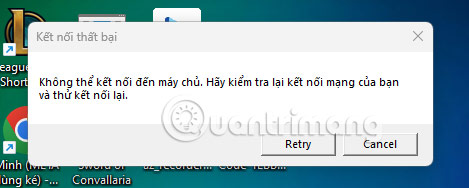
Another reason is that the network connection is unstable, leading to the inability to connect to the server, causing the connection to fail. Maybe you are using a VPN or Proxy that is not compatible with the Riot Games server. Or the default DNS of the network provider is having an error, making it impossible for gamers to access the server. In this case, you should turn off the VPN or use another Proxy, change the DNS and try again.
Other causes include firewalls blocking the connection between the game client and Riot servers, or your modem/router. Some antivirus software may mistake LeagueClient.exe for malicious software and automatically block it. You can try disabling your firewall and try connecting to the PBE server again.
Also, when updating the PBE version, the update process may be missing files or corrupted files. After trying a few errors without fixing them, you can delete the entire LOL PBE and reinstall it. You can find many reasons for losing connection to LMHT PBE, an error can have many causes. So, try many ways and try to reconnect to the PBE server.
FAQ
How do you fix LoL PBE, DTCL PBE access errors?
In practical terms, this is how to fix the error Connection failed LOL PBE, DTCL PBE, this situation currently appears quite a lot for gamers who want to experience new content in the LOL PBE test server.
What should you check before getting started?
Review the requirements, compatible device or software version, and any warnings described in the guide before making changes.
What should you do if the steps do not work?
Repeat the steps in order, confirm that your app or system is up to date, and review the troubleshooting details provided above.
Related Articles
 How to Fix the Error Is Stopped at the Dtcl Mobile Login Screen3 minutes read
 All Updates of DTCL Season 15: Hero War8 minutes read
 Dtcl Mobile Needs to Improve in the Near Future5 minutes read
 Fix Dtcl Mobile Queue Error: How to Bypass the Dtcl Mobile Queue3 minutes read
 Dtcl Champion Rank 9.22 from Strong to Weak4 minutes read
 Ezreal DTCL Season 10: Build, Lineup, Gameplay7 minutes read
Reader Comments 0
Sign in with email or Google to join the discussion.