Table of Contents
Overview
This guide explains how to download mp3 music files from YouTube super easy in clear, practical terms. It covers the key concepts, recommended steps, common limitations, and useful checks so you can make a better-informed decision.
When surfing the web watching clips on YouTube, you accidentally come across a song or a favorite piece of music and want to download it to your music player or use as a ringtone but don't know how? Today, this guide explains through some simple and quick ways to download Mp3 from YouTube!
Download mp3 music from YouTube with x2convert.com
X2Convert. Com is the best online video conversion website today. Supports converting YouTube videos to mp3, mp4, webm, m4v, 3Gp, after conversion, you are allowed to download mp3 from YouTube, convert YouTube to mp3, download high quality music from YouTube videos. Everything is completely free.
Step 1: Open the YouTube clip you want to download the mp3 file from, copy the link of that clip
Step 2: Access the link: the referenced website
Step 3: Paste the link into the address box and then click Get link Mp3

Step 4: select download now to download the mp3 file to your computer

Download MP3 music from YouTube with y2mate.com
Similar to x2convert, y2mate. com is also a website that allows you to extract mp3 music from YouTube online. All you need to do is access the address the referenced website then paste the link into the address box and press Start to convert the music.

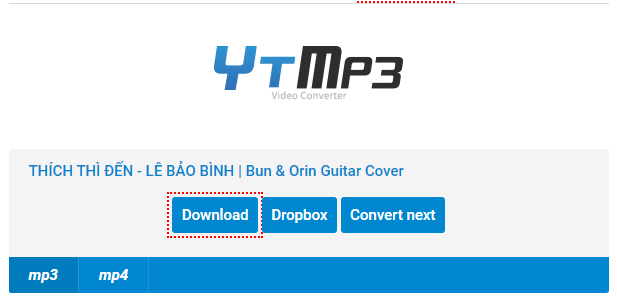
Download MP3 files on YouTube with YTMp3
Another website that also helps you split mp3 files from YouTube clips is YTMp3. Similar to the above websites, you will paste the YouTube page address where you want to download music into the address box, then click Convert to split the mp3 file, then click Download to download.
So this guide has shared with you 3 ways to download Mp3 files from YouTube with online websites. Straightforward and easy to do, right? Wish you success in downloading really good songs on YouTube!
Key Takeaways
Use the guidance above as a practical reference for download mp3 music files from YouTube super. Check compatibility, follow the steps carefully, and verify important details with official documentation when software, security, accounts, health, or purchases are involved.
FAQ
How do I download mp3 music files from YouTube super easy?
Follow the steps in this guide in order, confirm each setting before continuing, and save, restart, or reconnect the device when the instructions require it.
What should I check before I begin?
Confirm the correct device, account access, software version, compatibility, and a current backup whenever the process could affect files, settings, or security.
What should I do if the process does not work?
Repeat the steps carefully, check for model or version differences, install available updates, and consult the manufacturer's official support documentation.
Related Articles
 Convert YouTube MP3 Files: What You Need to Know9 minutes read
 How to Downloading Music on YouTube, Downloading MP3 Files of YouTube Videos4 minutes read
 How to Download MP3 Music from YouTube Using Software6 minutes read
 Download Youtube Music, 13 Ways to Download MP3 From YouTube28 minutes read
 How to Download MP3 Music from YouTube Extremely Fast with X2convert4 minutes read
 Rip Music from YouTube Videos, Download Mp3s, Download Music from5 minutes read
Reader Comments 0
Sign in with email or Google to join the discussion.