Table of Contents
Bronze Chests are special chests that can interact directly with golems to automatically sort items from regular chests and bronze chests.
Copper Chest is a new item added to Minecraft in the third update of 2025, along with a new mob – Copper Golem. This is a special chest that can interact directly with the golem to automatically sort items from regular chests and copper chests.
To unlock the crafting recipe, you must first craft the Bronze Golem yourself, then destroy the bronze chest that appears below it to learn the recipe. The Bronze Chest is crafted from 1 regular chest and 8 copper bars, making it extremely useful for those who want to optimize their inventory.
What is Bronze Chest?
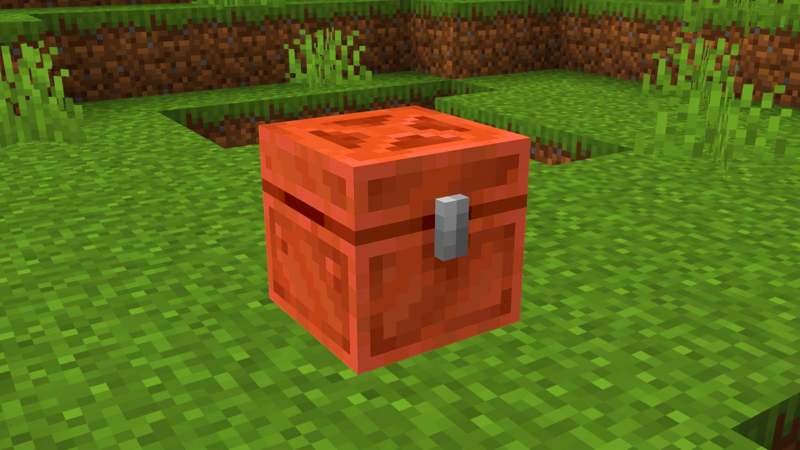
Copper Chest is a new chest variant in Minecraft, it works like a regular chest but has special features:
Bronze Golem can scan – sort – merge items
If you place multiple chests close together (normal chest + bronze chest), the Bronze Golem will:
- Pick up items in chests
- Find duplicate items in other chests
- Automatically folds into one place
Like a 'mini warehouse keeper', helping you manage your inventory automatically during long farming sessions.
How to unlock the Bronze Chest crafting recipe
To unlock the Bronze Chest crafting recipe you must:
- Create your first Bronze Golem by placing a carved Pumpkin or Pumpkin Lantern on a Copper block. The Bronze Golem will appear afterwards.
- As soon as the golem appears, a Bronze Chest will appear below it.
- Break this chest and pick it up, the new crafting recipe is now unlocked.
Then you can craft unlimited bronze chests.
Ingredients to prepare
To craft a Copper Chest, you will need:
| Items | Quantity | Note |
|---|---|---|
| Chest | 1 | Made from 8 wooden boards |
| Copper Ingot | 8 | Smelting of Copper Ore in Conventional Furnace or Blast Furnace |
You will also need to create a Crafting Table to place the materials in the crafting grid.
How to craft a Bronze Chest in Minecraft
Once the recipe is unlocked, follow these instructions:
Step 1: Place the Crafting Table on the ground
Prepare enough:
- 1 Regular Chest
- 8 Copper Ingots
Step 2: Arrange ingredients according to the recipe
- Place the regular chest in the center slot
- Place 8 copper bars in all surrounding cells.
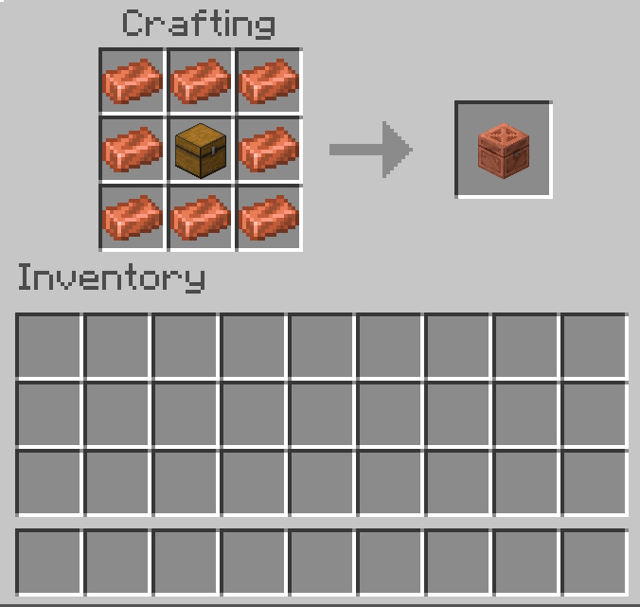
This is the standard 3×3 formula.
Step 3: Get the Bronze Chest
Now the Bronze Chest will appear in the right box, you just need to drag it into your inventory and you're done!
What is the Bronze Chest used for?
Bronze Chest has full functions like normal chest:
- Store items
- Fireproof
- For Redstone systems
But the special thing about the Bronze Chest is that the Bronze Golem can interact and arrange items by itself.
Accordingly, the Bronze Golem will:
- Pick up items
- Match in neighboring chests
- Merge similar items
- Clear out your inventory while you mine, go to the Nether, or hunt monsters
Tip: Place multiple Bronze Chests next to each other to optimize golem performance.
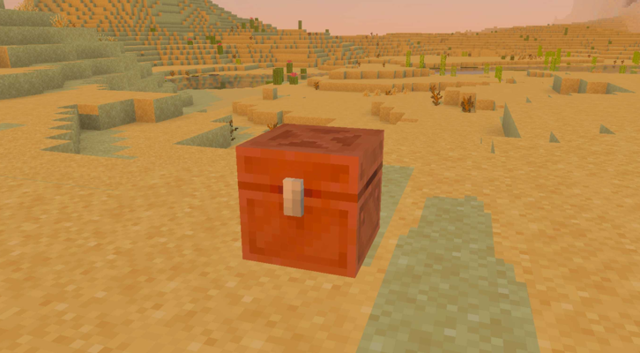
Advanced Tips for Using Bronze Chests
- Make a dedicated storage room to make the golem work faster
- Place chests in 2×2 or 3×3 clusters to speed up the item merging process
- Use Redstone Lamp as a compatible chest full signal
- Combined with Hopper → automatic sorting system + golem to support merging items = extremely optimal
The Copper Chest is a great addition for players who like to store things scientifically. When combined with the Copper Golem, you have a simple yet effective auto-sort system. If you like to optimize your inventory or build large storage, the Copper Chest is definitely an item you cannot miss in the Minecraft 2025 update.
FAQ
How do you craft a bronze chest in Minecraft: step-by-step guide?
In practical terms, bronze Chests are special chests that can interact directly with golems to automatically sort items from regular chests and bronze chests.
What should you check before getting started?
Review the requirements, compatible device or software version, and any warnings described in the guide before making changes.
What should you do if the steps do not work?
Repeat the steps in order, confirm that your app or system is up to date, and review the troubleshooting details provided above.
Related Articles
 Instructions on Creating a Bronze Door in Minecraft: Explained6 minutes read
 Minecraft Bronze Torch Making Tutorial: Complete Guide4 minutes read
 How to Craft Chains in Minecraft 1.204 minutes read
 How to Craft and Use a Name Tag in Minecraft 26.19 minutes read
 How to Use Funnels in Minecraft: Step-by-Step Guide9 minutes read
 How to Find and Use Bronze in Minecraft5 minutes read
Reader Comments 0
Sign in with email or Google to join the discussion.