Table of Contents
An Access Point Name (APN) tells a phone how to connect to a carrier's mobile-data network. Most current SIMs and eSIMs install the correct profile automatically. Enter an APN manually only when mobile data is active on the account but still does not work and the carrier profile is missing or incorrect.
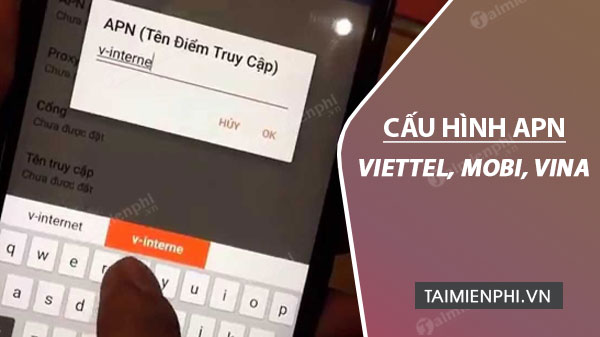
APN settings for Vietnamese mobile networks
| Carrier | APN | Username | Password |
|---|---|---|---|
| Viettel | v-internet | Leave blank | Leave blank |
| MobiFone | m-wap | Leave blank unless the carrier supplies a value | Leave blank unless the carrier supplies a value |
| VinaPhone | m3-world | mms | mms |
| Vietnamobile | internet | Leave blank | Leave blank |
The profile name is only a label, so you can use the carrier's name. Leave fields such as Proxy, Port, Server, MCC, MNC, authentication type, APN type, and APN protocol unchanged unless the carrier gives specific instructions. The original article contained two important errors: VinaPhone uses m3-world, not “m3-word,” and Vietnamobile currently lists internet, not v-internet.
Carrier settings can differ for enterprise SIMs, IoT plans, roaming, MMS, or mobile virtual network operators. Confirm unusual subscriptions with the carrier before saving a generic profile.
Before editing the APN
- Turn off Wi-Fi so you can test mobile data directly.
- Confirm that the correct SIM is selected for mobile data on a dual-SIM phone.
- Check that the SIM is active, the account has a data plan or balance, and there is coverage.
- Toggle Airplane mode on and off, then restart the phone.
- Reset APNs to default on Android, or check for a carrier-settings update on iPhone, before creating a duplicate profile.
Do not enable Data Roaming while in Vietnam unless the carrier specifically requires it. When abroad, roaming data may incur charges and usually must be activated on the subscription first.
Configure an APN on iPhone
- Open Settings > Cellular (or Mobile Service).
- Select the relevant SIM if the iPhone uses more than one line.
- Open Cellular Data Network or Mobile Data Network.
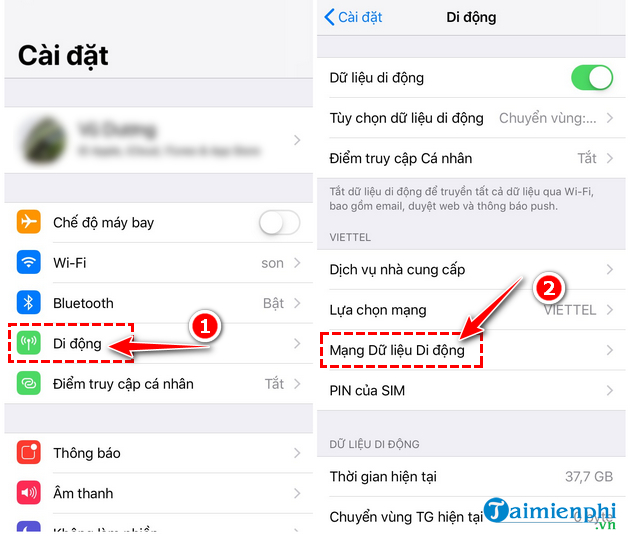
- Under Cellular Data, enter the APN, username, and password from the table. Do not copy those values into Personal Hotspot or MMS unless the carrier instructs you to do so.
- Return to the previous screen to save, restart the iPhone, and test a webpage with Wi-Fi off.
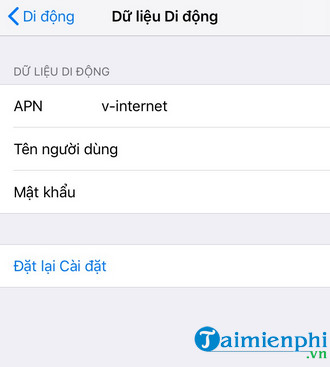
If Cellular Data Network is absent, the carrier may manage APN settings through its SIM, eSIM, or configuration profile. Do not install an unofficial profile to reveal the menu. Check Settings > General > About for a carrier-settings update, then contact the carrier if data still fails.
Configure an APN on Android
Menu names vary by phone maker and Android version. A common path is:
- Open Settings > Network & internet > SIMs, or Settings > Connections > Mobile networks.
- Select the correct SIM, then open Access Point Names.
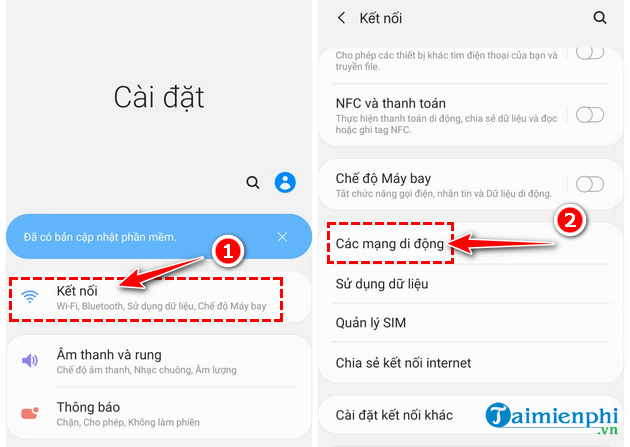
- Open the menu and choose Reset to default first. If the correct profile does not appear, tap Add or the plus button.
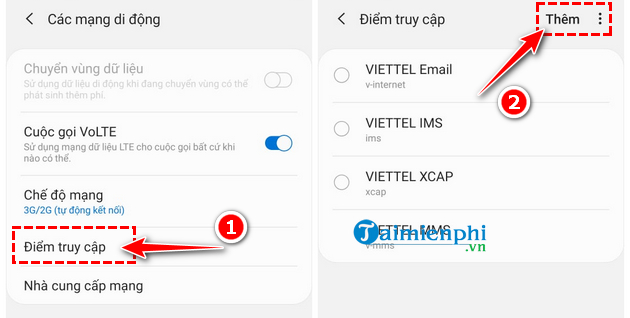
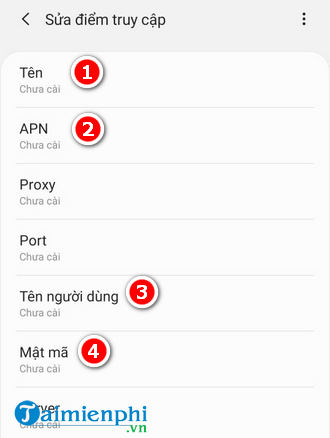
- Enter a descriptive Name and the carrier APN. Add username and password only when shown in the table or supplied by the carrier.
- Open the menu, select Save, then tap the new profile so its radio button is active.
- Restart the phone and test mobile data with Wi-Fi off.
On some phones, the path is Settings > SIM cards & mobile networks > [carrier] > Access Point Names. If Add and Edit are disabled, the SIM or device administrator may lock those fields.
Verify the carrier information
These carrier pages currently publish the core APNs:
If mobile data still does not work
- Check whether the phone shows signal, 4G/LTE, or 5G. “Emergency calls only” indicates a registration or coverage problem rather than only an APN problem; see TipsMake's network registration troubleshooting guide.
- Confirm the data allowance and service status in the carrier's official app.
- Switch network selection back to Automatic and use a supported preferred network mode.
- Remove VPN, proxy, or private-DNS settings temporarily if the connection exists but sites do not load.
- Test the SIM in another compatible phone, or test a known-working SIM in this phone, to separate SIM and device faults.
- Reset network settings only after recording saved Wi-Fi passwords and other network configuration.
Once data works, monitor usage to avoid unexpected charges. These mobile data management options explain the controls available on iOS and Android. If the APN keeps disappearing or the carrier rejects the profile, contact official support and provide the phone model, operating-system version, SIM type, and subscription name.
Related Articles
 How to Register for 4G Sim Student Package Viettel, Mobifone and8 minutes read
 How to Send SMS Messages from a PC to an Android Phone5 minutes read
 How to Register for a 1-day 4G Package Viettel, Mobifone and7 minutes read
 How to Check the Phone Is Not Deducted by the Network?7 minutes read
 How to Register Sim Student Vinaphone6 minutes read
 Vietnamobile Provides Services for Making Phone Calls on Wi-Fi3 minutes read
Reader Comments 0
Sign in with email or Google to join the discussion.