Table of Contents
A Claude Cowork plugin packages repeatable instructions and optional tool access so a team does not have to restate the same process in every session. The best candidate is a workflow with a stable method, recognizable inputs, clear exceptions, and an output that can be checked.
This guide covers the no-code workflow in Cowork using Anthropic’s Plugin Create plugin. Product menus can change, so consult the current Anthropic plugin instructions if a label differs.
What a Cowork plugin can contain
Anthropic describes Cowork plugins as packages that can bundle three kinds of components:
- Skills: instructions, methods, reference material, scripts, and reusable commands for a specific kind of work.
- Connectors: approved links to data or actions in external services. A plugin can still work with uploaded files when no connector is needed.
- Sub-agents: specialized agents with separate roles and context, useful when a task has genuinely distinct workstreams.
Not every plugin needs all three. A focused writing or review workflow may need only a skill and a template. Add a connector only when the task requires live data, and add sub-agents only when their separation makes the result easier to control or evaluate.
Before you build: define one repeatable job
Start with a narrow sentence such as “Prepare a weekly customer-support quality report from approved ticket exports.” Then write down:
- the required inputs and who may provide them;
- the exact steps a trained employee follows;
- the rules that require judgment;
- exceptions the workflow must escalate;
- the expected output format; and
- how a reviewer decides whether the result is correct.
Collect a clean example of a good deliverable, an empty template, and only the reference documents the workflow actually needs. Remove credentials, personal data, and confidential material unless your organization has explicitly approved its use in Cowork.
Build the plugin in Cowork
- Open Cowork. In Claude, open the Cowork tab. If you are new to the product, first read what Claude Cowork is and how it differs from regular chat.
- Open Customize. Choose Customize in the sidebar, then open the Plugins tab.
- Install Plugin Create. Select Browse plugins, find Anthropic’s Plugin Create plugin, and install it. Anthropic’s help page says this plugin is designed to help build custom plugins from scratch.
- Start a Cowork session. Describe the workflow, intended users, inputs, output, and any connected services. One sentence can start the conversation, but a concrete specification produces a more testable result.
- Answer the discovery questions. Clarify business rules, terminology, allowed sources, exception handling, and approval points. Provide a sanitized example or template when structure matters.
- Let Claude draft the package. Ask it to explain which parts became skills, connectors, or sub-agents and why each component is necessary.
- Review the generated files and permissions. Check the instructions, references, scripts, connector scope, and any actions the plugin can take. Remove unnecessary capabilities.
- Run a controlled test. Use representative cases, including at least one normal case, one incomplete input, and one case that should be escalated.
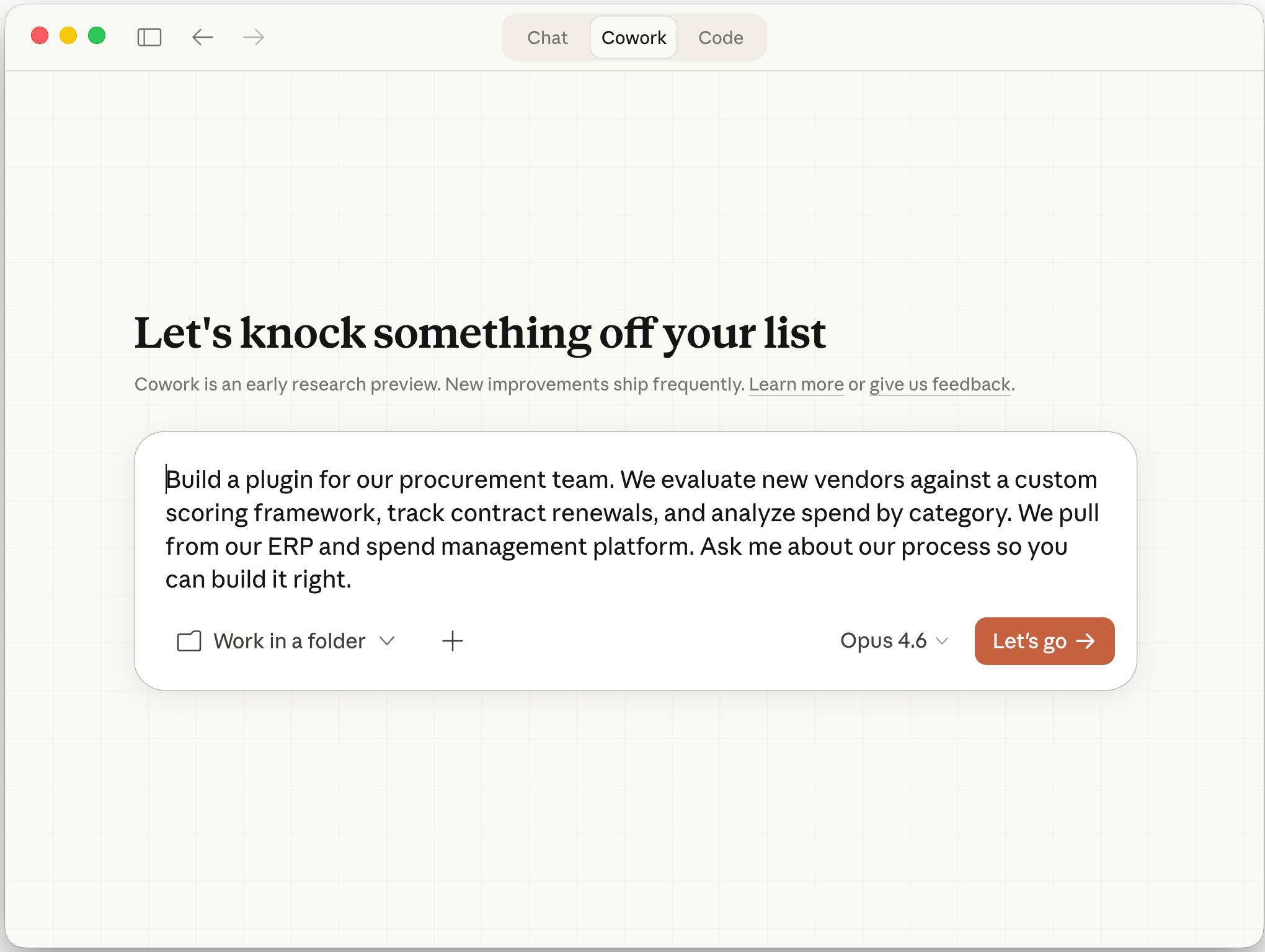
A better starter prompt
Build a Cowork plugin for our customer-support quality review.

Users: support team leads.
Input: a CSV export of closed tickets and our approved QA rubric.
Process: sample the specified number of tickets, score only against the rubric, quote the evidence for each score, and flag missing information.
Output: a table of scores plus a short trend summary.
Exceptions: never infer sensitive customer attributes; escalate ambiguous policy cases.
Tools: begin with uploaded files only. Do not add a connector or sub-agent unless you explain why it is required.
Testing: create three synthetic test cases and show the expected result before I install the plugin.
This prompt gives the builder a task boundary, evidence standard, privacy constraint, output contract, and test requirement. Replace the example details with your real approved process.
Test the plugin before sharing it
A successful run is not enough. Build a small evaluation set that covers the cases the plugin is likely to mishandle:
| Test | What to verify |
|---|---|
| Typical input | All required steps run and the output matches the template |
| Missing fields | The plugin asks for information or flags the gap instead of inventing it |
| Conflicting rules | The documented priority or escalation rule is followed |
| Unauthorized request | The plugin refuses or seeks approval rather than expanding its scope |
| Tool failure | The failure is visible and no action is reported as completed |
| Adversarial content | Instructions inside documents do not override the plugin’s trusted rules |
Compare outputs with an accepted human result. If the plugin makes a mistake, identify whether the cause is an unclear instruction, missing reference, bad connector data, excessive permissions, or an unnecessary sub-agent. Fix the cause and rerun the complete test set.
Keep the plugin maintainable
- Keep each skill focused. Its description should say what it does, when it should run, and what falls outside its scope.
- Prefer source material over duplicated prose. Record who owns each policy and when the plugin’s copy was last reviewed.
- Use versioned examples. A known-good input and output make regressions easier to spot.
- Separate judgment from fixed controls. Use deterministic validation for required fields, access checks, or numeric thresholds where possible.
- Assign an owner. Someone should review updates, connector permissions, reported failures, and changes to the underlying process.
Security and installation checks
Plugins can expand what Claude can read and do. Before installation, inspect unfamiliar files and scripts, verify the source, and limit connector access to the minimum required data and actions. Anthropic’s Cowork safety guidance also warns that plugins and connected tools create additional paths for untrusted content to influence an agent.
According to Anthropic’s current help documentation, custom plugins added in Claude Desktop or Cowork are stored locally on the computer. Organization controls and distribution options may differ by plan, so check the current admin documentation before deploying a plugin across a team.
A useful Cowork plugin is not merely a long prompt. It is a small, reviewable operating procedure with controlled access, clear failure behavior, and tests that show whether it still works.
Related Articles
 How to Customize Plugins in Claude Cowork8 minutes read
 How to Use Claude Cowork to Run Your Business with AI12 minutes read
 The Skill and Plugin Ecosystem in Claude Cowork10 minutes read
 What Is Claude Cowork?: What You Need to Know8 minutes read
 Setting up and Running Claude Cowork for the First Time5 minutes read
 Things to Know About Claude Cowork11 minutes read
Reader Comments 0
Sign in with email or Google to join the discussion.