Table of Contents
This updated guide examines How to Add External Games to Lulubox and organizes the essential facts, background, and practical takeaways in clear American English.
- The best doodle drawing app for iPhone, iPad
- Instructions for loading Free Fire cards, for loading Free Fire diamonds
- How to install Google Camera for phone
Instructions to add external apps to Lulubox
First, to add an external application to Lulubox, run the application and drag it to the bottom. Then select the plus icon, in the list you select the application or game you want to add and click Finish below to add.

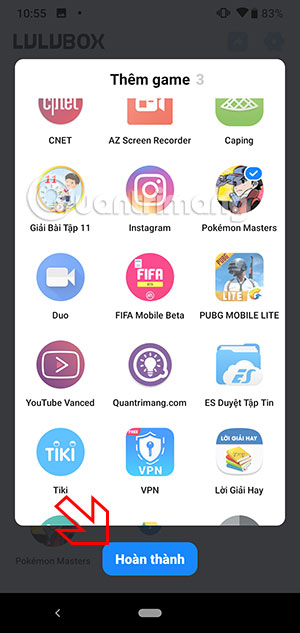
At this point in the game list you will see the game / app was added just now. Now you can use the support tools from Lulubox on the application or game you have added.
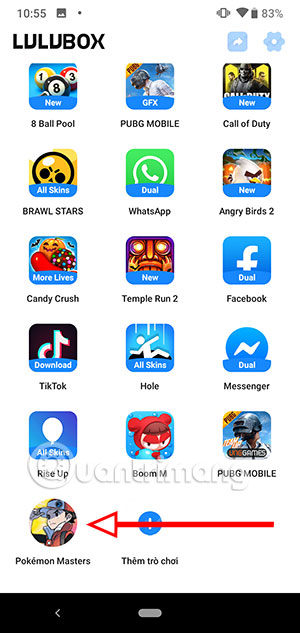
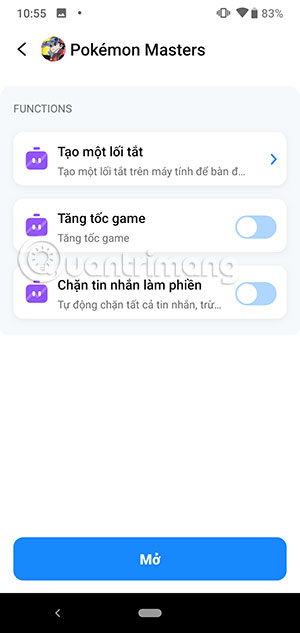
Because Lulubox does not support many uncommon titles, gamers will not have many tools to support the added applications or games.
FAQ
What is How to Add External Games to Lulubox about?
It provides a structured overview of Lulubox, explains the main context, and highlights practical takeaways for readers.
Why does this topic matter?
Understanding the main concepts helps readers evaluate the issue, avoid common mistakes, and make better-informed decisions.
How should readers use this information?
Use the guidance as a practical starting point, confirm details that may have changed, and follow current product, safety, or security recommendations.
Related Articles
 How to Download and Install the Latest Lulubox on Your Phone3 minutes read
 Lulubox 4.9.11: Game Management Application for Android9 minutes read
 How to Play Wii Games from an External Hard Drive or USB: Practical Guide16 minutes read
 Steps to Save PS5 Games on USB5 minutes read
 7 Best External Hard Drives9 minutes read
 Pros and Cons of Using an External Hard Drive for PS49 minutes read
Reader Comments 0
Sign in with email or Google to join the discussion.