Table of Contents
This article explores here maps for Android has vietnamese voice with straightforward explanations and useful context. It also highlights common questions and important details to consider.
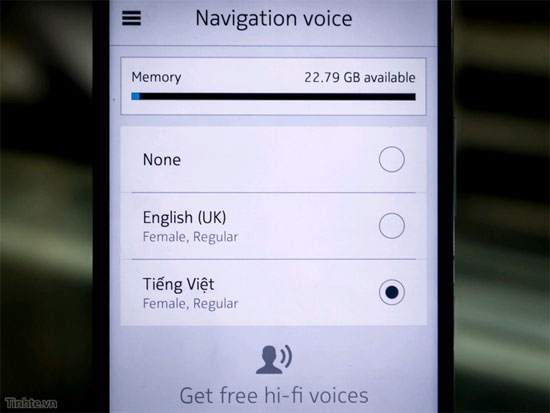
The default is currently only female, but quite good. With voice input, you can plug in headphones to get better navigation when moving. This version is still not high quality (Hi-fi), Hopefully in the future, Nokia will soon update it to make you hear better.
To download Vietnamese voice, go to Settings -> Voice navigation -> Manage voices -> Drag down with Vietnamese section -> Click it to download. If you haven't downloaded Here Maps For Android, download it here: Http://here. com/download
FAQ
What is the main benefit of here maps for Android has vietnamese voice?
The main benefit is a clearer understanding of the topic and a practical way to apply the information covered in this guide.
What should I check before using here maps for Android has vietnamese voice?
Confirm compatibility, review the required settings, protect important data, and use the latest supported version whenever possible.
What should I do if the result is different?
Repeat the steps carefully, verify permissions and version differences, and consult the product's official support documentation for changes not shown in the article.
Related Articles
 Search Google by Vietnamese Voice via Chrome4 minutes read
 How to Change the Voice Search Language to Vietnamese in Google Maps on iPhone // iPad3 minutes read
 Fix Google Maps Voice Navigation Not Working on Android: Step-by-Step Guide8 minutes read
 Google Assistant Has Been Integrated into Google Maps3 minutes read
 How to Install Vietnamese on Android Phones5 minutes read
 Tips for Using Google Maps on Android11 minutes read
Reader Comments 0
Sign in with email or Google to join the discussion.