Table of Contents
This guide provides a practical overview of GAMMALN. PRECISE Function, including its main features, benefits, limitations, and important considerations.

Description: The function returns the natural logarithm of the gamma function, Γ (x). The function is not different from the GAMMALN function, but the function only supports versions from Excel 2013 onwards.
Syntax: GAMMALN. PRECISE (x)
Inside:
- x: The value you want to calculate the natural logarithm of the gamma function, Γ (x). .
Attention:
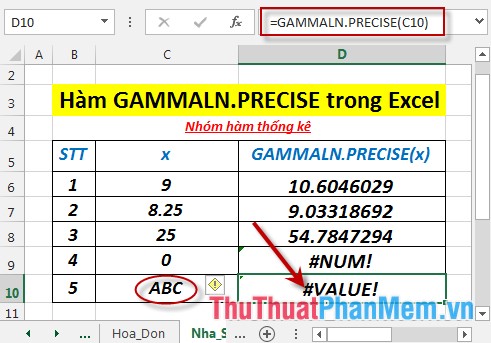
- If the function's x value is not numeric -> the function returns the #VALUE! Error value
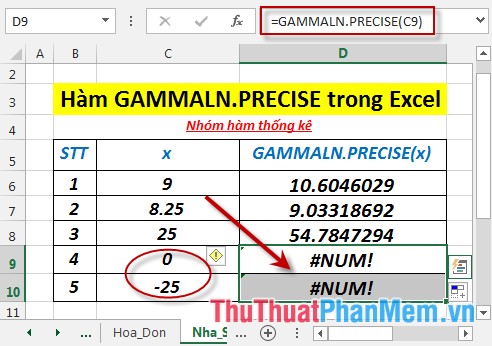
- If x ≤ 0 the function returns the #NUM! Error value
- The exponent e of GAMMALN. PRECISE (i), i is an integer, returns the same result as (i - 1)!.
- The function is calculated as follows:
[GAMMALN. PRECISE = LNleft ({Gamma left (x right)} right)]
Inside:
(fleft (x right) = left {{begin {array} {* {20} {c}} {0,,,,,,, {rm {if}}, x <0} {x,,,, { rm {if}}, 0 le x le 1} {1,,,,,,,, {rm {if}}, x> 1} end {array}} right.,)
For example:
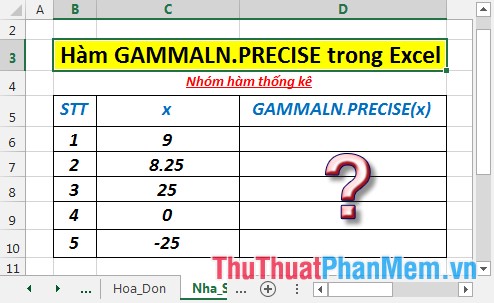
Calculate the natural logarithm value of the gamma function, Γ (x) of the values in the following data table:
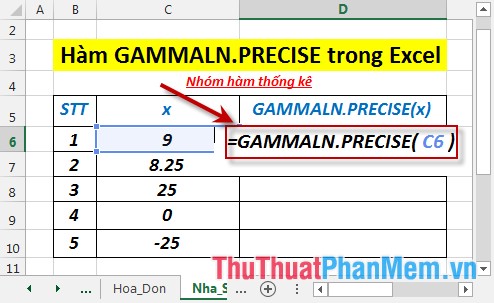
- In the cell to calculate enter the formula : = GAMMALN. PRECISE (C6)
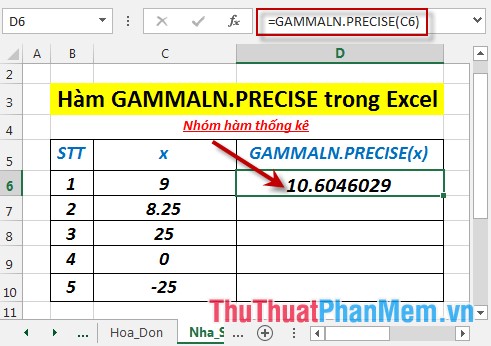
- Press Enter -> the natural logarithmic value of the gamma function, Γ (x) is:
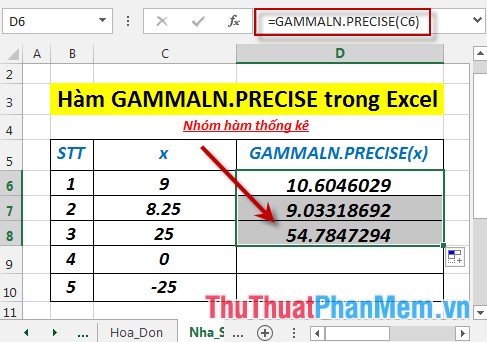
- Similarly copying the formula for the remaining values results:
- Where x ≤ 0 -> the function returns the #NUM! Error value
- Where x is not a number -> the function returns the error value #VALUE!
Above are instructions and some specific examples when using the GAMMALN. PRECISE function in Excel.
Good luck!
FAQ
What does the GAMMALN. PRECISE Function function do in Excel?
The GAMMALN. PRECISE Function function performs the calculation described in this guide. Use the correct arguments and compatible data types for reliable results.
How do I enter the GAMMALN. PRECISE Function function correctly?
Start with an equals sign, enter GAMMALN. PRECISE Function, add the required arguments inside parentheses, and confirm that cell references and separators are correct.
Why does the GAMMALN. PRECISE Function function return an error?
Common causes include missing arguments, invalid data types, incorrect cell references, unsupported values, or regional separator settings.
Related Articles
 How to Use the GAMMALN Function in Excel3 minutes read
 How to Use the GAMMA Function in Excel3 minutes read
 GAMMA. INV Function in Excel3 minutes read
 GAMMA. DIST Function in Excel4 minutes read
 How to Use the NORMDIST Function in Excel - Function That Returns4 minutes read
 CHISQ. TEST Function in Excel3 minutes read
Reader Comments 0
Sign in with email or Google to join the discussion.