Table of Contents
This guide provides a practical overview of free 6 month license for bitdefender internet security 2019 with clear explanations and useful details. It focuses on the information users are most likely to need.
Some outstanding features of Bitdefender Total Security 2019
- Protect the device in real time.
- Detects and removes spyware, trojans, keyloggers, rootkits, etc., protecting the privacy and data of users.
- Technology against multi-layer ransomeware.
- Rescue mode.
- Detect and prevent phishing sites.
- Malware prevention support for devices using operating systems including: Windows, macOS, Android and iOS.
- Optimize virus scanning speed without affecting computer performance.
How Free 6 Month License for Bitdefender Internet Security 2019 Works
Bitdefender Internet Security 2019 is priced at 90 USD and is currently copyright free for a period of 6 months. If you need to use it, please quickly activate before the program expires.
Steps to register and receive a free license
Step 1: Visit the link below and enter the required information -> click GET IT NOW .
- Https://www. bitdefender. com/media/HTML/consumer/new/get-internet-security2019-opt/

Step 2: Check your newly registered email to receive copyright activation email. In the mail, users will be given instructions on how to get the license.
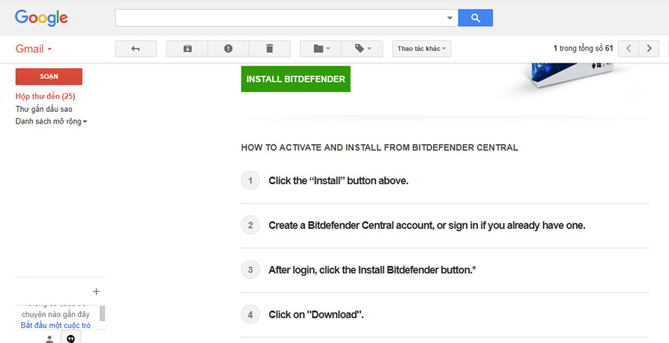
Step 3: Click INSTALL BITDEFENDER.

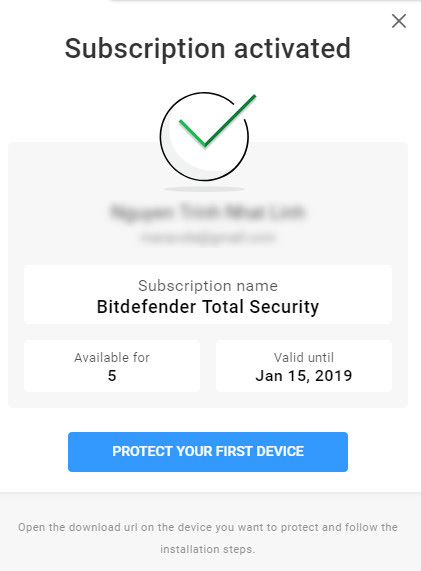
Step 4: The Bitdefender Central page appears, click Create One To create an account or sign in if you already have an account. After logging in, you will receive a notification to successfully activate this 6-month copyright of the famous antivirus application.
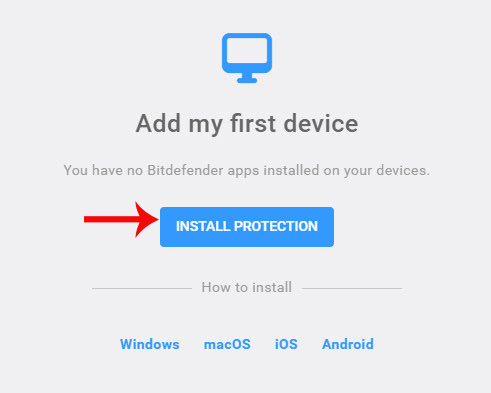
Step 5: Finally, you just need to click Install Protection To use it.
- Top free anti-virus software, no bloatware and requires an upgrade of the annoying version
- Top 10 best USB protection software today
- 9 best antivirus software for Mac
FAQ
What is the main benefit of free 6 month license for bitdefender internet security 2019?
The main benefit is a clearer understanding of the topic and a practical way to apply the information covered in this guide.
What should I check before using free 6 month license for bitdefender internet security 2019?
Confirm compatibility, review the required settings, protect important data, and use the latest supported version whenever possible.
What should I do if the result is different?
Repeat the steps carefully, verify permissions and version differences, and consult the product's official support documentation for changes not shown in the article.
Related Articles
 How to Activate Bitdefender Total Security 2018 License for 63 minutes read
 (Giveaway) Free License of AMC Security, Security and4 minutes read
 Free 6-month Subscription to Mcafee Internet Security 2019 License4 minutes read
 Download Bitdefender Antivirus Free 2020.1.0.17.1693 minutes read
![[Free] 6 Months License Comodo Internet Security Pro 8](/data/thumbs_200x120/[free]-6-months-license-comodo-internet-security-pro-8_thumbs_200x120_TQxHccsZS.jpg) [Free] 6 Months License Comodo Internet Security Pro 85 minutes read
[Free] 6 Months License Comodo Internet Security Pro 85 minutes read Bitdefender Antivirus Free Edition Review: Compact, Full-featured5 minutes read
Reader Comments 0
Sign in with email or Google to join the discussion.