Table of Contents
This guide covers eeepc is discounted by 100 usd with practical context and easy-to-follow details. Use it to understand the subject and apply the information confidently.
EeePC stands for Easy to Learn, Easy to Work, Easy to Play (easy to learn, easy to work, easy to play). The device meets the needs: compact, easy to move, Wi-Fi connection, surf the web, play games, listen to music. With a smaller size than A4 paper, weighs 920 grams. Configuring EeePC 701: Intel Mobile ULV Celeron 900Mhz / 7inch XGA 480x800 / 512 MB DDR2 1 x SO-DIMM socket up to 1GB / 4 GB SSD / 802. 11b / g LAN 10/100 / 4 Cell (2. 5 - 3, 5 hours) / 0. 92kg / Linux + Open Office / (Windows XP compatible) 0. 35M Pixel Camera / VGA Out, MMC / SD (SDHC) card reader, 3 USB.
FAQ
What should I check before following these steps?
Confirm device and software compatibility, save important data, and make sure you have the required permissions, files, and account access.
Why might the process not work?
Common causes include outdated software, missing permissions, incompatible hardware, an unstable connection, or completing a step in the wrong order.
Can I undo the changes if necessary?
That depends on the tool or setting. Use built-in restore options when available, keep a backup, and record the original configuration first.
Related Articles
 Asus EeePC 900, EeePC 901, New EeePC 10004 minutes read
 Laptop Mini EeePC 1000H Costs 539 USD3 minutes read
 EeePC: 'Product of 2008'5 minutes read
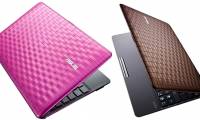 Wavy Design of EeePC Karim Rashid 1008P4 minutes read
 Asus Comes with Netbooks Using MeeGo Operating System3 minutes read
 From Today ASUS Started Selling Mini Laptops in Vietnam5 minutes read
Reader Comments 0
Sign in with email or Google to join the discussion.