Table of Contents
This guide covers culv laptop watching hd videos and playing games with practical context and easy-to-follow details. Use it to understand the subject and apply the information confidently.
According to Mydigitallife, the CULV BenQ JoyBook S43 laptop is available in China, Taiwan and some countries in the Asia Pacific region at a retail price of 875 USD, about 16. 6 million but not yet seen in Vietnam.
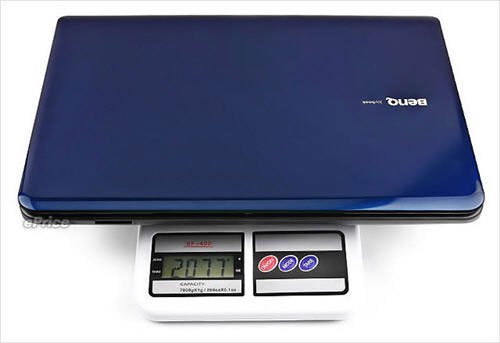 CULV BenQ JoyBook S43 laptop 14 inch screen weighs 2. 1 kg (Photo: ePrice) .
JoyBook S43 has 14 inch screen, resolution of 1366 x 768 pixels, equipped with Intel Pentium SU4100 CPU 1. 3 GHz, DDR3 2 GB RAM, 320 GB HDD and ATI Radeon HD4330 discrete graphics card 512 MB. It has 3 USB ports, 1 eSata port, DVD burner, VGA and HDMI video outputs, 4-in-1 card reader, full Wi-Fi 802. 11 a / g / n connection and Bluetooth 2. 1 + EDR.
BenQ JoyBook S43 runs a 6-cell battery, weighs 2. 1 kg and comes pre-installed with Windows 7 Home Premium operating system.
Real photos of BenQ JoyBook S43.
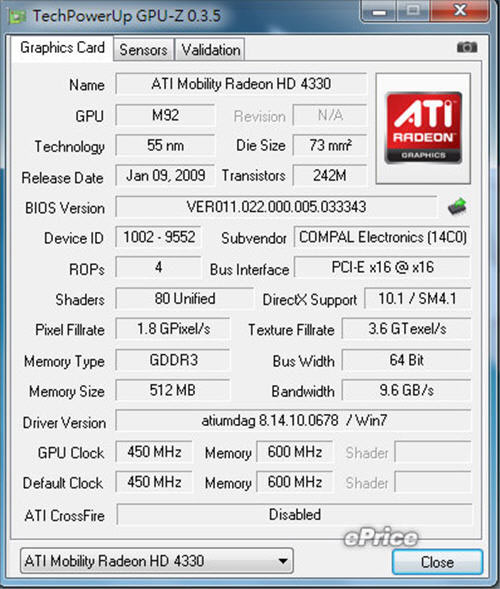 BenQ JoyBook S43 equipped with ATI Radeon HD4330 discrete graphics card 512 MB.
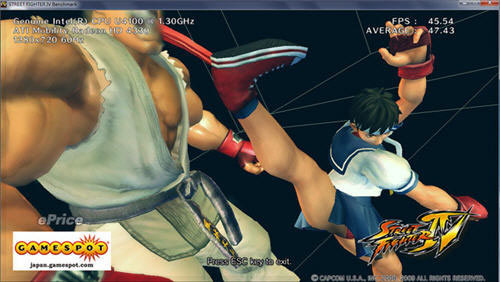 Play Street Fighter games averaging 42 fps at 1280 x 720 resolution.
FAQ
What should I check before following these steps?
Confirm device and software compatibility, save important data, and make sure you have the required permissions, files, and account access.
Why might the process not work?
Common causes include outdated software, missing permissions, incompatible hardware, an unstable connection, or completing a step in the wrong order.
Can I undo the changes if necessary?
That depends on the tool or setting. Use built-in restore options when available, keep a backup, and record the original configuration first.
Related Articles
 How to Fix the Hidden Taskbar Error When Watching Videos, Playing Games3 minutes read
 Steps to Fix Taskbar Not Hiding When Playing Games, Watching4 minutes read
 CULV Laptop 'Crowned'6 minutes read
 How to Connect a Laptop to a TV: Clear Instructions10 minutes read
 Laptop Automatically Stops Charging When Playing Games - Fast Processing: Explained6 minutes read
 HP Pavilion dm1 'Baby Pepper'3 minutes read
Reader Comments 0
Sign in with email or Google to join the discussion.