Table of Contents
This guide covers asus w5f - a simple 12-inch laptop with practical context and easy-to-follow details. Use it to understand the subject and apply the information confidently.
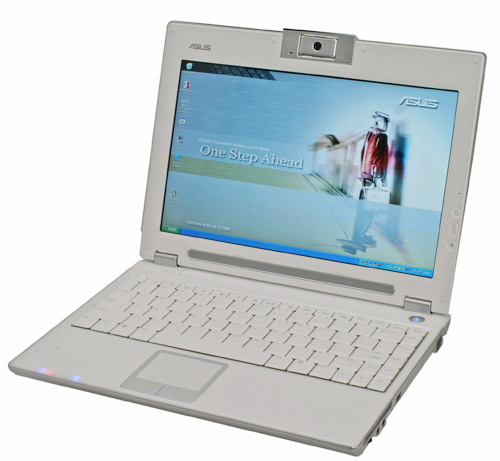 Asus W5F white version.
Not as impressive and fashionable as Sony's computer, unlike the Lenovo ThinkPad's monotonous design, the Asus W5F's design is simple with clear straight lines around. The design of this laptop is not too bad, but it is not as rugged as the ThinkPad. The case is anti-warping, the screen border is quite good, there is no flexing phenomenon. Although only the contours fit together, the screen folding latch is quite unlikely to turn itself on. Sensitive keyboard is one of the advantages of W5F, it brings comfortable feeling when typing. Although not as good as the ThinkPad keyboard, it still meets the demand. Because there are more letters, the Enter key must be smaller. On the other hand, the function keys starting with F are very convenient, helping users quickly adjust: volume, screen, wireless network or external sockets.
Because it is a small laptop, the built-in speakers are not big, however, the quality is still quite good compared to such a super compact computer. It can meet the basic needs of listening to music or watching movies. The volume is loud enough but it does not convey the sound of deep bass.
Actual use shows that the speed of Asus W5F is not too prominent compared to the usual models. Memory access speed is quite slow, but on Windows operating system as well as when running other app software, the W5F proved no less competitive than 'brothers'. While graphics processors can't be like desktops, they still work well in some games, for example, playing chess.
W5F is compatible with micro wireless network card Intel 3945 a / b / g for good quality, stable speed - about 20 Mb / s when near the access point and about 12-14 Mbps for other areas. Bluetooth 2. 0 system is very good, works stably but doesn't have a WAN card. In terms of speed, the W5F uses a 6-cell battery that can run up to 3 hours and 45 minutes in case of turning on the WLAN connection and screen brightness of about 60%. If the network connection is turned off and the screen brightness is at 60%, the device can run for 4 hours and 20 minutes (if running on a 3-cell battery, only 1 hour 50 minutes). When operating at maximum level, one battery must be charged every 2. 5 hours. Experimenting watching DVD movies on the device, then 3 hours and a half is out of energy. In general, battery life is rated for quite a long time.
Like most laptops in general and Notebook in particular, the W5F also suffers from heat and noise issues. Its average temperature is about 50 - 51 degrees Celsius and when working at full capacity it can be up to 65 degrees C. However, it is only the temperature around the machine and the keyboard and the armrests are not affected. What. This temperature is still acceptable, not too hot. When the machine temperature rises to 55 - 57 degrees Celsius, the cooling fan starts to operate and the higher the temperature the fan runs, the faster it is only at a moderate level, making no noise annoying to the user. In Vietnam, there are two portable versions of Asus W5F: Asus W5F-1BGP (Intel Core 2 Duo T5500 1. 66 GHz 1 GB RAM, 100 GB HDD, Intel GMA 950 VGA, Linux) and W5FM-1B2P (Intel Core 2 Duo T5600 1. 83 GHz, 1 GB RAM, 120 GB HDD, Intel GMA 950 VGA, Linux) reference prices are 1, 800 and 1, 900 USD respectively.
Advantages:Disadvantages: - Elegant design, compact - Long battery life - Stable operation - No LAN connection - No light sensor under the keyboard (helps to see better when it is dark) - There are not many plug ports
FAQ
What should I check before following these steps?
Confirm device and software compatibility, save important data, and make sure you have the required permissions, files, and account access.
Why might the process not work?
Common causes include outdated software, missing permissions, incompatible hardware, an unstable connection, or completing a step in the wrong order.
Can I undo the changes if necessary?
That depends on the tool or setting. Use built-in restore options when available, keep a backup, and record the original configuration first.
Related Articles
 Top 5 Best 15 Inch Laptops 20206 minutes read
 Laptop Playing 3D Game 17 Inch Screen of Asus3 minutes read
 Asus F70 - the World's First 17. 3-inch Laptop4 minutes read
 Asus Quietly Came Out with a 13-inch Touchscreen Vivobook Laptop3 minutes read
 Asus Transformer Book 13. 3 Inch Starts Receiving Orders3 minutes read
 Asus Vivobook Touchscreen Adds 13 and 15. 6 Inch Size3 minutes read
Reader Comments 0
Sign in with email or Google to join the discussion.