Table of Contents
This guide covers asus f70 - the world's first 17. 3-inch laptop with practical context and easy-to-follow details. Use it to understand the subject and apply the information confidently.
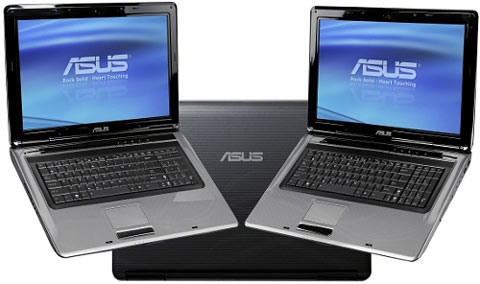 Asus F70 with wide screen, strong entertainment Photo: Cnet .
F70 is for those who regularly use laptops to watch movies, 17. 3-inch screen of the high-resolution machine, supports watching 1080p HD movies, in addition to the speaker system of Altec Lasing, HDMI port to connect connected to the TV. The machine possesses a beautiful design, the metal cover is inspired by the light at sunrise. Keyboard of the machine is standard chiclet, like the style of MacBook or Sony Vaio. F70 runs on Intel Core 2 Duo processor, 4 GB RAM, standard Wi-Fi connection b / g / n for web browsing besides Bluetooth 2. 1 option. In addition, the machine also has 4 more USB ports.
 Express Gate interface allows quick access to apps Photo: Cnet .
The F70 features the Express Gate feature, which acts as an interface that allows users to quickly access most apps without going through the Windows boot phase. Just select the Express Gate Menu, users can surf the web, listen to music, chat via Skype. Asus F70 is priced at 860 (equivalent to VND 22. 6 million) and began to appear in the UK market, the device will be available in the Asia-Pacific market but no information about the arrival time.
FAQ
What should I check before following these steps?
Confirm device and software compatibility, save important data, and make sure you have the required permissions, files, and account access.
Why might the process not work?
Common causes include outdated software, missing permissions, incompatible hardware, an unstable connection, or completing a step in the wrong order.
Can I undo the changes if necessary?
That depends on the tool or setting. Use built-in restore options when available, keep a backup, and record the original configuration first.
Related Articles
 Top 5 Best 15 Inch Laptops 20206 minutes read
 Laptop Playing 3D Game 17 Inch Screen of Asus3 minutes read
 Asus W5F - a Simple 12-inch Laptop6 minutes read
 Asus Quietly Came Out with a 13-inch Touchscreen Vivobook Laptop3 minutes read
 Asus Transformer Book 13. 3 Inch Starts Receiving Orders3 minutes read
 Asus Vivobook Touchscreen Adds 13 and 15. 6 Inch Size3 minutes read
Reader Comments 0
Sign in with email or Google to join the discussion.